Zig Requires Chilkat v11.2.0+
Zig
Markdown to HTML - Full Document, ChatGPT Theme with Code Syntax Highlighting
See more Markdown Examples
Demonstrates how to convert a complete Markdown document to HTML using the pre-defined "ChatGPT" theme but also with Cloudfare Prism's code syntax highlighting.Chilkat Zig Downloads
const std = @import("std");
const chilkat = @import("chilkat");
pub fn main(init: std.process.Init) !void {
const alloc = init.arena.allocator();
var success: bool = false;
success = false;
// Select the pre-defined "ChatGPT" style.
const options = try chilkat.JsonObject.init();
defer options.deinit();
options.updateString("theme", "ChatGPT") catch {};
// We can also set an option for the max-width, which by default is "72ch".
options.updateString("ChatGPT.max-width", "120ch") catch {};
// We can add extra content to the bottom of the HTML head and body sections like this:
// Here we are using the "tomorrow" theme.
options.updateString("extraHead", "<link rel=\"stylesheet\" href=\"https://cdnjs.cloudflare.com/ajax/libs/prism/1.29.0/themes/prism-tomorrow.min.css\" />") catch {};
options.updateString("extraBody", "<script src=\"https://cdnjs.cloudflare.com/ajax/libs/prism/1.29.0/prism.min.js\"></script><script src =\"https://cdnjs.cloudflare.com/ajax/libs/prism/1.29.0/plugins/autoloader/prism-autoloader.min.js\"></script>") catch {};
const sb_markdown = try chilkat.StringBuilder.init();
defer sb_markdown.deinit();
const sb_html = try chilkat.StringBuilder.init();
defer sb_html.deinit();
sb_markdown.loadFile("qa_data/markdown/test1.md", "utf-8") catch {
std.debug.print("{s}\n", .{try sb_markdown.getLastErrorText(alloc)});
return;
};
sb_markdown.markdownToHtml(options, sb_html) catch {};
sb_html.toCRLF() catch {};
std.debug.print("{s}\n", .{try sb_html.getAsString(alloc)});
// The sample markdown input for this example is identical to the one at Markdown to HTML - Full Document, Raw, where you can view it.
// Sample HTML output as viewed in a browser:
// 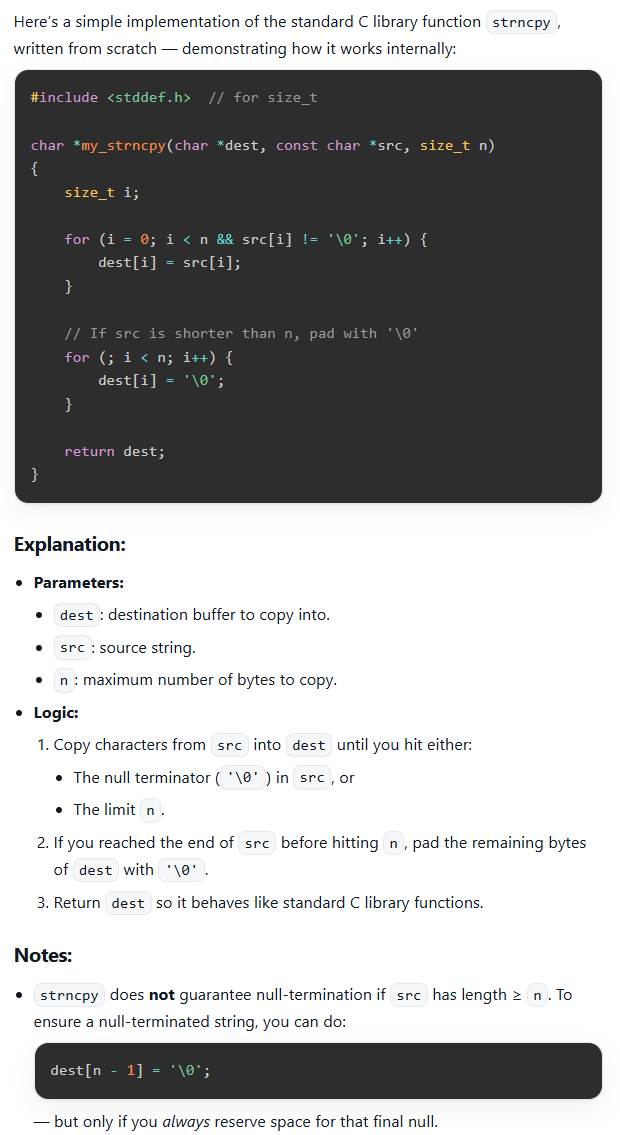 }
}