Zig Requires Chilkat v10.1.2+
Zig
HMRC OAuth2 Access Token
See more OAuth2 Examples
Demonstrates how to get an HMRC OAuth2 access token from a desktop (installed) application or script. This example gets an HMRC MTD VAT read/write access token.Chilkat Zig Downloads
const std = @import("std");
const chilkat = @import("chilkat");

pub fn main(init: std.process.Init) !void {
    const alloc = init.arena.allocator();

    // To further clarify, see OAuth 2.0 Authorization Flow

    const oauth2 = try chilkat.OAuth2.init();
    defer oauth2.deinit();

    // This should be the port in the localhost callback URL for your app.
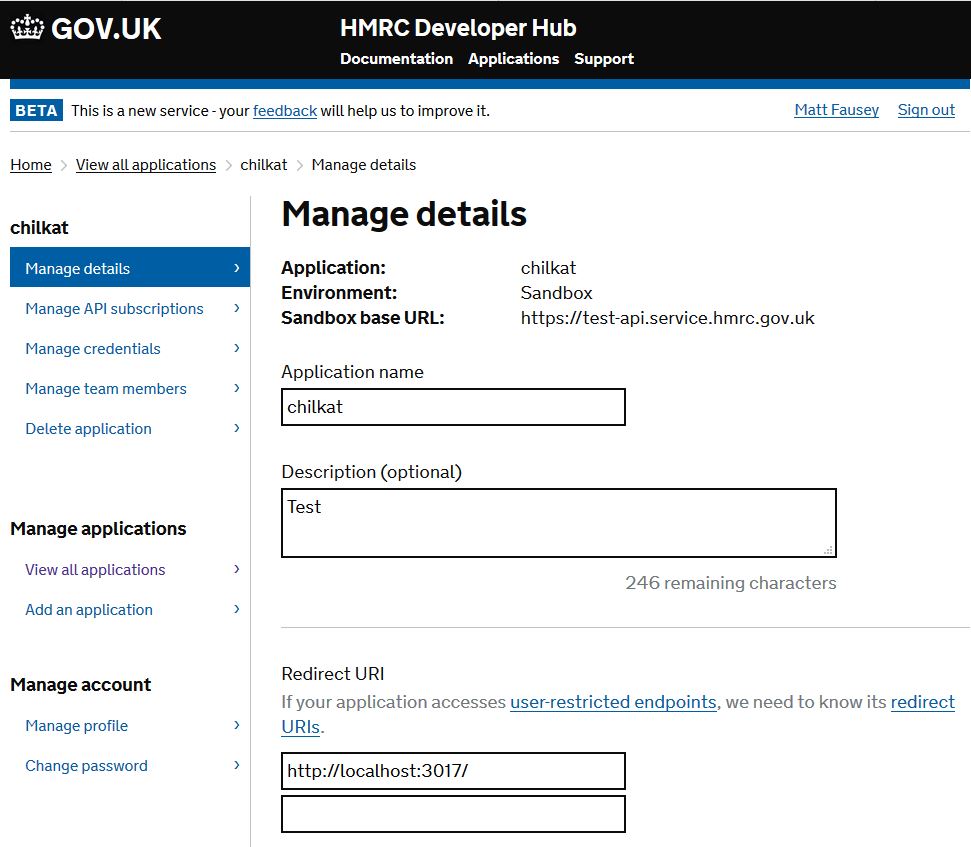
    // Important: Make sure the callback URI in your HMRC developer app
    // is exactly "http://localhost:3017/".  Don't forget the ending "/" char.
    // The callback URL would look like "http://localhost:3017/" if the port number is 3017.

    // IMPORTANT: Don't forget to setup your HMRC application to use the Redirect URI "http://localhost:3017/" as shown
    // here: Configure Redirect URI for HMRC application
    oauth2.setListenPort(3017);

    oauth2.setAuthorizationEndpoint("https://test-api.service.hmrc.gov.uk/oauth/authorize");
    oauth2.setTokenEndpoint("https://test-api.service.hmrc.gov.uk/oauth/token");

    // Replace with your actual client ID
    oauth2.setClientId("HMRC-CLIENT-ID");

    // The scopes are documented in the HMRC reference documentation for each API.
    // This example gets a read/write access token for the HMRC MTD VAT API.
    oauth2.setScope("read:vat write:vat");

    // Begin the OAuth2 Authorization code flow.  This returns a URL that should be loaded in a browser.
    const url = oauth2.startAuth(alloc) catch {
        std.debug.print("{s}\n", .{try oauth2.getLastErrorText(alloc)});
        return;
    };

    // Launch the default browser on the system and navigate to the url.
    // The LaunchBrowser method was added in Chilkat v10.1.2.
    oauth2.launchBrowser(url) catch {
        std.debug.print("{s}\n", .{try oauth2.getLastErrorText(alloc)});
        return;
    };

    // Wait for the user to approve or deny authorization in the browser.
    var num_ms_waited: i32 = 0;
    while ((num_ms_waited < 90000) and (oauth2.getAuthFlowState() < 3)) {
        oauth2.sleepMs(100);
        num_ms_waited = num_ms_waited + 100;
    }

    // If the browser does not respond within the specified time, AuthFlowState will be:
    //
    // 1: Waiting for Redirect – The OAuth2 background thread is waiting for the browser's redirect request.
    // 2: Waiting for Final Response – The thread is awaiting the final access token response.
    // In either case, cancel the background task initiated by StartAuth.

    if (oauth2.getAuthFlowState() < 3) {
        oauth2.cancel() catch {};
        std.debug.print("No response from the browser!\n", .{});
        return;
    }

    // Check AuthFlowState to determine if authorization was granted, denied, or failed:
    //
    // 3: Success – OAuth2 flow completed, the background thread exited, and the successful response is in AccessTokenResponse.
    // 4: Access Denied – OAuth2 flow completed, the background thread exited, and the error response is in AccessTokenResponse.
    // 5: Failure – OAuth2 flow failed before completion, the background thread exited, and error details are in FailureInfo.

    if (oauth2.getAuthFlowState() == 5) {
        std.debug.print("OAuth2 failed to complete.\n", .{});
        std.debug.print("{s}\n", .{try oauth2.getFailureInfo(alloc)});
        return;
    }

    if (oauth2.getAuthFlowState() == 4) {
        std.debug.print("OAuth2 authorization was denied.\n", .{});
        std.debug.print("{s}\n", .{try oauth2.getAccessTokenResponse(alloc)});
        return;
    }

    if (oauth2.getAuthFlowState() != 3) {
        std.debug.print("Unexpected AuthFlowState:{d}\n", .{oauth2.getAuthFlowState()});
        return;
    }

    std.debug.print("OAuth2 authorization granted!\n", .{});
    std.debug.print("Access Token = {s}\n", .{try oauth2.getAccessToken(alloc)});

    // Get the full JSON response:
    const json = try chilkat.JsonObject.init();
    defer json.deinit();
    json.load(try oauth2.getAccessTokenResponse(alloc)) catch {};
    json.setEmitCompact(false);
    std.debug.print("{s}\n", .{try json.emit(alloc)});

    // The JSON response looks like this:

    // {
    //   "token_type": "Bearer",
    //   "scope": "user_impersonation",
    //   "expires_in": "3599",
    //   "ext_expires_in": "0",
    //   "expires_on": "1524783438",
    //   "not_before": "1524779538",
    //   "resource": "https://mydomain.api.crm.dynamics.com",
    //   "access_token": "...",
    //   "refresh_token": "...",
    //   "id_token": "..."
    // }

    // If an "expires_on" member does not exist, then add the JSON member by
    // getting the current system date/time and adding the "expires_in" seconds.
    // This way we'll know when the token expires.
    if (!json.hasMember("expires_on")) {
        const dt_expire = try chilkat.DateTime.init();
        defer dt_expire.deinit();
        dt_expire.setFromCurrentSystemTime() catch {};
        dt_expire.addSeconds(json.intOf("expires_in")) catch {};
        json.appendString("expires_on", try dt_expire.getAsUnixTimeStr(alloc, false)) catch {};
    }

    std.debug.print("{s}\n", .{try json.emit(alloc)});

    // Save the JSON to a file for future requests.
    const fac = try chilkat.FileAccess.init();
    defer fac.deinit();
    fac.writeEntireTextFile("qa_data/tokens/hmrc.json", try json.emit(alloc), "utf-8", false) catch {};
}