Xojo Plugin Requires Chilkat v10.1.2+
Xojo Plugin
Yahoo Mail OAuth2 Access Token for Desktop App
See more Yahoo Mail Examples
Demonstrates how to get a Yahoo Email OAuth2 access token from a desktop application or script.Chilkat Xojo Plugin Downloads
Dim success As Boolean
success = False
// First, you must define your app in Yahoo Developer (https://developer.yahoo.com/apps/) like this:
// 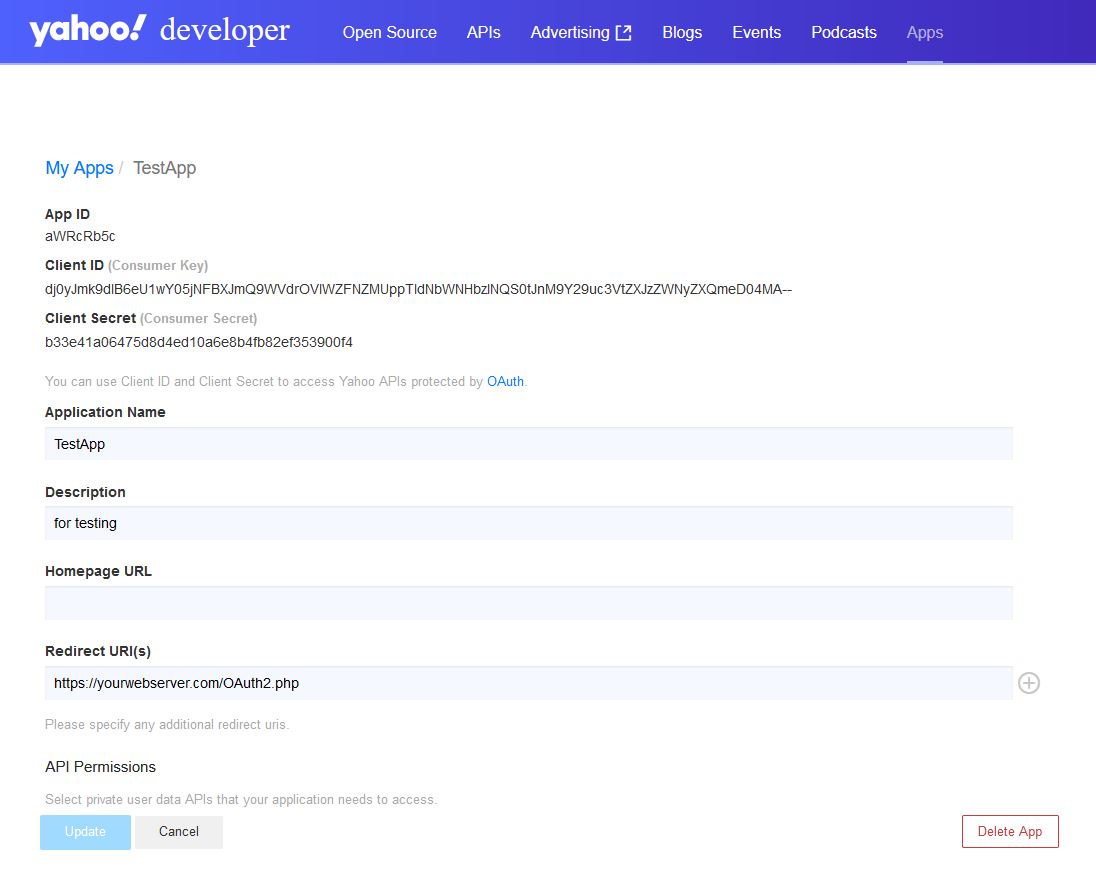 // This example requires the Chilkat API to have been previously unlocked.
// See Global Unlock Sample for sample code.
Dim oauth2 As New Chilkat.OAuth2
// Your applicaton must use your own public web server as an intermediate
// to receive and forward the redirect to localhost.
// See Using Your Web Server as an Intermediary for OAuth2 Redirect to localhost
oauth2.AppCallbackUrl = "https://yourwebserver.com/oauth_redirect"
oauth2.ListenPort = 3017
oauth2.AuthorizationEndpoint = "https://api.login.yahoo.com/oauth2/request_auth"
oauth2.TokenEndpoint = "https://api.login.yahoo.com/oauth2/get_token"
// Replace these with actual values.
oauth2.ClientId = "CLIENT_ID"
oauth2.ClientSecret = "CLIENT_SECRET"
// Do not send the "scope" query param for Yahoo OAuth2.
oauth2.UncommonOptions = "NO_OAUTH2_SCOPE"
// Begin the OAuth2 Authorization code flow. This returns a URL that should be loaded in a browser.
Dim url As String
url = oauth2.StartAuth()
If (oauth2.LastMethodSuccess = False) Then
System.DebugLog(oauth2.LastErrorText)
Return
End If
System.DebugLog("url = " + url)
// Launch the default browser on the system and navigate to the url.
// The LaunchBrowser method was added in Chilkat v10.1.2.
success = oauth2.LaunchBrowser(url)
If (success = False) Then
System.DebugLog(oauth2.LastErrorText)
Return
End If
// Wait for the user to approve or deny authorization in the browser.
Dim numMsWaited As Int32
numMsWaited = 0
While (numMsWaited < 90000) And (oauth2.AuthFlowState < 3)
oauth2.SleepMs 100
numMsWaited = numMsWaited + 100
Wend
// If the browser does not respond within the specified time, AuthFlowState will be:
//
// 1: Waiting for Redirect - The OAuth2 background thread is waiting for the browser's redirect request.
// 2: Waiting for Final Response - The thread is awaiting the final access token response.
// In either case, cancel the background task initiated by StartAuth.
If (oauth2.AuthFlowState < 3) Then
success = oauth2.Cancel()
System.DebugLog("No response from the browser!")
Return
End If
// Check AuthFlowState to determine if authorization was granted, denied, or failed:
//
// 3: Success - OAuth2 flow completed, the background thread exited, and the successful response is in AccessTokenResponse.
// 4: Access Denied - OAuth2 flow completed, the background thread exited, and the error response is in AccessTokenResponse.
// 5: Failure - OAuth2 flow failed before completion, the background thread exited, and error details are in FailureInfo.
If (oauth2.AuthFlowState = 5) Then
System.DebugLog("OAuth2 failed to complete.")
System.DebugLog(oauth2.FailureInfo)
Return
End If
If (oauth2.AuthFlowState = 4) Then
System.DebugLog("OAuth2 authorization was denied.")
System.DebugLog(oauth2.AccessTokenResponse)
Return
End If
If (oauth2.AuthFlowState <> 3) Then
System.DebugLog("Unexpected AuthFlowState:" + Str(oauth2.AuthFlowState))
Return
End If
// Save the full JSON access token response to a file.
Dim sbJson As New Chilkat.StringBuilder
success = sbJson.Append(oauth2.AccessTokenResponse)
success = sbJson.WriteFile("qa_data/tokens/yahooMail.json","utf-8",False)
// The saved JSON response looks like this:
// {
// "access_token": "kCVQdnOdul...LHucA--",
// "refresh_token": "AIenVXETSo0jklFBVkPS8vVm8E.Ej9ToRG.xDbDYmZ65WIs5t6CZhDrD",
// "expires_in": 3600,
// "token_type": "bearer",
// "xoauth_yahoo_guid": "HGDQCVF5JB4YDOWHITQJFBHCWA"
// }
System.DebugLog("OAuth2 authorization granted!")
System.DebugLog("Access Token: " + oauth2.AccessToken)
// This example requires the Chilkat API to have been previously unlocked.
// See Global Unlock Sample for sample code.
Dim oauth2 As New Chilkat.OAuth2
// Your applicaton must use your own public web server as an intermediate
// to receive and forward the redirect to localhost.
// See Using Your Web Server as an Intermediary for OAuth2 Redirect to localhost
oauth2.AppCallbackUrl = "https://yourwebserver.com/oauth_redirect"
oauth2.ListenPort = 3017
oauth2.AuthorizationEndpoint = "https://api.login.yahoo.com/oauth2/request_auth"
oauth2.TokenEndpoint = "https://api.login.yahoo.com/oauth2/get_token"
// Replace these with actual values.
oauth2.ClientId = "CLIENT_ID"
oauth2.ClientSecret = "CLIENT_SECRET"
// Do not send the "scope" query param for Yahoo OAuth2.
oauth2.UncommonOptions = "NO_OAUTH2_SCOPE"
// Begin the OAuth2 Authorization code flow. This returns a URL that should be loaded in a browser.
Dim url As String
url = oauth2.StartAuth()
If (oauth2.LastMethodSuccess = False) Then
System.DebugLog(oauth2.LastErrorText)
Return
End If
System.DebugLog("url = " + url)
// Launch the default browser on the system and navigate to the url.
// The LaunchBrowser method was added in Chilkat v10.1.2.
success = oauth2.LaunchBrowser(url)
If (success = False) Then
System.DebugLog(oauth2.LastErrorText)
Return
End If
// Wait for the user to approve or deny authorization in the browser.
Dim numMsWaited As Int32
numMsWaited = 0
While (numMsWaited < 90000) And (oauth2.AuthFlowState < 3)
oauth2.SleepMs 100
numMsWaited = numMsWaited + 100
Wend
// If the browser does not respond within the specified time, AuthFlowState will be:
//
// 1: Waiting for Redirect - The OAuth2 background thread is waiting for the browser's redirect request.
// 2: Waiting for Final Response - The thread is awaiting the final access token response.
// In either case, cancel the background task initiated by StartAuth.
If (oauth2.AuthFlowState < 3) Then
success = oauth2.Cancel()
System.DebugLog("No response from the browser!")
Return
End If
// Check AuthFlowState to determine if authorization was granted, denied, or failed:
//
// 3: Success - OAuth2 flow completed, the background thread exited, and the successful response is in AccessTokenResponse.
// 4: Access Denied - OAuth2 flow completed, the background thread exited, and the error response is in AccessTokenResponse.
// 5: Failure - OAuth2 flow failed before completion, the background thread exited, and error details are in FailureInfo.
If (oauth2.AuthFlowState = 5) Then
System.DebugLog("OAuth2 failed to complete.")
System.DebugLog(oauth2.FailureInfo)
Return
End If
If (oauth2.AuthFlowState = 4) Then
System.DebugLog("OAuth2 authorization was denied.")
System.DebugLog(oauth2.AccessTokenResponse)
Return
End If
If (oauth2.AuthFlowState <> 3) Then
System.DebugLog("Unexpected AuthFlowState:" + Str(oauth2.AuthFlowState))
Return
End If
// Save the full JSON access token response to a file.
Dim sbJson As New Chilkat.StringBuilder
success = sbJson.Append(oauth2.AccessTokenResponse)
success = sbJson.WriteFile("qa_data/tokens/yahooMail.json","utf-8",False)
// The saved JSON response looks like this:
// {
// "access_token": "kCVQdnOdul...LHucA--",
// "refresh_token": "AIenVXETSo0jklFBVkPS8vVm8E.Ej9ToRG.xDbDYmZ65WIs5t6CZhDrD",
// "expires_in": 3600,
// "token_type": "bearer",
// "xoauth_yahoo_guid": "HGDQCVF5JB4YDOWHITQJFBHCWA"
// }
System.DebugLog("OAuth2 authorization granted!")
System.DebugLog("Access Token: " + oauth2.AccessToken)