Xojo Plugin Requires Chilkat v10.1.2+
Xojo Plugin
Rabobank OAuth2 Access Token
See more OAuth2 Examples
Demonstrates how to get an OAuth 2.0 access token to access Rabobank API'sImportant: This example is for desktop apps only. (It is not for web-based applications.)
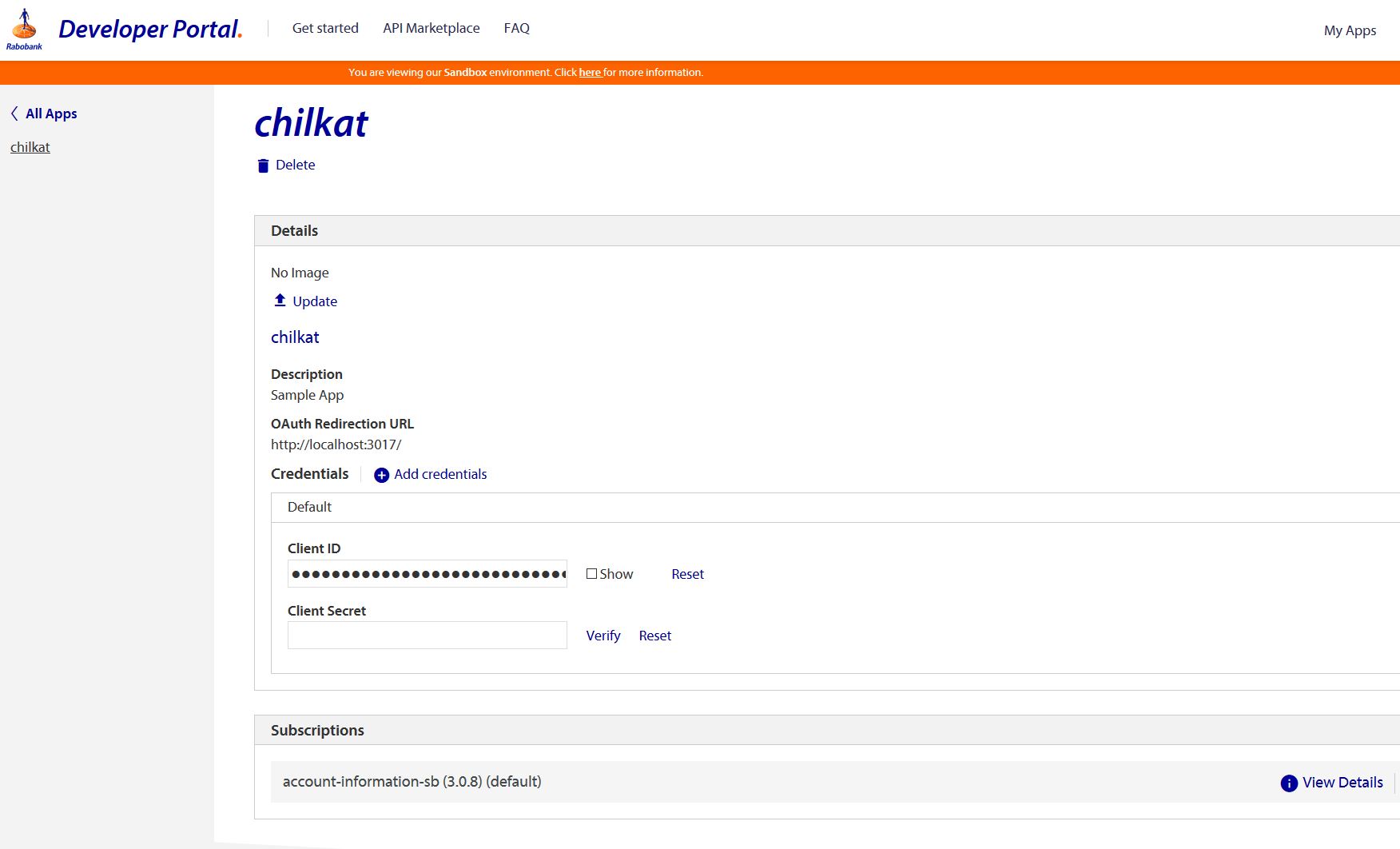
Your app defined in the Rabobank portal should look something like this. (Our test app is named "chilkat". You should name your app something else.)
Chilkat Xojo Plugin Downloads
Dim success As Boolean
success = False

//  For more information about the OAuth2, see OAuth 2.0 Authorization Flow

Dim oauth2 As New Chilkat.OAuth2

//  This should be the port in the localhost callback URL for your app.
//  The callback URL would look like "http://localhost:3017/" if the port number is 3017.
oauth2.ListenPort = 3017

//  IMPORTANT: Don't forget to subscribe your Rabobank application to the OAuth 2.0 services in the Rabobank Online Developer Portal.
//  IMPORTANT: Don't forget to subscribe your Rabobank application to the OAuth 2.0 services in the Rabobank Online Developer Portal.
//  IMPORTANT: Don't forget to subscribe your Rabobank application to the OAuth 2.0 services in the Rabobank Online Developer Portal.
//  IMPORTANT: Don't forget to subscribe your Rabobank application to the OAuth 2.0 services in the Rabobank Online Developer Portal.

//  See also https://developer.rabobank.nl/faq

oauth2.AuthorizationEndpoint = "https://api-sandbox.rabobank.nl/openapi/sandbox/oauth2/authorize"
oauth2.TokenEndpoint = "https://api-sandbox.rabobank.nl/openapi/sandbox/oauth2/token"

//  Replace these with actual values.
oauth2.ClientId = "YOUR_APP_CLIENT_ID"
//  This is your app password:
oauth2.ClientSecret = "YOUR_APP_CLIENT_SECRET"

oauth2.CodeChallenge = False
//  Provide a SPACE separated list of scopes, as defined in the Rabobank API documentation,
//  such as at https://developer-sandbox.rabobank.nl/reference/accounts-ais-sb/3-0-8

//  Important: To get a refresh token in the final response, you have to ask for "offline_access" scope
oauth2.Scope = "ais.balances.read ais.transactions.read-90days ais.transactions.read-history"

//  Begin the OAuth2 Authorization code flow.  This returns a URL that should be loaded in a browser.
Dim url As String
url = oauth2.StartAuth()
If (oauth2.LastMethodSuccess <> True) Then
    System.DebugLog(oauth2.LastErrorText)
    Return
End If

System.DebugLog("url = " + url)

//  Launch the default browser on the system and navigate to the url.
//  The LaunchBrowser method was added in Chilkat v10.1.2.
success = oauth2.LaunchBrowser(url)
If (success = False) Then
    System.DebugLog(oauth2.LastErrorText)
    Return
End If

//  Wait for the user to approve or deny authorization in the browser.
Dim numMsWaited As Int32
numMsWaited = 0
While (numMsWaited < 90000) And (oauth2.AuthFlowState < 3)
    oauth2.SleepMs 100
    numMsWaited = numMsWaited + 100
Wend

//  If the browser does not respond within the specified time, AuthFlowState will be:
//
//  1: Waiting for Redirect - The OAuth2 background thread is waiting for the browser's redirect request.
//  2: Waiting for Final Response - The thread is awaiting the final access token response.
//  In either case, cancel the background task initiated by StartAuth.

If (oauth2.AuthFlowState < 3) Then
    success = oauth2.Cancel()
    System.DebugLog("No response from the browser!")
    Return
End If

//  Check AuthFlowState to determine if authorization was granted, denied, or failed:
//
//  3: Success - OAuth2 flow completed, the background thread exited, and the successful response is in AccessTokenResponse.
//  4: Access Denied - OAuth2 flow completed, the background thread exited, and the error response is in AccessTokenResponse.
//  5: Failure - OAuth2 flow failed before completion, the background thread exited, and error details are in FailureInfo.

If (oauth2.AuthFlowState = 5) Then
    System.DebugLog("OAuth2 failed to complete.")
    System.DebugLog(oauth2.FailureInfo)
    Return
End If

If (oauth2.AuthFlowState = 4) Then
    System.DebugLog("OAuth2 authorization was denied.")
    System.DebugLog(oauth2.AccessTokenResponse)
    Return
End If

If (oauth2.AuthFlowState <> 3) Then
    System.DebugLog("Unexpected AuthFlowState:" + Str(oauth2.AuthFlowState))
    Return
End If

System.DebugLog("OAuth2 authorization granted!")
System.DebugLog("Access Token = " + oauth2.AccessToken)

//  Get the full JSON response:
Dim json As New Chilkat.JsonObject
success = json.Load(oauth2.AccessTokenResponse)
json.EmitCompact = False

//  The JSON response looks like this:

//  {
//    "token_type": "Bearer",
//    "access_token": "AAIkYTU0ZWM ... sxE0KL0HHWw",
//    "expires_in": 3600,
//    "consented_on": 1584641121,
//    "scope": "ais.balances.read ais.transactions.read-90days ais.transactions.read-history",
//    "refresh_token": "AAJXXSdN ... Uiblz9ILkxNBlytRGA",
//    "refresh_token_expires_in": 157784760,
//    "expires_on": "1584644722"
//  }

System.DebugLog(json.Emit())

//  Save the JSON to a file to be used in future requests.
Dim fac As New Chilkat.FileAccess
success = fac.WriteEntireTextFile("qa_data/tokens/rabobank.json",json.Emit(),"utf-8",False)