Xbase++ Requires Chilkat v11.0.0+
Xbase++
ETrade OAuth1 Authorization (3-legged) Step 1
See more ETrade Examples
Demonstrates the first step in 3-legged OAuth1 authorization for the ETrade REST API. This example sends an HTTP request to the "request token URL" to get a request token that begins the OAuth1 process. (See https://apisb.etrade.com/docs/api/authorization/request_token.html )This example uses the sandbox request token URL. The live request token URL would be "https://api.etrade.com/oauth/request_token".
Chilkat Xbase++ Downloads
LOCAL nSuccess
LOCAL cConsumerKey
LOCAL cConsumerSecret
LOCAL cRequestTokenUrl
LOCAL oHttp
LOCAL oResp
LOCAL oHashTab
LOCAL cRequestToken
LOCAL cRequestTokenSecret
LOCAL oJson
LOCAL oFac
LOCAL cAuthorizeUrl
LOCAL oSbUrlForBrowser
LOCAL cUrl
LOCAL oOauth2
nSuccess := 0
// This requires the Chilkat API to have been previously unlocked.
// See Global Unlock Sample for sample code.
cConsumerKey := "ETRADE_CONSUMER_KEY"
cConsumerSecret := "ETRADE_CONSUMER_SECRET"
// Note: This example uses the sandbox request token URL.
// The live Get Request Token Request URL is:
// https://api.etrade.com/oauth/request_token
// This example will use the Sandbox Token Request URL:
cRequestTokenUrl := "https://apisb.etrade.com/oauth/request_token"
oHttp := CreateObject("Chilkat.Http")
nSuccess := 1
oHttp:OAuth1 := 1
oHttp:OAuthConsumerKey := cConsumerKey
oHttp:OAuthConsumerSecret := cConsumerSecret
oHttp:OAuthCallback := "oob"
oResp := CreateObject("Chilkat.HttpResponse")
nSuccess := oHttp:HttpNoBody("GET", cRequestTokenUrl, oResp)
IF (nSuccess == 0)
? oHttp:LastErrorText
oHttp:destroy()
oResp:destroy()
RETURN
ENDIF
// If successful, the resp.BodyStr contains something like this:
// oauth_token=-Wa_KwAAAAAAxfEPAAABV8Qar4Q&oauth_token_secret=OfHY4tZBX2HK4f7yIw76WYdvnl99MVGB&oauth_callback_confirmed=true
? oResp:BodyStr
oHashTab := CreateObject("Chilkat.Hashtable")
oHashTab:AddQueryParams(oResp:BodyStr)
cRequestToken := oHashTab:LookupStr("oauth_token")
cRequestTokenSecret := oHashTab:LookupStr("oauth_token_secret")
oHttp:OAuthTokenSecret := cRequestTokenSecret
? "oauth_token = " + cRequestToken
? "oauth_token_secret = " + cRequestTokenSecret
// Save this request token for the next step..
oJson := CreateObject("Chilkat.JsonObject")
oJson:AppendString("oauth_token", cRequestToken)
oJson:AppendString("oauth_token_secret", cRequestTokenSecret)
oFac := CreateObject("Chilkat.FileAccess")
oFac:WriteEntireTextFile("qa_data/tokens/etrade_request_token.json", oJson:Emit(), "utf-8", 0)
// ---------------------------------------------------------------------------
// The next step is to form a URL to send to the authorizeUrl
// This is an HTTP GET that we load into a popup browser.
cAuthorizeUrl := "https://us.etrade.com/e/t/etws/authorize"
oSbUrlForBrowser := CreateObject("Chilkat.StringBuilder")
oSbUrlForBrowser:Append(cAuthorizeUrl)
oSbUrlForBrowser:Append("?key=")
oSbUrlForBrowser:Append(cConsumerKey)
oSbUrlForBrowser:Append("&token=")
oSbUrlForBrowser:Append(cRequestToken)
cUrl := oSbUrlForBrowser:GetAsString()
// Launch the system's default browser navigated to the URL.
oOauth2 := CreateObject("Chilkat.OAuth2")
nSuccess := oOauth2:LaunchBrowser(cUrl)
IF (nSuccess == 0)
? oOauth2:LastErrorText
oHttp:destroy()
oResp:destroy()
oHashTab:destroy()
oJson:destroy()
oFac:destroy()
oSbUrlForBrowser:destroy()
oOauth2:destroy()
RETURN
ENDIF
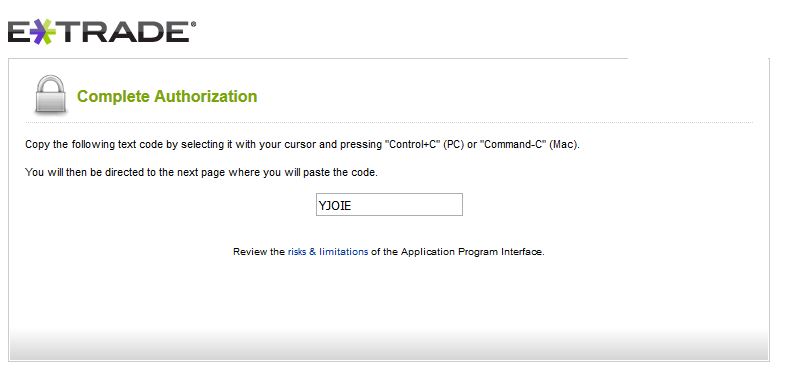
// The ETrade account owner will login and grant access to the application.
// A short verifier code will be displayed (as shown below), and this must be copy-and-pasted
// into the next step to Complete the 3-legged OAuth1 Authorization
// Note: The browser will NOT automatically direct you to the next page.
// You should copy the verifier code, close the browser, and then paste the verifier
// code into your application.
//  oHttp:destroy()
oResp:destroy()
oHashTab:destroy()
oJson:destroy()
oFac:destroy()
oSbUrlForBrowser:destroy()
oOauth2:destroy()
oHttp:destroy()
oResp:destroy()
oHashTab:destroy()
oJson:destroy()
oFac:destroy()
oSbUrlForBrowser:destroy()
oOauth2:destroy()