VBScript Requires Chilkat v11.7.0+
VBScript
QR Code Error Correction Levels
See more QR Code Examples
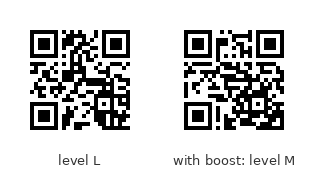
Demonstrates the four QR error-correction levels. L, M, Q and H allow a reader to recover the data when about 7%, 15%, 25% and 30% of the symbol is damaged or covered. More error correction leaves less room for data, so the same text needs a larger symbol at a higher level. The default is M. The example also shows boostErrorCorrection, which raises the level for free when the chosen version has room to spare.Chilkat VBScript Downloads
Dim fso, outFile
Set fso = CreateObject("Scripting.FileSystemObject")
'Create a Unicode (utf-16) output text file.
Set outFile = fso.CreateTextFile("output.txt", True, True)
success = 0
' This example requires the Chilkat API to have been previously unlocked.
' See Global Unlock Sample for sample code.
set fmt = CreateObject("Chilkat.Formats")
set json = CreateObject("Chilkat.JsonObject")
set jsonOut = CreateObject("Chilkat.JsonObject")
success = json.UpdateString("payload.text","https://www.chilkatsoft.com/barcode_overview.asp")
' Encode the same text at each level.
set levels = CreateObject("Chilkat.JsonArray")
success = levels.Load("[""L"",""M"",""Q"",""H""]")
For i = 0 To 3
success = json.UpdateString("encoding.qr.errorCorrection",levels.StringAt(i))
success = fmt.QrCode("generate",json,jsonOut)
If (success = 0) Then
outFile.WriteLine(fmt.LastErrorText)
WScript.Quit
End If
outFile.WriteLine("level " & levels.StringAt(i) & ": version " & jsonOut.IntOf("symbols[0].selectedEncoding.version") & ", " & jsonOut.IntOf("symbols[0].dimensions.modulesWide") _
& " modules wide")
Next
' The four symbols. They hold the same text, and the higher the level, the larger the symbol:
' 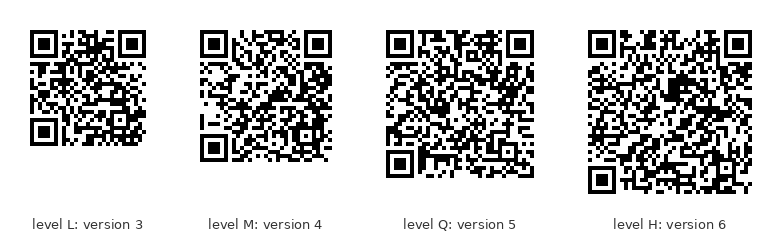 ' A symbol often has room left over. boostErrorCorrection uses it: the level is raised
' as far as the same version allows, so the symbol is no larger but is more robust.
set json2 = CreateObject("Chilkat.JsonObject")
success = json2.UpdateString("payload.text","https://chilkatsoft.com")
success = json2.UpdateString("encoding.qr.errorCorrection","L")
success = fmt.QrCode("generate",json2,jsonOut)
If (success = 0) Then
outFile.WriteLine(fmt.LastErrorText)
WScript.Quit
End If
outFile.WriteLine("level L requested: version " & jsonOut.IntOf("symbols[0].selectedEncoding.version") & ", level " & jsonOut.StringOf("symbols[0].selectedEncoding.errorCorrection"))
success = json2.UpdateBool("encoding.qr.boostErrorCorrection",1)
success = fmt.QrCode("generate",json2,jsonOut)
If (success = 0) Then
outFile.WriteLine(fmt.LastErrorText)
WScript.Quit
End If
outFile.WriteLine("level L with boost: version " & jsonOut.IntOf("symbols[0].selectedEncoding.version") & ", level " & jsonOut.StringOf("symbols[0].selectedEncoding.errorCorrection"))
' Level L, and level M reached by the boost. The two symbols are the same size:
'
 ' Sample output:
' level L: version 3, 29 modules wide
' level M: version 4, 33 modules wide
' level Q: version 5, 37 modules wide
' level H: version 6, 41 modules wide
' level L requested: version 2, level L
' level L with boost: version 2, level M
outFile.Close