Visual Basic 6.0 Requires Chilkat v11.7.0+
Visual Basic 6.0
Generate a QR Code PNG File
See more QR Code Examples
Demonstrates the simplest way to create a QR code: the text to encode goes in payload.text, and output.path names the PNG file to write. QrCode chooses the smallest QR version that holds the text at error-correction level M, and the response reports what it chose and the size of the image. The request and the response are both JSON objects, and they must be two different objects.Chilkat Visual Basic 6.0 Downloads
Dim success As Long
success = 0
' This example requires the Chilkat API to have been previously unlocked.
' See Global Unlock Sample for sample code.
Dim json As New ChilkatJsonObject
success = json.UpdateString("payload.text","https://www.chilkatsoft.com/")
' Each module (one of the small squares) is drawn 8 pixels wide. The default is 4.
success = json.UpdateInt("render.moduleSize",8)
' Write the image to a file. An existing file is replaced only when output.overwrite is true.
' Otherwise the call fails and the existing file is left as it was.
success = json.UpdateString("output.path","qa_output/qr_chilkat.png")
success = json.UpdateBool("output.overwrite",1)
' The image is also returned in the response as base64 unless output.return is "none".
success = json.UpdateString("output.return","none")
Dim fmt As New ChilkatFormats
Dim jsonOut As New ChilkatJsonObject
success = fmt.QrCode("generate",json,jsonOut)
If (success = 0) Then
Debug.Print fmt.LastErrorText
Exit Sub
End If
Debug.Print "file: " & jsonOut.StringOf("outputs[0].path")
Debug.Print "image: " & jsonOut.IntOf("outputs[0].width") & " x " & jsonOut.IntOf("outputs[0].height") & " pixels, " & jsonOut.IntOf("outputs[0].byteCount") & " bytes"
Debug.Print "QR version: " & jsonOut.IntOf("symbols[0].selectedEncoding.version")
Debug.Print "error correction: " & jsonOut.StringOf("symbols[0].selectedEncoding.errorCorrection")
Debug.Print "modules: " & jsonOut.IntOf("symbols[0].dimensions.modulesWide") & " x " & jsonOut.IntOf("symbols[0].dimensions.modulesHigh")
' The image written to qa_output/qr_chilkat.png:
' 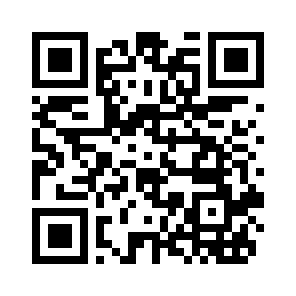 ' Sample output:
' file: qa_output/qr_chilkat.png
' image: 296 x 296 pixels, 1251 bytes
' QR version: 3
' error correction: M
' modules: 29 x 29