Unicode C Requires Chilkat v11.7.0+
Unicode C
QR Code Numeric, Alphanumeric and Byte Modes
See more QR Code Examples
Demonstrates the QR encoding modes. Digits alone are stored in numeric mode, and text made only of digits, upper-case letters, space and $ % * + - . / : in alphanumeric mode. Both pack more characters into a symbol than byte mode, which is used for everything else. QrCode chooses the most compact mode the text allows, and the response reports it. A product code written in upper case therefore gives a smaller symbol than the same code in lower case.Chilkat Unicode C Downloads
#include <C_CkFormatsW.h>
#include <C_CkJsonObjectW.h>
void ChilkatSample(void)
{
BOOL success;
HCkFormatsW fmt;
HCkJsonObjectW json;
HCkJsonObjectW jsonOut;
success = FALSE;
// This example requires the Chilkat API to have been previously unlocked.
// See Global Unlock Sample for sample code.
fmt = CkFormatsW_Create();
json = CkJsonObjectW_Create();
jsonOut = CkJsonObjectW_Create();
// Digits only.
CkJsonObjectW_UpdateString(json,L"payload.text",L"00123456789012345678");
success = CkFormatsW_QrCode(fmt,L"generate",json,jsonOut);
if (success == FALSE) {
wprintf(L"%s\n",CkFormatsW_lastErrorText(fmt));
CkFormatsW_Dispose(fmt);
CkJsonObjectW_Dispose(json);
CkJsonObjectW_Dispose(jsonOut);
return;
}
wprintf(L"digits: mode %s, version %d\n",CkJsonObjectW_stringOf(jsonOut,L"symbols[0].selectedEncoding.mode"),CkJsonObjectW_IntOf(jsonOut,L"symbols[0].selectedEncoding.version"));
// Upper-case letters, digits, space and - are all in the alphanumeric set.
CkJsonObjectW_UpdateString(json,L"payload.text",L"ORDER-12345 LOT A7 SHELF 12-C");
success = CkFormatsW_QrCode(fmt,L"generate",json,jsonOut);
if (success == FALSE) {
wprintf(L"%s\n",CkFormatsW_lastErrorText(fmt));
CkFormatsW_Dispose(fmt);
CkJsonObjectW_Dispose(json);
CkJsonObjectW_Dispose(jsonOut);
return;
}
wprintf(L"upper case: mode %s, version %d\n",CkJsonObjectW_stringOf(jsonOut,L"symbols[0].selectedEncoding.mode"),CkJsonObjectW_IntOf(jsonOut,L"symbols[0].selectedEncoding.version"));
// Lower-case letters are not, so the same text in lower case needs byte mode.
CkJsonObjectW_UpdateString(json,L"payload.text",L"order-12345 lot a7 shelf 12-c");
success = CkFormatsW_QrCode(fmt,L"generate",json,jsonOut);
if (success == FALSE) {
wprintf(L"%s\n",CkFormatsW_lastErrorText(fmt));
CkFormatsW_Dispose(fmt);
CkJsonObjectW_Dispose(json);
CkJsonObjectW_Dispose(jsonOut);
return;
}
wprintf(L"lower case: mode %s, version %d\n",CkJsonObjectW_stringOf(jsonOut,L"symbols[0].selectedEncoding.mode"),CkJsonObjectW_IntOf(jsonOut,L"symbols[0].selectedEncoding.version"));
// The mode can be named. Byte mode can hold any text. Naming a mode the text cannot use
// (numeric for text with letters, for example) fails with conflictingOptions.
CkJsonObjectW_UpdateString(json,L"payload.text",L"00123456789012345678");
CkJsonObjectW_UpdateString(json,L"encoding.qr.mode",L"byte");
success = CkFormatsW_QrCode(fmt,L"generate",json,jsonOut);
if (success == FALSE) {
wprintf(L"%s\n",CkFormatsW_lastErrorText(fmt));
CkFormatsW_Dispose(fmt);
CkJsonObjectW_Dispose(json);
CkJsonObjectW_Dispose(jsonOut);
return;
}
wprintf(L"digits as bytes: mode %s, version %d\n",CkJsonObjectW_stringOf(jsonOut,L"symbols[0].selectedEncoding.mode"),CkJsonObjectW_IntOf(jsonOut,L"symbols[0].selectedEncoding.version"));
// The four symbols, in the order they were made:
// 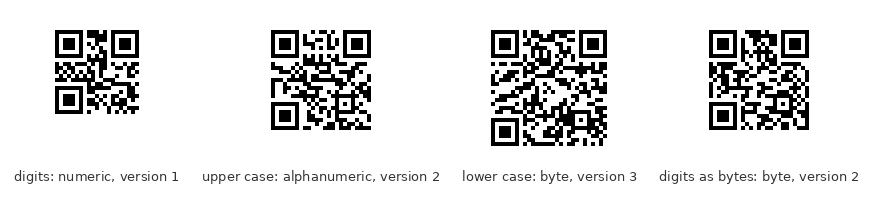 // Sample output:
// digits: mode numeric, version 1
// upper case: mode alphanumeric, version 2
// lower case: mode byte, version 3
// digits as bytes: mode byte, version 2
CkFormatsW_Dispose(fmt);
CkJsonObjectW_Dispose(json);
CkJsonObjectW_Dispose(jsonOut);
}