Tcl Requires Chilkat v11.7.0+
Tcl
Embed a QR Code in HTML as a Data URI
See more QR Code Examples
Demonstrates putting a QR code directly into an HTML page or HTML email with no separate image file. The base64 PNG returned by QrCode becomes the src of an img tag as a data URI, which is the MIME type from outputs[0].mimeType followed by the base64 from outputs[0].base64.Chilkat Tcl Downloads
load ./chilkat.dll
set success 0
# This example requires the Chilkat API to have been previously unlocked.
# See Global Unlock Sample for sample code.
set json [new_CkJsonObject]
CkJsonObject_UpdateString $json "payload.text" "https://www.chilkatsoft.com/"
CkJsonObject_UpdateInt $json "render.moduleSize" 5
set fmt [new_CkFormats]
set jsonOut [new_CkJsonObject]
set success [CkFormats_QrCode $fmt "generate" $json $jsonOut]
if {$success == 0} then {
puts [CkFormats_lastErrorText $fmt]
delete_CkJsonObject $json
delete_CkFormats $fmt
delete_CkJsonObject $jsonOut
exit
}
# A data URI has the form data:<MIME type>;base64,<base64 data>
set sbHtml [new_CkStringBuilder]
CkStringBuilder_Append $sbHtml "<html><body><p>Scan to visit chilkatsoft.com</p><img alt=\"QR code\" width=\""
CkStringBuilder_AppendInt $sbHtml [CkJsonObject_IntOf $jsonOut "outputs[0].width"]
CkStringBuilder_Append $sbHtml "\" height=\""
CkStringBuilder_AppendInt $sbHtml [CkJsonObject_IntOf $jsonOut "outputs[0].height"]
CkStringBuilder_Append $sbHtml "\" src=\"data:"
CkStringBuilder_Append $sbHtml [CkJsonObject_stringOf $jsonOut "outputs[0].mimeType"]
CkStringBuilder_Append $sbHtml ";base64,"
CkStringBuilder_Append $sbHtml [CkJsonObject_stringOf $jsonOut "outputs[0].base64"]
CkStringBuilder_Append $sbHtml "\"></body></html>"
set success [CkStringBuilder_WriteFile $sbHtml "qa_output/qr_page.html" "utf-8" 0]
if {$success == 0} then {
puts [CkStringBuilder_lastErrorText $sbHtml]
delete_CkJsonObject $json
delete_CkFormats $fmt
delete_CkJsonObject $jsonOut
delete_CkStringBuilder $sbHtml
exit
}
puts "image: [CkJsonObject_IntOf $jsonOut {outputs[0].width}] x [CkJsonObject_IntOf $jsonOut {outputs[0].height}] pixels"
puts "HTML length: [CkStringBuilder_get_Length $sbHtml]"
# The page, as a browser shows it:
# 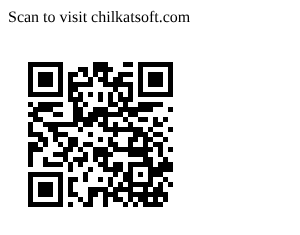 # Sample output:
# image: 185 x 185 pixels
# HTML length: 1211
delete_CkJsonObject $json
delete_CkFormats $fmt
delete_CkJsonObject $jsonOut
delete_CkStringBuilder $sbHtml