Swift
Swift
Firebase PATCH - Updating Data
See more Firebase Examples
Uses the PATCH method to update record with new information. The data used in this example is at Chilkat Firebase Pigs Database, and is shown here: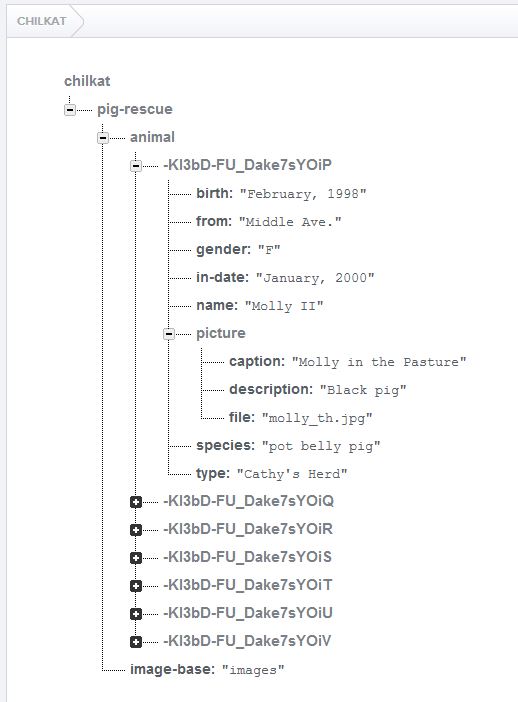
Chilkat Swift Downloads
func chilkatTest() {
    var success: Bool = false

    // Uses the PATCH method to update a Firebase record.

    // This example requires the Chilkat API to have been previously unlocked.
    // See Global Unlock Sample for sample code.

    // This example assumes a JWT authentication token, if required, has been previously obtained.
    // See Get Firebase Access Token from JSON Service Account Private Key for sample code.

    // Load the previously obtained Firebase access token into a string.
    let fac = CkoFileAccess()!
    var accessToken: String? = fac.readEntireTextFile(path: "qa_data/tokens/firebaseToken.txt", charset: "utf-8")
    if fac.lastMethodSuccess != true {
        print("\(fac.lastErrorText!)")
        return
    }

    let rest = CkoRest()!

    // Make the initial connection (without sending a request yet).
    // Once connected, any number of requests may be sent.  It is not necessary to explicitly
    // call Connect before each request.
    success = rest.connect(hostname: "chilkat.firebaseio.com", port: 443, tls: true, autoReconnect: true)
    if success != true {
        print("\(rest.lastErrorText!)")
        return
    }

    let authGoogle = CkoAuthGoogle()!
    authGoogle.accessToken = accessToken
    rest.setAuthGoogle(authProvider: authGoogle)

    // Chilkat's sample data (pig-rescue data) is publicly readable at: https://chilkat.firebaseio.com/.json
    // This data is publicly readable, but not writable.  You'll need to
    // run against your own database..

    // We're going to update "Molly II" to "Molly III"
    let pigNameUpdate = CkoJsonObject()!
    pigNameUpdate.appendString(name: "name", value: "Molly III")

    // The string content of the last arg passed is  {"name":"Molly III"}
    var jsonResponse: String? = rest.fullRequestString(httpVerb: "PATCH", uriPath: "/pig-rescue/animal/-KI3bD-FU_Dake7sYOiP.json", bodyText: pigNameUpdate.emit())
    if rest.lastMethodSuccess != true {
        // Something happened in the communications (either no request was sent, or no response was received.
        // (The Chilkat REST API also has lower-level methods where an app can send the request in one call,
        // and then receive the response in another call.)
        print("\(rest.lastErrorText!)")
        return
    }

    // Check the response status code.   A 200 response status indicates success.
    if rest.responseStatusCode.intValue != 200 {
        print("\(rest.responseStatusText!)")
        print("\(jsonResponse!)")
        print("Failed.")
        return
    }

    // When successful, the response contains the data written.
    print("\(jsonResponse!)")
    print("Success.")

}