SQL Server
SQL Server
AddAttribute - Insert New Attribute in an XML Node
Demonstrates adding an name=value attribute to an XML element.
This example uses the XML sample file here: sample1.xml. The sample1.xml file contains this content: 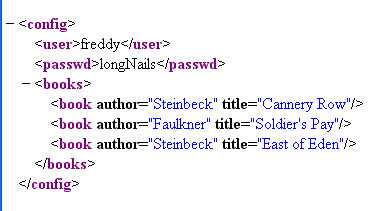
Chilkat SQL Server Downloads
-- Important: See this note about string length limitations for strings returned by sp_OAMethod calls.
--
CREATE PROCEDURE ChilkatSample
AS
BEGIN
    DECLARE @hr int
    -- Important: Do not use nvarchar(max).  See the warning about using nvarchar(max).
    DECLARE @sTmp0 nvarchar(4000)
    DECLARE @success int
    SELECT @success = 0

    DECLARE @xml int
    EXEC @hr = sp_OACreate 'Chilkat.Xml', @xml OUT
    IF @hr <> 0
    BEGIN
        PRINT 'Failed to create ActiveX component'
        RETURN
    END

    EXEC sp_OAMethod @xml, 'LoadXmlFile', @success OUT, 'qa_data/xml/sample1.xml'
    IF @success <> 1
      BEGIN
        EXEC sp_OAGetProperty @xml, 'LastErrorText', @sTmp0 OUT
        PRINT @sTmp0
        EXEC @hr = sp_OADestroy @xml
        RETURN
      END

    -- Navigate to the "books" element:
    DECLARE @bFound int
    EXEC sp_OAMethod @xml, 'FindChild2', @bFound OUT, 'books'
    IF @bFound = 0
      BEGIN

        PRINT 'No books child found!'
        EXEC @hr = sp_OADestroy @xml
        RETURN
      END

    DECLARE @numChildren int
    EXEC sp_OAGetProperty @xml, 'NumChildren', @numChildren OUT

    DECLARE @i int
    SELECT @i = 0
    WHILE @i < @numChildren
      BEGIN

        -- Navigate to the Nth book
        EXEC sp_OAMethod @xml, 'GetChild2', @success OUT, @i

        -- Display the book title:
        EXEC sp_OAMethod @xml, 'GetAttrValue', @sTmp0 OUT, 'title'
        PRINT @sTmp0

        -- Add a new integer attribute:
        -- Should never fail..
        EXEC sp_OAMethod @xml, 'AddAttributeInt', @success OUT, 'bookId', @i

        -- Add a new unread="yes" attribute:
        EXEC sp_OAMethod @xml, 'AddAttribute', @success OUT, 'unread', 'yes'

        -- Navigate back up to the parent:
        EXEC sp_OAMethod @xml, 'GetParent2', @success OUT

        SELECT @i = @i + 1
      END

    -- Navigate back to the document root:
    EXEC sp_OAMethod @xml, 'GetRoot2', NULL

    -- Save the updated document:
    EXEC sp_OAMethod @xml, 'SaveXml', @success OUT, 'modified.xml'
    IF @success <> 1
      BEGIN
        EXEC sp_OAGetProperty @xml, 'LastErrorText', @sTmp0 OUT
        PRINT @sTmp0
        EXEC @hr = sp_OADestroy @xml
        RETURN
      END

    EXEC sp_OAMethod @xml, 'GetXml', @sTmp0 OUT
    PRINT @sTmp0

    EXEC @hr = sp_OADestroy @xml


END
GO