SQL Server Requires Chilkat v11.7.0+
SQL Server
Choose the QR Code Version and Mask Pattern
See more QR Code Examples
Demonstrates fixing the QR version and the mask pattern. The version (1 to 40) is the size of the symbol: version 1 is 21 modules wide and each version adds 4. By default QrCode picks the smallest version that holds the data and the mask pattern that scores best under the QR standard. Fixing the version is useful when a series of codes must all be the same size, and minVersion and maxVersion bound the automatic choice instead.Chilkat SQL Server Downloads
--
CREATE PROCEDURE ChilkatSample
AS
BEGIN
DECLARE @hr int
DECLARE @iTmp0 int
DECLARE @iTmp1 int
DECLARE @iTmp2 int
DECLARE @sTmp0 nvarchar(4000)
DECLARE @success int
SELECT @success = 0
-- This example requires the Chilkat API to have been previously unlocked.
-- See Global Unlock Sample for sample code.
DECLARE @fmt int
EXEC @hr = sp_OACreate 'Chilkat.Formats', @fmt OUT
IF @hr <> 0
BEGIN
PRINT 'Failed to create ActiveX component'
RETURN
END
DECLARE @json int
EXEC @hr = sp_OACreate 'Chilkat.JsonObject', @json OUT
DECLARE @jsonOut int
EXEC @hr = sp_OACreate 'Chilkat.JsonObject', @jsonOut OUT
EXEC sp_OAMethod @json, 'UpdateString', @success OUT, 'payload.text', 'https://www.chilkatsoft.com/'
-- Automatic: the smallest version that holds the text, and the best-scoring mask.
EXEC sp_OAMethod @fmt, 'QrCode', @success OUT, 'generate', @json, @jsonOut
IF @success = 0
BEGIN
EXEC sp_OAGetProperty @fmt, 'LastErrorText', @sTmp0 OUT
PRINT @sTmp0
EXEC @hr = sp_OADestroy @fmt
EXEC @hr = sp_OADestroy @json
EXEC @hr = sp_OADestroy @jsonOut
RETURN
END
EXEC sp_OAMethod @jsonOut, 'IntOf', @iTmp0 OUT, 'symbols[0].selectedEncoding.version'
EXEC sp_OAMethod @jsonOut, 'IntOf', @iTmp1 OUT, 'symbols[0].dimensions.modulesWide'
EXEC sp_OAMethod @jsonOut, 'IntOf', @iTmp2 OUT, 'symbols[0].selectedEncoding.mask'
PRINT 'automatic: version ' + @iTmp0 + ', ' + @iTmp1 + ' modules wide, mask ' + @iTmp2
-- A fixed version. The call fails with capacityExceeded if the text does not fit it.
EXEC sp_OAMethod @json, 'UpdateInt', @success OUT, 'encoding.qr.version', 8
EXEC sp_OAMethod @fmt, 'QrCode', @success OUT, 'generate', @json, @jsonOut
IF @success = 0
BEGIN
EXEC sp_OAGetProperty @fmt, 'LastErrorText', @sTmp0 OUT
PRINT @sTmp0
EXEC @hr = sp_OADestroy @fmt
EXEC @hr = sp_OADestroy @json
EXEC @hr = sp_OADestroy @jsonOut
RETURN
END
EXEC sp_OAMethod @jsonOut, 'IntOf', @iTmp0 OUT, 'symbols[0].selectedEncoding.version'
EXEC sp_OAMethod @jsonOut, 'IntOf', @iTmp1 OUT, 'symbols[0].dimensions.modulesWide'
EXEC sp_OAMethod @jsonOut, 'IntOf', @iTmp2 OUT, 'symbols[0].selectedEncoding.mask'
PRINT 'version 8: version ' + @iTmp0 + ', ' + @iTmp1 + ' modules wide, mask ' + @iTmp2
-- A fixed mask pattern, 0 to 7. Every mask gives a valid symbol holding the same data.
EXEC sp_OAMethod @json, 'UpdateInt', @success OUT, 'encoding.qr.mask', 5
EXEC sp_OAMethod @fmt, 'QrCode', @success OUT, 'generate', @json, @jsonOut
IF @success = 0
BEGIN
EXEC sp_OAGetProperty @fmt, 'LastErrorText', @sTmp0 OUT
PRINT @sTmp0
EXEC @hr = sp_OADestroy @fmt
EXEC @hr = sp_OADestroy @json
EXEC @hr = sp_OADestroy @jsonOut
RETURN
END
EXEC sp_OAMethod @jsonOut, 'IntOf', @iTmp0 OUT, 'symbols[0].selectedEncoding.version'
EXEC sp_OAMethod @jsonOut, 'IntOf', @iTmp1 OUT, 'symbols[0].selectedEncoding.mask'
PRINT 'version 8, mask 5: version ' + @iTmp0 + ', mask ' + @iTmp1
-- Bounds for the automatic choice: no smaller than version 4, no larger than version 10.
DECLARE @json2 int
EXEC @hr = sp_OACreate 'Chilkat.JsonObject', @json2 OUT
EXEC sp_OAMethod @json2, 'UpdateString', @success OUT, 'payload.text', 'https://www.chilkatsoft.com/'
EXEC sp_OAMethod @json2, 'UpdateInt', @success OUT, 'encoding.qr.minVersion', 4
EXEC sp_OAMethod @json2, 'UpdateInt', @success OUT, 'encoding.qr.maxVersion', 10
EXEC sp_OAMethod @fmt, 'QrCode', @success OUT, 'generate', @json2, @jsonOut
IF @success = 0
BEGIN
EXEC sp_OAGetProperty @fmt, 'LastErrorText', @sTmp0 OUT
PRINT @sTmp0
EXEC @hr = sp_OADestroy @fmt
EXEC @hr = sp_OADestroy @json
EXEC @hr = sp_OADestroy @jsonOut
EXEC @hr = sp_OADestroy @json2
RETURN
END
EXEC sp_OAMethod @jsonOut, 'IntOf', @iTmp0 OUT, 'symbols[0].selectedEncoding.version'
PRINT 'minVersion 4: version ' + @iTmp0
-- The four symbols, in the order they were made. The second and the third hold the same data
-- in the same version and differ only in the mask:
-- 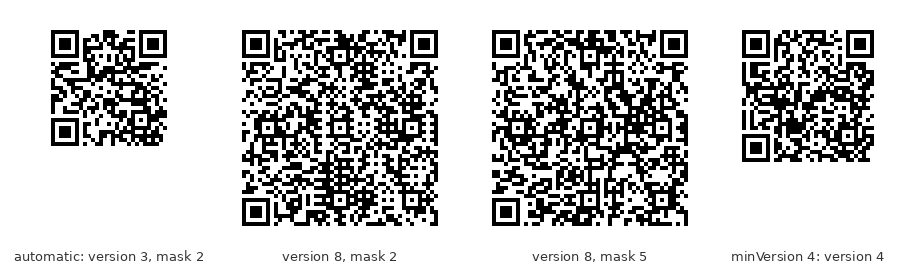 -- Sample output:
-- automatic: version 3, 29 modules wide, mask 2
-- version 8: version 8, 49 modules wide, mask 2
-- version 8, mask 5: version 8, mask 5
-- minVersion 4: version 4
EXEC @hr = sp_OADestroy @fmt
EXEC @hr = sp_OADestroy @json
EXEC @hr = sp_OADestroy @jsonOut
EXEC @hr = sp_OADestroy @json2
END
GO