React Native
React Native
Salesforce OAuth2 Refresh Access Token
See more OAuth2 Examples
Demonstrates how to refresh a Salesforce Access Token.Note: Use Chilkat v10.1.2 or later for this example.
Chilkat React Native Downloads
import { JsonObject, OAuth2, StringBuilder } from '@chilkat/react-native'
async function chilkatExample() {
// This example requires the Chilkat API to have been previously unlocked.
// See Global Unlock Sample for sample code.
// It is assumed we previously obtained an OAuth2 access token.
// This example loads the JSON access token file
// saved by this example: Get SalesForce OAuth2 Access Token via Authorization Flow
const jsonToken = new JsonObject();
try {
jsonToken.loadFile('qa_data/tokens/_salesforce.json');
} catch {
console.log('Failed to load _salesforce.json');
return;
}
// This is an example of a Salesforce OAuth2 access token to be refreshed:
// {
// "access_token": "00D41000....uLZBpT6",
// "refresh_token": "5Aep....25xdGgkrV",
// "signature": "cjTbSc5DvcKpaMoRTzuQTJLb1tcMw8LEO01flq4aMD4=",
// "scope": "refresh_token id",
// "instance_url": "https://d41000000f8a0eak-dev-ed.my.salesforce.com",
// "id": "https://login.salesforce.com/id/00D41000000F8A0EAK/005410000....xAAE",
// "token_type": "Bearer",
// "issued_at": "1738348388166"
// }
const oauth2 = new OAuth2();
oauth2.tokenEndpoint = 'https://login.salesforce.com/services/oauth2/token';
// Replace this with your actual client ID (Consumer Key)
oauth2.clientId = 'CLIENT_ID';
// Note: The client secret is not required because we configured our Connected App
// to not require it for the refresh flow. See the screenshot below.
// Get the "refresh_token"
oauth2.refreshToken = jsonToken.stringOf('refresh_token');
// Send the HTTP POST to refresh the access token..
try {
await oauth2.refreshAccessTokenAsync();
} catch {
console.log(oauth2.lastErrorText);
return;
}
// The response contains a new access token, but we must keep
// our existing refresh token for when we need to refresh again in the future.
jsonToken.updateString('access_token', oauth2.accessToken);
// Save the new JSON access token response to a file.
const sbJson = new StringBuilder();
jsonToken.emitCompact = false;
jsonToken.emitSb(sbJson);
sbJson.writeFile('qa_data/tokens/_salesforce.json', 'utf-8', false);
console.log('OAuth2 authorization granted!');
console.log(`New Access Token = ${oauth2.accessToken}`);
// --------------------------------------------------------------------------
// Here's a screenshot of a Salesforce Connected App
// which does not requires the secret for the authorization or refresh flow.
// 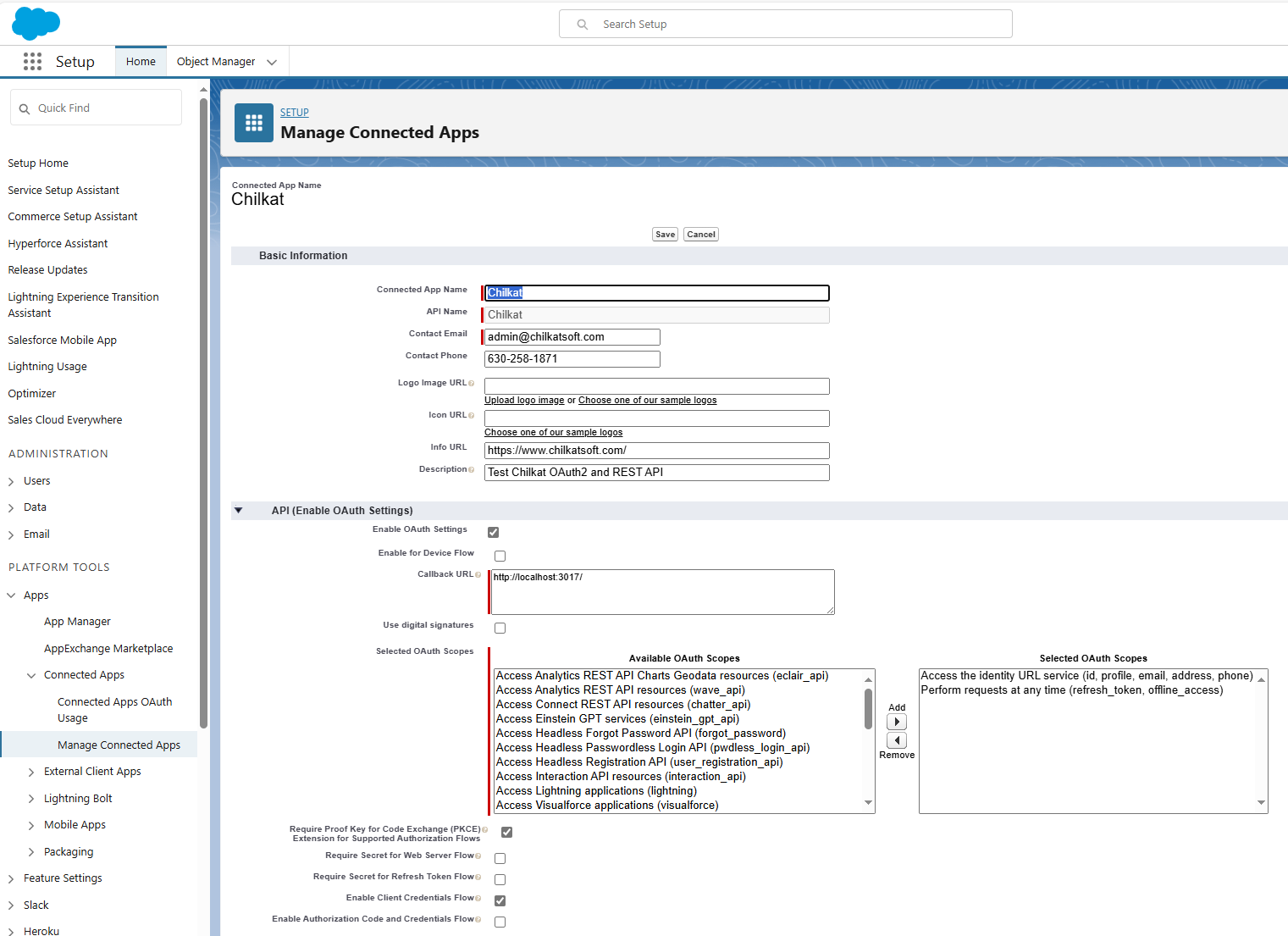 }
}