PureBasic Requires Chilkat v11.2.0+
PureBasic
Markdown to HTML - Full Document, ChatGPT Theme
See more Markdown Examples
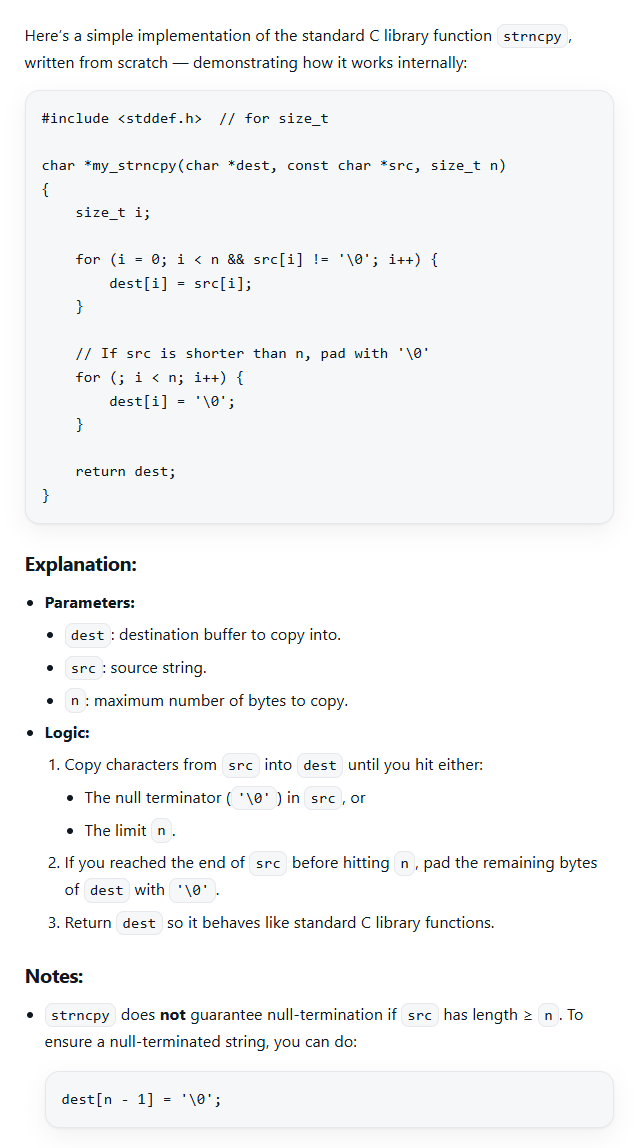
Demonstrates how to convert a complete Markdown document to HTML using the pre-defined "ChatGPT" theme. The "ChatGPT" theme produces a full HTML document including:
- Document Type Declaration (e.g. <!DOCTYPE html>)
- Root Element (e.g., <html> )
- Head Section
- Enclosing <body> and </body> elements
- Closing </html> element
The Head Section includes style definitions that display the HTML in a style similar to the ChatGPT app. (How did Chilkat do it? We simply asked ChatGPT to generate CSS that is similar in style to the HTML displayed in the ChatGPT app.)
Chilkat PureBasic Downloads
IncludeFile "CkStringBuilder.pb"
IncludeFile "CkJsonObject.pb"
Procedure ChilkatExample()
success.i = 0
; Select the pre-defined "ChatGPT" style.
options.i = CkJsonObject::ckCreate()
If options.i = 0
Debug "Failed to create object."
ProcedureReturn
EndIf
CkJsonObject::ckUpdateString(options,"theme","ChatGPT")
; We can also set an option for the max-width, which by default is "72ch".
CkJsonObject::ckUpdateString(options,"ChatGPT.max-width","120ch")
sbMarkdown.i = CkStringBuilder::ckCreate()
If sbMarkdown.i = 0
Debug "Failed to create object."
ProcedureReturn
EndIf
sbHtml.i = CkStringBuilder::ckCreate()
If sbHtml.i = 0
Debug "Failed to create object."
ProcedureReturn
EndIf
success = CkStringBuilder::ckLoadFile(sbMarkdown,"qa_data/markdown/test1.md","utf-8")
If success = 0
Debug CkStringBuilder::ckLastErrorText(sbMarkdown)
CkJsonObject::ckDispose(options)
CkStringBuilder::ckDispose(sbMarkdown)
CkStringBuilder::ckDispose(sbHtml)
ProcedureReturn
EndIf
CkStringBuilder::ckMarkdownToHtml(sbMarkdown,options,sbHtml)
CkStringBuilder::ckToCRLF(sbHtml)
Debug CkStringBuilder::ckGetAsString(sbHtml)
; The sample markdown input for this example is identical to the one at Markdown to HTML - Full Document, Raw, where you can view it.
; Sample HTML output as viewed in a browser:
;
; To add code syntax highlighting, see the example at Markdown to HTML - Full Document, ChatGPT Theme with Code Syntax Highlighting
;  CkJsonObject::ckDispose(options)
CkStringBuilder::ckDispose(sbMarkdown)
CkStringBuilder::ckDispose(sbHtml)
ProcedureReturn
EndProcedure
CkJsonObject::ckDispose(options)
CkStringBuilder::ckDispose(sbMarkdown)
CkStringBuilder::ckDispose(sbHtml)
ProcedureReturn
EndProcedure