PowerShell
PowerShell
AddAttribute - Insert New Attribute in an XML Node
Demonstrates adding an name=value attribute to an XML element.
This example uses the XML sample file here: sample1.xml. The sample1.xml file contains this content: 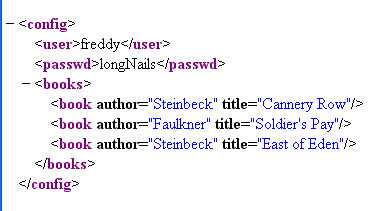
Chilkat PowerShell Downloads
Add-Type -Path "C:\chilkat\ChilkatDotNet47-x64\ChilkatDotNet47.dll"

$success = $false

$xml = New-Object Chilkat.Xml

$success = $xml.LoadXmlFile("qa_data/xml/sample1.xml")
if ($success -ne $true) {
    $($xml.LastErrorText)
    exit
}

# Navigate to the "books" element:
$bFound = $xml.FindChild2("books")
if ($bFound -eq $false) {
    $("No books child found!")
    exit
}

$numChildren = $xml.NumChildren

$i = 0
while ($i -lt $numChildren) {

    # Navigate to the Nth book
    $xml.GetChild2($i)

    # Display the book title:
    $($xml.GetAttrValue("title"))

    # Add a new integer attribute:
    # Should never fail..
    $xml.AddAttributeInt("bookId",$i)

    # Add a new unread="yes" attribute:
    $xml.AddAttribute("unread","yes")

    # Navigate back up to the parent:
    $xml.GetParent2()

    $i = $i + 1
}

# Navigate back to the document root:
$xml.GetRoot2()

# Save the updated document:
$success = $xml.SaveXml("modified.xml")
if ($success -ne $true) {
    $($xml.LastErrorText)
    exit
}

$($xml.GetXml())