PowerShell Requires Chilkat v10.1.2+
PowerShell
X.com OAuth 2.0 Authorization Code with PKCE
See more X Examples
Demonstrates how to get an X.com OAuth2 access token from a desktop application or script.Chilkat PowerShell Downloads
Add-Type -Path "C:\chilkat\ChilkatDotNet47-x64\ChilkatDotNet47.dll"

$success = $false

#  For more information about the OAuth2, see OAuth 2.0 Authorization Flow

$oauth2 = New-Object Chilkat.OAuth2

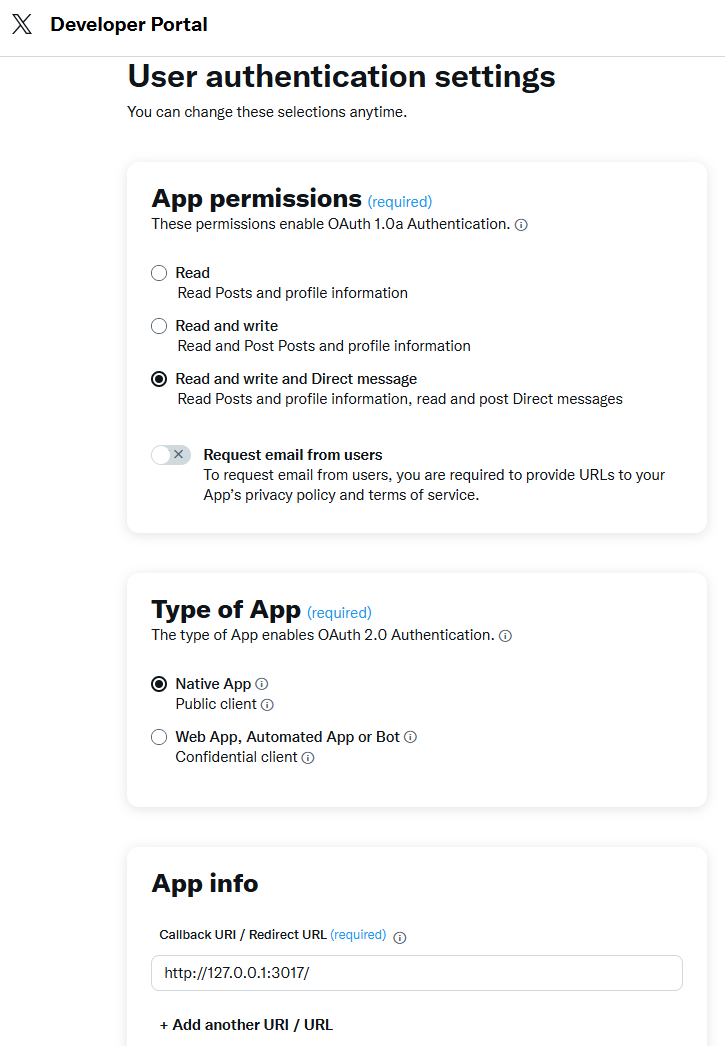
#  The port should match the Authorized Redirect URL in your X.com app,
#  which would look like "http://127.0.0.1:3017/"
#  See the screenshot below of the App Settings in the X Developer Portal
$oauth2.LocalHost = "127.0.0.1"
$oauth2.ListenPort = 3017

$oauth2.AuthorizationEndpoint = "https://x.com/i/oauth2/authorize"
$oauth2.TokenEndpoint = "https://api.x.com/2/oauth2/token"

#  Replace this with your actual X.com OAuth2 Client ID and Client Secret
$oauth2.ClientId = "OAUTH2_CLIENT_ID"
$oauth2.ClientSecret = "OAUTH2_CLIENT_SECRET"

#  This is for Require Proof Key for Code Exchange (PKCE)
#  See OAuth2 PKCE Explained
$oauth2.CodeChallenge = $true
$oauth2.CodeChallengeMethod = "S256"

#  Space separated scopes...
$oauth2.Scope = "tweet.read tweet.write users.read follows.read follows.write offline.access like.read like.write block.read block.write"

#  Begin the OAuth2 Authorization code flow.  This returns a URL that should be loaded in a browser.
$url = $oauth2.StartAuth()
if ($oauth2.LastMethodSuccess -ne $true) {
    $($oauth2.LastErrorText)
    exit
}

$("url = " + $url)

#  Launch the default browser on the system and navigate to the url.
#  The LaunchBrowser method was added in Chilkat v10.1.2.
$success = $oauth2.LaunchBrowser($url)
if ($success -eq $false) {
    $($oauth2.LastErrorText)
    exit
}

#  Wait for the user to approve or deny authorization in the browser.
$numMsWaited = 0
while (($numMsWaited -lt 10000) -and ($oauth2.AuthFlowState -lt 3)) {
    $oauth2.SleepMs(100)
    $numMsWaited = $numMsWaited + 100
}

#  If the browser does not respond within the specified time, AuthFlowState will be:
#
#  1: Waiting for Redirect - The OAuth2 background thread is waiting for the browser's redirect request.
#  2: Waiting for Final Response - The thread is awaiting the final access token response.
#  In either case, cancel the background task initiated by StartAuth.

if ($oauth2.AuthFlowState -lt 3) {
    $oauth2.Cancel()
    $("No response from the browser!")
    exit
}

#  Check AuthFlowState to determine if authorization was granted, denied, or failed:
#
#  3: Success - OAuth2 flow completed, the background thread exited, and the successful response is in AccessTokenResponse.
#  4: Access Denied - OAuth2 flow completed, the background thread exited, and the error response is in AccessTokenResponse.
#  5: Failure - OAuth2 flow failed before completion, the background thread exited, and error details are in FailureInfo.

if ($oauth2.AuthFlowState -eq 5) {
    $("OAuth2 failed to complete.")
    $($oauth2.FailureInfo)
    exit
}

if ($oauth2.AuthFlowState -eq 4) {
    $("OAuth2 authorization was denied.")
    $($oauth2.AccessTokenResponse)
    exit
}

if ($oauth2.AuthFlowState -ne 3) {
    $("Unexpected AuthFlowState:" + $oauth2.AuthFlowState)
    exit
}

$("OAuth2 authorization granted!")

$json = New-Object Chilkat.JsonObject
$json.Load($oauth2.AccessTokenResponse)
$json.EmitCompact = $false

#  If an "expires_on" member does not exist, then add the JSON member by
#  getting the current system date/time and adding the "expires_in" seconds.
#  This way we'll know when the token expires.
if ($json.HasMember("expires_on") -eq $false) {
    $dtExpire = New-Object Chilkat.CkDateTime
    $dtExpire.SetFromCurrentSystemTime()
    $dtExpire.AddSeconds($json.IntOf("expires_in"))
    $json.AppendString("expires_on",$dtExpire.GetAsUnixTimeStr($false))
}

$("Access Token Response = " + $json.Emit())

#  A sample access token response:

#  {
#    "token_type": "bearer",
#    "expires_in": 7200,
#    "access_token": "VmNDLVZiYUZwejY5Mkx3RblFTmo3ek1leTRGclMuZFVOUTVUTWpNbVZKb1N5OjE3NDAxNjk4MDVxNTE6MToxOaF0OjE",
#    "scope": "block.read follows.read offline.access tweet.write block.write like.write like.read users.read tweet.read follows.write",
#    "refresh_token": "eThOWVVFSTRqdVp3QTFndGsxM2ZGZmFyNWVrU0phM1JKbGdrbGNWRGJzb1loOjE3NDAwMjk4MDUxNTI6MTowOnJ0OjE"
#  }

$("Access Token = " + $oauth2.AccessToken)

$("Refresh Token = " + $oauth2.RefreshToken)

#  Save the JSON access token response to a file for subsequent use..
$json.WriteFile("qa_data/tokens/x.json")

#