PHP ActiveX
PHP ActiveX
Firebase GET - Reading Data
See more Firebase Examples
Demonstrates how to read parts of a Firebase JSON database. The data used in this example is at Chilkat Firebase Pigs Database, and is shown here: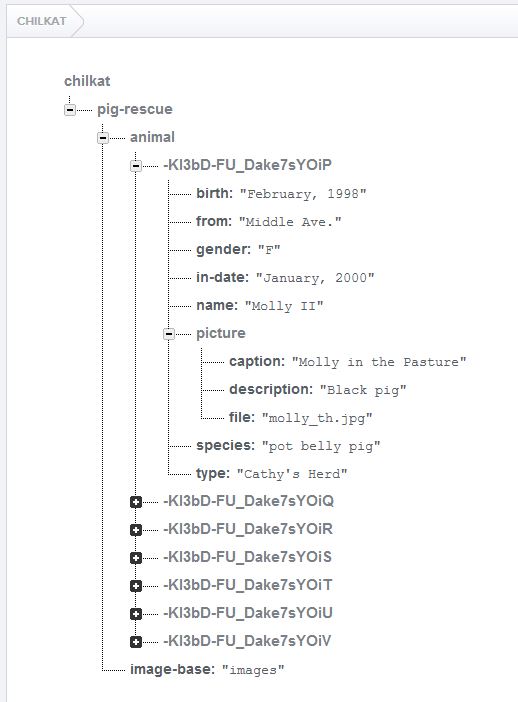
Chilkat PHP ActiveX Downloads
<?php

$success = 0;

// Demonstrates how to read parts of a Firebase JSON database.

// This example requires the Chilkat API to have been previously unlocked.
// See Global Unlock Sample for sample code.

// This example assumes a JWT authentication token, if required, has been previously obtained.
// See Get Firebase Access Token from JSON Service Account Private Key for sample code.

// Load the previously obtained Firebase access token into a string.
$fac = new COM("Chilkat.FileAccess");
$accessToken = $fac->readEntireTextFile('qa_data/tokens/firebaseToken.txt','utf-8');
if ($fac->LastMethodSuccess != 1) {
    print $fac->LastErrorText . "\n";
    exit;
}

$rest = new COM("Chilkat.Rest");

// Make the initial connection (without sending a request yet).
// Once connected, any number of requests may be sent.  It is not necessary to explicitly
// call Connect before each request.
$success = $rest->Connect('chilkat.firebaseio.com',443,1,1);
if ($success != 1) {
    print $rest->LastErrorText . "\n";
    exit;
}

// If authentication is required...
$authGoogle = new COM("Chilkat.AuthGoogle");
$authGoogle->AccessToken = $accessToken;
$rest->SetAuthGoogle($authGoogle);

// Chilkat's sample data (pig-rescue data) is publicly readable at: https://chilkat.firebaseio.com/.json

// Let's get the animals with the shallow parameter so we can see how many pigs exist.
$jsonResponse = $rest->fullRequestNoBody('GET','/pig-rescue/animal.json?shallow=true');
if ($rest->LastMethodSuccess != 1) {
    print $rest->LastErrorText . "\n";
    exit;
}

// The JSON returned should look like this:
// {"-KI3bD-FU_Dake7sYOiP":true,"-KI3bD-FU_Dake7sYOiT":true,"-KI3bD-FU_Dake7sYOiS":true,"-KI3bD-FU_Dake7sYOiU":true,"-KI3bD-FU_Dake7sYOiV":true,"-KI3bD-FU_Dake7sYOiR":true,"-KI3bD-FU_Dake7sYOiQ":true}
print $jsonResponse . "\n";

// Parse the response so we can iterate over each pig in the database..
$piggyPath = new COM("Chilkat.StringBuilder");
$shallow = new COM("Chilkat.JsonObject");
$piggyData = new COM("Chilkat.JsonObject");
$shallow->Load($jsonResponse);
$count = $shallow->Size;
$i = 0;
while ($i < $count) {

    // Get each individual pig's data.
    $piggyPath->Clear();
    $piggyPath->Append('/pig-rescue/animal/');
    $piggyPath->Append($shallow->nameAt($i));
    $piggyPath->Append('/.json');

    $piggyJson = $rest->fullRequestNoBody('GET',$piggyPath->getAsString());
    if ($rest->LastMethodSuccess != 1) {
        print $rest->LastErrorText . "\n";
        exit;
    }

    // Show this piggy's data...
    // An example of one pig's data is shown here:
    // {"birth":"February, 1998","from":"Middle Ave.","gender":"F","in-date":"January, 2000",
    //   "name":"Molly II","picture":{"caption":"Molly in the Pasture","description":"Black pig","file":"molly_th.jpg"},
    //   "species":"pot belly pig","type":"Cathy's Herd"}
    print '---- ' . $i . ' ----' . "\n";
    print $piggyJson . "\n";

    // Let's get the pig's name, and the caption of the picture.
    $piggyData->Load($piggyJson);
    print 'name: ' . $piggyData->stringOf('name') . "\n";
    print 'caption: ' . $piggyData->stringOf('picture.caption') . "\n";

    $i = $i + 1;
}

// Note: In many of the Chilkat examples, you may notice strange ways
// of doing something that should be simpler and shorter.  For example,
// building the piggyPath (above) could've been written differently,
// with some simple string concatenation.
//
// The reason is that the Chilkat examples are written in a
// proprietary "example code" scripting language,
// and then automatically generated to each of the different programming
// languages you see on example-code.com.  The code generation is
// limited in what it can do.  For example, string concatentation
// is not yet a feature of the "example code" scripting language (as of May 2016),
// and therefore you won't see the use of a programming language's string
// concatentation operators in any example.
//

?>