Lazarus Pascal
Lazarus Pascal
AddAttribute - Insert New Attribute in an XML Node
Demonstrates adding an name=value attribute to an XML element.
This example uses the XML sample file here: sample1.xml. The sample1.xml file contains this content: 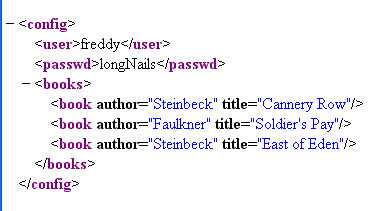
Chilkat Lazarus Pascal Downloads
program ChilkatDemo;

// Demonstrates using the Chilkat Pascal wrapper via the C bridge DLL.
// Builds as a console application under Lazarus (FPC) or Delphi.

{$IFDEF FPC}
  {$MODE DELPHI}
{$ENDIF}
{$APPTYPE CONSOLE}

uses
  {$IFDEF UNIX}
  cthreads,
  {$ENDIF}
  SysUtils,
  CkDllLoader,
  Chilkat.Xml;

// ---------------------------------------------------------------------------

procedure RunDemo;
var
  success: Boolean;
  xml: TXml;
  bFound: Boolean;
  numChildren: Integer;
  i: Integer;

begin
  success := False;

  xml := TXml.Create;

  success := xml.LoadXmlFile('qa_data/xml/sample1.xml');
  if (success <> True) then
    begin
      WriteLn(xml.LastErrorText);
      Exit;
    end;

  //  Navigate to the "books" element:
  bFound := xml.FindChild2('books');
  if (bFound = False) then
    begin
      WriteLn('No books child found!');
      Exit;
    end;

  numChildren := xml.NumChildren;

  i := 0;
  while i < numChildren do
    begin

      //  Navigate to the Nth book
      xml.GetChild2(i);

      //  Display the book title:
      WriteLn(xml.GetAttrValue('title'));

      //  Add a new integer attribute:
      //  Should never fail..
      xml.AddAttributeInt('bookId',i);

      //  Add a new unread="yes" attribute:
      xml.AddAttribute('unread','yes');

      //  Navigate back up to the parent:
      xml.GetParent2();

      i := i + 1;
    end;

  //  Navigate back to the document root:
  xml.GetRoot2();

  //  Save the updated document:
  success := xml.SaveXml('modified.xml');
  if (success <> True) then
    begin
      WriteLn(xml.LastErrorText);
      Exit;
    end;

  WriteLn(xml.GetXml());


  xml.Free;

end;

// ---------------------------------------------------------------------------

begin

  try
    RunDemo;
  except
    on E: Exception do
      WriteLn('Unhandled exception: ', E.ClassName, ': ', E.Message);
  end;

  WriteLn;
  {$IFDEF MSWINDOWS}
  WriteLn('Press Enter to exit...');
  ReadLn;
  {$ENDIF}
end.