Lazarus Pascal
Lazarus Pascal
ScMinidriver - Delete Smart Card Key Container
See more ScMinidriver Examples
Demonstrates how to delete the contents of a key container on a smart card (or USB token).Chilkat Lazarus Pascal Downloads
program ChilkatDemo;
// Demonstrates using the Chilkat Pascal wrapper via the C bridge DLL.
// Builds as a console application under Lazarus (FPC) or Delphi.
{$IFDEF FPC}
{$MODE DELPHI}
{$ENDIF}
{$APPTYPE CONSOLE}
uses
{$IFDEF UNIX}
cthreads,
{$ENDIF}
SysUtils,
CkDllLoader,
Chilkat.ScMinidriver;
// ---------------------------------------------------------------------------
procedure RunDemo;
var
success: Boolean;
scmd: TScMinidriver;
readerName: string;
pinId: string;
retval: Integer;
begin
success := False;
// This example requires the Chilkat API to have been previously unlocked.
// See Global Unlock Sample for sample code.
// Chilkat recommends the following free tool for interactively examining the contents of your smart card
// through the ScMinidriver interface: MGTEK Tool for Minidriver enabled Smart Cards
// Let's first look at our smart card..
// Here's the view of the card we happen to be using: a Gemalto (Thales) IDPrime MD T=0 smart card.
// 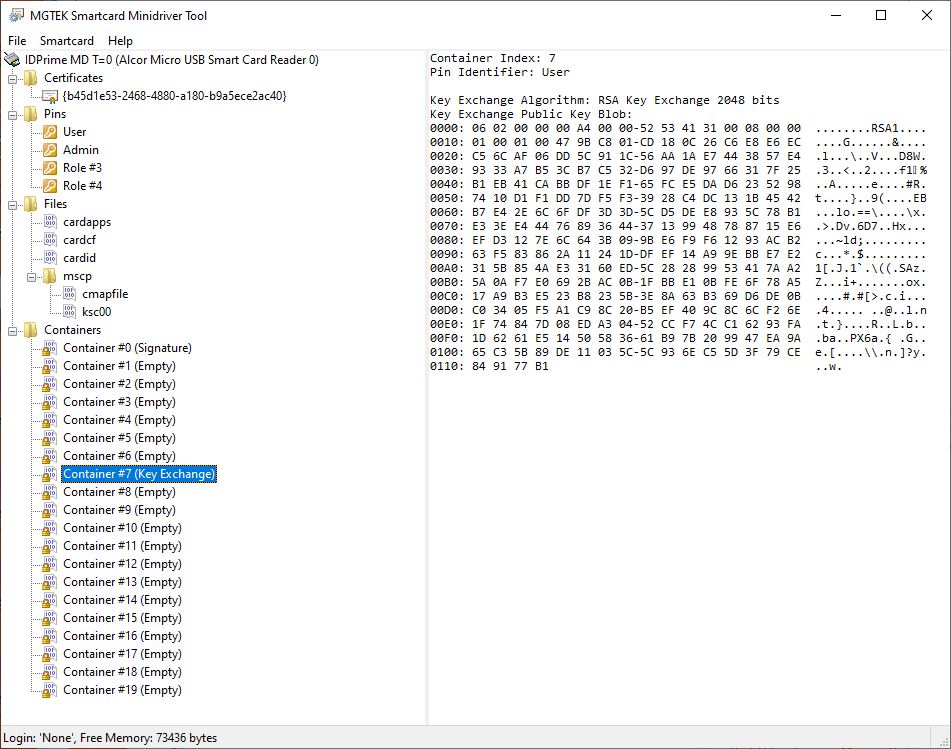 scmd := TScMinidriver.Create;
// First we need to acquire a context to the smart card in the reader where it is inserted.
// Reader names (smart card readers or USB tokens) can be discovered
// via List Readers or Find Smart Cards
readerName := 'Alcor Micro USB Smart Card Reader 0';
success := scmd.AcquireContext(readerName);
if (success = False) then
begin
WriteLn(scmd.LastErrorText);
Exit;
end;
// If successful, the name of the currently inserted smart card is available:
WriteLn('Card name: ' + scmd.CardName);
// To delete the contents of a key container, we'll need to be PIN authenticated..
// For more details about smart card PIN authentication, see the Smart Card PIN Authentication Example
pinId := 'user';
retval := scmd.PinAuthenticate(pinId,'0000');
if (retval <> 0) then
begin
WriteLn('PIN Authentication failed.');
scmd.DeleteContext();
Exit;
end;
// Let's delete the contents of key container #7
// This deletes both keys (signature key and "key exchange" key) that might be present in the key container.
// (It is not possible to delete just one or the other.)
success := scmd.DeleteKeyContainer(7);
if (success = False) then
begin
WriteLn(scmd.LastErrorText);
scmd.DeleteContext();
Exit;
end;
scmd.DeleteContext();
WriteLn('Successfully delete the contents of key container #7');
scmd.Free;
end;
// ---------------------------------------------------------------------------
begin
try
RunDemo;
except
on E: Exception do
WriteLn('Unhandled exception: ', E.ClassName, ': ', E.Message);
end;
WriteLn;
{$IFDEF MSWINDOWS}
WriteLn('Press Enter to exit...');
ReadLn;
{$ENDIF}
end.
scmd := TScMinidriver.Create;
// First we need to acquire a context to the smart card in the reader where it is inserted.
// Reader names (smart card readers or USB tokens) can be discovered
// via List Readers or Find Smart Cards
readerName := 'Alcor Micro USB Smart Card Reader 0';
success := scmd.AcquireContext(readerName);
if (success = False) then
begin
WriteLn(scmd.LastErrorText);
Exit;
end;
// If successful, the name of the currently inserted smart card is available:
WriteLn('Card name: ' + scmd.CardName);
// To delete the contents of a key container, we'll need to be PIN authenticated..
// For more details about smart card PIN authentication, see the Smart Card PIN Authentication Example
pinId := 'user';
retval := scmd.PinAuthenticate(pinId,'0000');
if (retval <> 0) then
begin
WriteLn('PIN Authentication failed.');
scmd.DeleteContext();
Exit;
end;
// Let's delete the contents of key container #7
// This deletes both keys (signature key and "key exchange" key) that might be present in the key container.
// (It is not possible to delete just one or the other.)
success := scmd.DeleteKeyContainer(7);
if (success = False) then
begin
WriteLn(scmd.LastErrorText);
scmd.DeleteContext();
Exit;
end;
scmd.DeleteContext();
WriteLn('Successfully delete the contents of key container #7');
scmd.Free;
end;
// ---------------------------------------------------------------------------
begin
try
RunDemo;
except
on E: Exception do
WriteLn('Unhandled exception: ', E.ClassName, ': ', E.Message);
end;
WriteLn;
{$IFDEF MSWINDOWS}
WriteLn('Press Enter to exit...');
ReadLn;
{$ENDIF}
end.