Pascal (Lazarus/Delphi)
Pascal (Lazarus/Delphi)
Auto-Refresh O365 Access Token when Sending Email
See more Office365 Examples
Demonstrates how to automatically recover from an expired access token when sending email from smtp.office365.com using OAuth2 authentication. If the server responds with an error indicating that the access token is expired, then we refresh the access token and retry.Chilkat Pascal (Lazarus/Delphi) Downloads
program ChilkatDemo;

// Demonstrates using the Chilkat Pascal wrapper via the C bridge DLL.
// Builds as a console application under Lazarus (FPC) or Delphi.

{$IFDEF FPC}
  {$MODE DELPHI}
{$ENDIF}
{$APPTYPE CONSOLE}

uses
  {$IFDEF UNIX}
  cthreads,
  {$ENDIF}
  SysUtils,
  CkDllLoader,
  Chilkat.MailMan,
  Chilkat.OAuth2,
  Chilkat.Email,
  Chilkat.JsonObject,
  Chilkat.StringBuilder;

// ---------------------------------------------------------------------------

procedure RunDemo;
var
  success: Boolean;
  jsonToken: TJsonObject;
  mailman: TMailMan;
  email: TEmail;
  oauth2: TOAuth2;
  sbJson: TStringBuilder;

begin
  success := False;

  //  This example requires the Chilkat API to have been previously unlocked.
  //  See Global Unlock Sample for sample code.

  //  An Office365 OAuth2 access token must first be obtained prior
  //  to running this code.

  //  First get our previously obtained OAuth2 access token.
  jsonToken := TJsonObject.Create;
  success := jsonToken.LoadFile('qa_data/tokens/office365.json');

  mailman := TMailMan.Create;

  mailman.SmtpHost := 'smtp.office365.com';
  mailman.SmtpPort := 587;
  mailman.StartTLS := True;

  //  Use your Office365 email address for the SmtpUsername.
  mailman.SmtpUsername := 'OFFICE365_EMAIL_ADDRESS';
  mailman.OAuth2AccessToken := jsonToken.StringOf('access_token');

  //  Create a new email object
  email := TEmail.Create;

  email.Subject := 'This is a test';
  email.Body := 'This is a test';
  email.From := 'MY_NAME <OFFICE365_EMAIL_ADDRESS>';
  success := email.AddTo('John Doe','somebody@example.com');

  //  Call SendEmail to connect to the SMTP server and send.
  //  The connection (i.e. session) to the SMTP server remains
  //  open so that subsequent SendEmail calls may use the
  //  same connection.
  success := mailman.SendEmail(email);
  if (success = True) then
    begin
      WriteLn('Mail Sent!');
      Exit;
    end;

  //  If we fall through to here, it means something failed.
  //  If we failed because of an invalid or expired access token, we should get this SMTP status code and error message:
  //     response: 535 5.7.3 Authentication unsuccessful [CH2PR19CA0023.namprd19.prod.outlook.com]
  //     status code: 535
  if (mailman.LastSmtpStatus <> 535) then
    begin
      WriteLn(mailman.LastErrorText);
      Exit;
    end;

  //  If we get here, it means the SMTP status code equaled 535, which is an authentication failure.
  //  Let's refresh the access token, and then retry..

  oauth2 := TOAuth2.Create;

  //  Update to use your token endpoint.
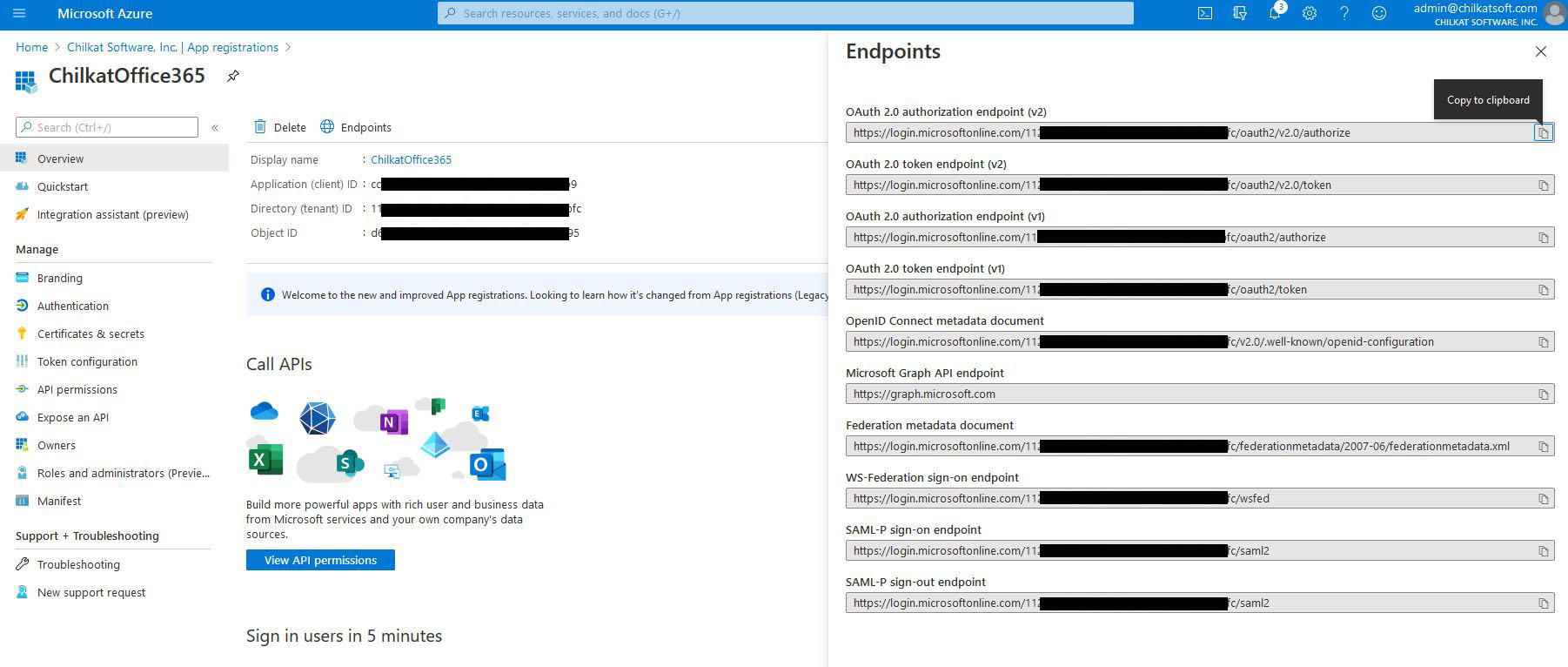
  //  In the Azure Portal, in "App registrations", go to "Endpoints" (located to the right of the "+ New registration" link.)
  //     Find your endpoint for the "OAuth 2.0 token endpoint (v2)"
  //     See Office365 OAuth2 Endpoints

  oauth2.TokenEndpoint := 'https://login.microsoftonline.com/xxxxxxxxxx-71bf-4ebe-a866-738364321bf2/oauth2/v2.0/token';

  //  Replace these with actual values.
  oauth2.ClientId := 'CLIENT_ID';
  oauth2.ClientSecret := 'CLIENT_SECRET';

  //  Get the "refresh_token"
  oauth2.RefreshToken := jsonToken.StringOf('refresh_token');

  //  Send the HTTP POST to refresh the access token..
  success := oauth2.RefreshAccessToken();
  if (success <> True) then
    begin
      WriteLn(oauth2.LastErrorText);
      Exit;
    end;

  WriteLn('New access token: ' + oauth2.AccessToken);
  WriteLn('New refresh token: ' + oauth2.RefreshToken);

  //  Update the JSON with the new tokens.
  jsonToken.UpdateString('access_token',oauth2.AccessToken);
  jsonToken.UpdateString('refresh_token',oauth2.RefreshToken);

  //  Save the new JSON access token response to a file.
  sbJson := TStringBuilder.Create;
  jsonToken.EmitCompact := False;
  jsonToken.EmitSb(sbJson);
  sbJson.WriteFile('qa_data/tokens/office365.json','utf-8',False);

  WriteLn('OAuth2 authorization granted!');
  WriteLn('New Access Token = ' + oauth2.AccessToken);

  //  -------------------------------------------------
  //  Retry the SMTP send using the refreshed access token.

  WriteLn('Retrying the send using the refreshed access token.');

  mailman.OAuth2AccessToken := oauth2.AccessToken;

  success := mailman.SendEmail(email);
  if (success = False) then
    begin
      WriteLn(mailman.LastErrorText);
      Exit;
    end;

  success := mailman.CloseSmtpConnection();
  if (success <> True) then
    begin
      WriteLn('Connection to SMTP server not closed cleanly.');
    end;

  WriteLn('Email sent!');


  jsonToken.Free;
  mailman.Free;
  email.Free;
  oauth2.Free;
  sbJson.Free;

end;

// ---------------------------------------------------------------------------

begin

  try
    RunDemo;
  except
    on E: Exception do
      WriteLn('Unhandled exception: ', E.ClassName, ': ', E.Message);
  end;

  WriteLn;
  {$IFDEF MSWINDOWS}
  WriteLn('Press Enter to exit...');
  ReadLn;
  {$ENDIF}
end.