Lazarus Pascal Requires Chilkat v11.2.0+
Lazarus Pascal
Markdown to HTML - Full Document, Custom Theme with Code Syntax Highlighting
See more Markdown Examples
Demonstrates how to convert a complete Markdown document to HTML using your own custom theme with Cloudfare Prism's code syntax highlighting.Chilkat Lazarus Pascal Downloads
program ChilkatDemo;
// Demonstrates using the Chilkat Pascal wrapper via the C bridge DLL.
// Builds as a console application under Lazarus (FPC) or Delphi.
{$IFDEF FPC}
{$MODE DELPHI}
{$ENDIF}
{$APPTYPE CONSOLE}
uses
{$IFDEF UNIX}
cthreads,
{$ENDIF}
SysUtils,
CkDllLoader,
Chilkat.JsonObject,
Chilkat.StringBuilder;
// ---------------------------------------------------------------------------
procedure RunDemo;
var
success: Boolean;
options: TJsonObject;
sbHead: TStringBuilder;
bCrlf: Boolean;
sbMarkdown: TStringBuilder;
sbHtml: TStringBuilder;
begin
success := False;
success := False;
options := TJsonObject.Create;
// Instead of specifying a "theme", provide values for the HTML document parts.
sbHead := TStringBuilder.Create;
bCrlf := True;
sbHead.AppendLine('<head>',bCrlf);
sbHead.AppendLine('<style>',bCrlf);
sbHead.AppendLine('body {',bCrlf);
sbHead.AppendLine(' font-family: "Segoe UI", Tahoma, Geneva, Verdana, sans-serif;',bCrlf);
sbHead.AppendLine('}',bCrlf);
sbHead.AppendLine('</style>',bCrlf);
sbHead.AppendLine('</head>',bCrlf);
// Each HTML section can be set individually.
options.UpdateString('docType','<!DOCTYPE html>');
options.UpdateString('rootElement','<html lang="en">');
options.UpdateString('head',sbHead.GetAsString());
options.UpdateString('bodyStart','<body>' + #10 + '<div id="content"');
options.UpdateString('bodyEnd','</div>' + #10 + '</body>');
// We can add extra content to the bottom of the HTML head and body sections like this:
// Here we are using the Cloudfare Prism "coy" theme for code syntax higlighting.
options.UpdateString('extraHead','<link rel="stylesheet" href="https://cdnjs.cloudflare.com/ajax/libs/prism/1.29.0/themes/prism-coy.min.css" />');
options.UpdateString('extraBody','<script src="https://cdnjs.cloudflare.com/ajax/libs/prism/1.29.0/prism.min.js"></script><script src ="https://cdnjs.cloudflare.com/ajax/libs/prism/1.29.0/plugins/autoloader/prism-autoloader.min.js"></script>');
sbMarkdown := TStringBuilder.Create;
sbHtml := TStringBuilder.Create;
success := sbMarkdown.LoadFile('qa_data/markdown/test1.md','utf-8');
if (success = False) then
begin
WriteLn(sbMarkdown.LastErrorText);
Exit;
end;
sbMarkdown.MarkdownToHtml(options,sbHtml);
sbHtml.ToCRLF();
WriteLn(sbHtml.GetAsString());
// The sample markdown input for this example is identical to the one at Markdown to HTML - Full Document, Raw, where you can view it.
// Sample HTML output as viewed in a browser:
// 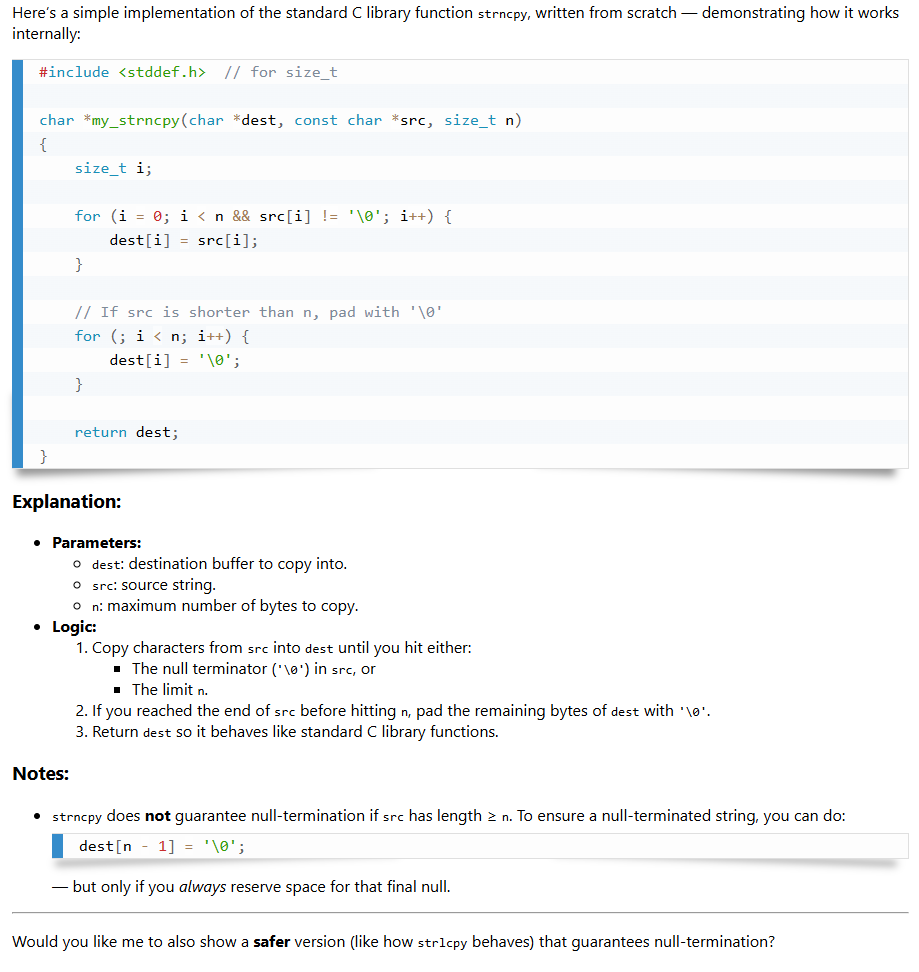 options.Free;
sbHead.Free;
sbMarkdown.Free;
sbHtml.Free;
end;
// ---------------------------------------------------------------------------
begin
try
RunDemo;
except
on E: Exception do
WriteLn('Unhandled exception: ', E.ClassName, ': ', E.Message);
end;
WriteLn;
{$IFDEF MSWINDOWS}
WriteLn('Press Enter to exit...');
ReadLn;
{$ENDIF}
end.
options.Free;
sbHead.Free;
sbMarkdown.Free;
sbHtml.Free;
end;
// ---------------------------------------------------------------------------
begin
try
RunDemo;
except
on E: Exception do
WriteLn('Unhandled exception: ', E.ClassName, ': ', E.Message);
end;
WriteLn;
{$IFDEF MSWINDOWS}
WriteLn('Press Enter to exit...');
ReadLn;
{$ENDIF}
end.