Lazarus Pascal
Lazarus Pascal
Firebase POST - Pushing Data
See more Firebase Examples
Uses the POST method to append a new record at a particular location in the database. Firebase automatically generates the push ID and returns it in the response. The data used in this example is at Chilkat Firebase Pigs Database, and is shown here: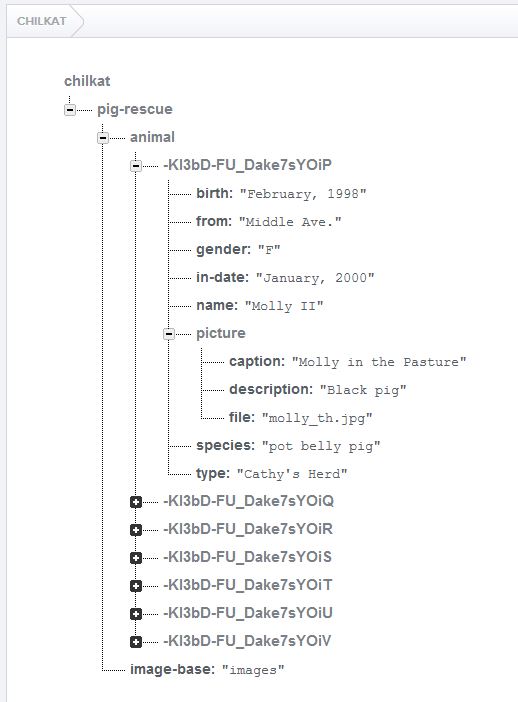
Chilkat Lazarus Pascal Downloads
program ChilkatDemo;

// Demonstrates using the Chilkat Pascal wrapper via the C bridge DLL.
// Builds as a console application under Lazarus (FPC) or Delphi.

{$IFDEF FPC}
  {$MODE DELPHI}
{$ENDIF}
{$APPTYPE CONSOLE}

uses
  {$IFDEF UNIX}
  cthreads,
  {$ENDIF}
  SysUtils,
  CkDllLoader,
  Chilkat.FileAccess,
  Chilkat.Rest,
  Chilkat.AuthGoogle,
  Chilkat.JsonObject;

// ---------------------------------------------------------------------------

procedure RunDemo;
var
  success: Boolean;
  fac: TFileAccess;
  accessToken: string;
  rest: TRest;
  authGoogle: TAuthGoogle;
  pigRecord: TJsonObject;
  jsonResponse: string;
  resp: TJsonObject;
  pushId: string;

begin
  success := False;

  //  Push a new record to a Firebase JSON database using the POST HTTP method.

  //  This example requires the Chilkat API to have been previously unlocked.
  //  See Global Unlock Sample for sample code.

  //  This example assumes a JWT authentication token, if required, has been previously obtained.
  //  See Get Firebase Access Token from JSON Service Account Private Key for sample code.

  //  Load the previously obtained Firebase access token into a string.
  fac := TFileAccess.Create;
  accessToken := fac.ReadEntireTextFile('qa_data/tokens/firebaseToken.txt','utf-8');
  if (fac.LastMethodSuccess <> True) then
    begin
      WriteLn(fac.LastErrorText);
      Exit;
    end;

  rest := TRest.Create;

  //  Make the initial connection (without sending a request yet).
  //  Once connected, any number of requests may be sent.  It is not necessary to explicitly
  //  call Connect before each request.
  success := rest.Connect('chilkat.firebaseio.com',443,True,True);
  if (success <> True) then
    begin
      WriteLn(rest.LastErrorText);
      Exit;
    end;
  authGoogle := TAuthGoogle.Create;
  authGoogle.AccessToken := accessToken;
  rest.SetAuthGoogle(authGoogle);

  //  Chilkat's sample data (pig-rescue data) is publicly readable at: https://chilkat.firebaseio.com/.json
  //  This data is publicly readable, but not writable.  You'll need to
  //  run against your own database..

  //  We're going to add a new pig with just the name.
  pigRecord := TJsonObject.Create;
  pigRecord.AppendString('name','William');

  //  The string content of the last arg passed is  {"name":"William"}
  jsonResponse := rest.FullRequestString('POST','/pig-rescue/animal.json',pigRecord.Emit());
  if (rest.LastMethodSuccess <> True) then
    begin
      //  Something happened in the communications (either no request was sent, or no response was received.
      //  (The Chilkat REST API also has lower-level methods where an app can send the request in one call,
      //  and then receive the response in another call.)
      WriteLn(rest.LastErrorText);
      Exit;
    end;

  //  Check the response status code.   A 200 response status indicates success.
  if (rest.ResponseStatusCode <> 200) then
    begin
      WriteLn(rest.ResponseStatusText);
      WriteLn(jsonResponse);
      WriteLn('Failed.');
      Exit;
    end;

  //  Get the push ID generated by Firebase
  resp := TJsonObject.Create;
  resp.Load(jsonResponse);
  pushId := resp.StringOf('name');
  WriteLn('Added record with push ID ' + pushId);
  WriteLn('Success.');


  fac.Free;
  rest.Free;
  authGoogle.Free;
  pigRecord.Free;
  resp.Free;

end;

// ---------------------------------------------------------------------------

begin

  try
    RunDemo;
  except
    on E: Exception do
      WriteLn('Unhandled exception: ', E.ClassName, ': ', E.Message);
  end;

  WriteLn;
  {$IFDEF MSWINDOWS}
  WriteLn('Press Enter to exit...');
  ReadLn;
  {$ENDIF}
end.