Lazarus Pascal
Lazarus Pascal
Azure Key Vault - Create or Update a Binary Secret
See more Secrets Examples
Demonstrates how to create or update a binary secret stored in the Azure Key Vault.Note: This example requires Chilkat v10.1.0 or later.
Chilkat Lazarus Pascal Downloads
program ChilkatDemo;
// Demonstrates using the Chilkat Pascal wrapper via the C bridge DLL.
// Builds as a console application under Lazarus (FPC) or Delphi.
{$IFDEF FPC}
{$MODE DELPHI}
{$ENDIF}
{$APPTYPE CONSOLE}
uses
{$IFDEF UNIX}
cthreads,
{$ENDIF}
SysUtils,
CkDllLoader,
Chilkat.Http,
Chilkat.Secrets,
Chilkat.BinData,
Chilkat.JsonObject;
// ---------------------------------------------------------------------------
procedure RunDemo;
var
success: Boolean;
bootstrap: TSecrets;
bsId: TJsonObject;
secrets: TSecrets;
json: TJsonObject;
url: string;
http: THttp;
bd: TBinData;
begin
success := False;
// This example requires the Chilkat API to have been previously unlocked.
// See Global Unlock Sample for sample code.
// The bootstrap secret will contain the following information:
// Azure Tenant ID
// Azure Client ID
// Azure Client Secret
// See following examples for setting up a bootstrap secret in memory,
// or in the local manager (Windows Credentials Manager or Apple Keychain)
// Setup Bootstrap Secret in Local Manager
// Setup Bootstrap Secret in Memory
bootstrap := TSecrets.Create;
// Set the location of the bootstrap secret.
// Can be "local_manager" or "memory", depending on how you setup the bootstrap secret.
// ---------------------------------------------------------------------------------------------
// If your operating system is NOT Windows or MacOS/iOS, then change "local_manager" to "memory"
// You can also, if desired, use "memory" on Windows and MacOS/iOS if your bootstrap secret was previously setup in memory.
// ---------------------------------------------------------------------------------------------
bootstrap.Location := 'local_manager';
// Specify the bootstrap secret to be used.
bsId := TJsonObject.Create;
bsId.UpdateString('appName','azure_bs');
bsId.UpdateString('service','Example');
bsId.UpdateString('username','Joe');
// ----------------------------------------------------
secrets := TSecrets.Create;
secrets.Location := 'azure_key_vault';
success := secrets.SetBootstrapSecret(bsId,bootstrap);
if (success = False) then
begin
WriteLn(secrets.LastErrorText);
Exit;
end;
// Specify the name of the secret to be created or updated.
// service and username are required.
// appName and domain are optional.
// Note: The values are arbitrary and can be anything you want.
json := TJsonObject.Create;
json.UpdateString('appName','Test2');
json.UpdateString('service','Custom');
json.UpdateString('domain','Ocean');
json.UpdateString('username','Starfish');
// For Azure Key Vault, we also need to specify the name of the vault where the secret is to be stored.
// Replace "kvChilkat" with the name of your key vault.
json.UpdateString('vaultName','kvChilkat');
// The purpose of this example is to show how arbitrary binary data
// can be stored as a secret.
// We'll use a small JPG image that is approximately 6KB in size.
// You can test using this same JPG at this URL:
url := 'https://chilkatdownload.com/sample_data/starfish.jpg';
http := THttp.Create;
bd := TBinData.Create;
success := http.DownloadBd(url,bd);
if (success = False) then
begin
WriteLn(http.LastErrorText);
Exit;
end;
// Create or update the binary secret.
success := secrets.UpdateSecretBd(json,bd);
if (success = False) then
begin
WriteLn(secrets.LastErrorText);
Exit;
end;
WriteLn('Success.');
// Here you can see the secret that was created in the Azure Key Vault:
// 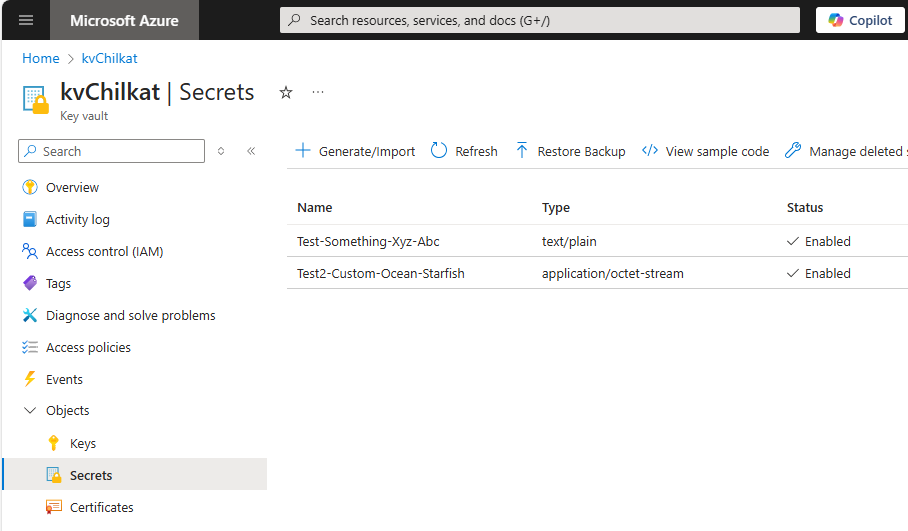 bootstrap.Free;
bsId.Free;
secrets.Free;
json.Free;
http.Free;
bd.Free;
end;
// ---------------------------------------------------------------------------
begin
try
RunDemo;
except
on E: Exception do
WriteLn('Unhandled exception: ', E.ClassName, ': ', E.Message);
end;
WriteLn;
{$IFDEF MSWINDOWS}
WriteLn('Press Enter to exit...');
ReadLn;
{$ENDIF}
end.
bootstrap.Free;
bsId.Free;
secrets.Free;
json.Free;
http.Free;
bd.Free;
end;
// ---------------------------------------------------------------------------
begin
try
RunDemo;
except
on E: Exception do
WriteLn('Unhandled exception: ', E.ClassName, ': ', E.Message);
end;
WriteLn;
{$IFDEF MSWINDOWS}
WriteLn('Press Enter to exit...');
ReadLn;
{$ENDIF}
end.