Lua Requires Chilkat v10.0.0+
Lua
Apple Keychain - Import RSA Private Key
See more Apple Keychain Examples
Imports an RSA private key to the Apple Keychain.Chilkat Lua Downloads
local chilkat = require("chilkat")

local pemPath = "/Users/chilkat/qa_data/rsa/rsaPrivKey_pkcs8.pem"
-- Provide a password if your PEM is encrypted. Otherwise pass the empty string.
local pemPassword = ""

local privKey = chilkat.PrivateKey.new()
local success = privKey:load_any_format_file(pemPath, pemPassword)
if not success then
    print(privKey.last_error_text)
    return
end

-- In Apple Keychain, the label for an item such as a private key is a user-friendly identifier that helps distinguish one item from
-- another in the Keychain. It is typically a brief name or description associated with the item.
-- The label is displayed in the Keychain Access application and is useful for quickly identifying the purpose
-- or source of a specific key, certificate, or password entry.

-- The label does not affect the functionality or security of the item; it is purely for organizational purposes.
-- You can edit or assign labels to make your Keychain easier to navigate.

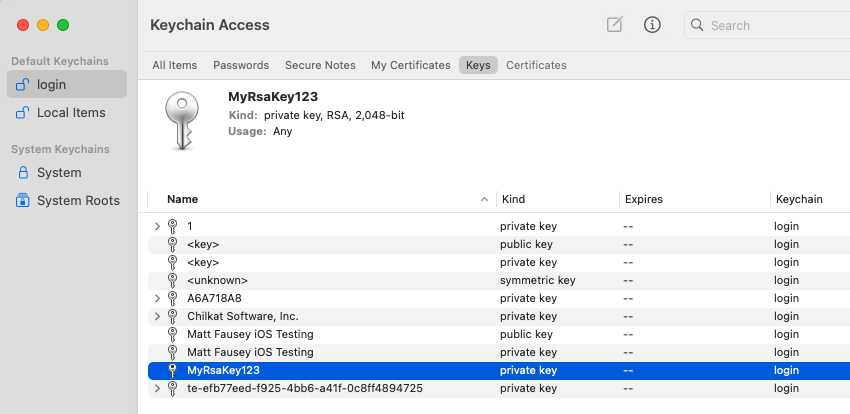
-- On MacOS, you can save the private key to the Keychain by calling SavePkcs8File with a "filename" in the format"keychain:<label>"
success = privKey:save_pkcs8_file("keychain:MyRsaKey123")
if not success then
    print(privKey.last_error_text)
    return
end

print("Success.")

-- Here you can see:
--
--