Lianja
Lianja
Salesforce OAuth2 Refresh Access Token
See more OAuth2 Examples
Demonstrates how to refresh a Salesforce Access Token.Note: Use Chilkat v10.1.2 or later for this example.
Chilkat Lianja Downloads
llSuccess = .F.
// This example requires the Chilkat API to have been previously unlocked.
// See Global Unlock Sample for sample code.
// It is assumed we previously obtained an OAuth2 access token.
// This example loads the JSON access token file
// saved by this example: Get SalesForce OAuth2 Access Token via Authorization Flow
loJsonToken = createobject("CkJsonObject")
llSuccess = loJsonToken.LoadFile("qa_data/tokens/_salesforce.json")
if (llSuccess <> .T.) then
? "Failed to load _salesforce.json"
release loJsonToken
return
endif
// This is an example of a Salesforce OAuth2 access token to be refreshed:
// {
// "access_token": "00D41000....uLZBpT6",
// "refresh_token": "5Aep....25xdGgkrV",
// "signature": "cjTbSc5DvcKpaMoRTzuQTJLb1tcMw8LEO01flq4aMD4=",
// "scope": "refresh_token id",
// "instance_url": "https://d41000000f8a0eak-dev-ed.my.salesforce.com",
// "id": "https://login.salesforce.com/id/00D41000000F8A0EAK/005410000....xAAE",
// "token_type": "Bearer",
// "issued_at": "1738348388166"
// }
loOauth2 = createobject("CkOAuth2")
loOauth2.TokenEndpoint = "https://login.salesforce.com/services/oauth2/token"
// Replace this with your actual client ID (Consumer Key)
loOauth2.ClientId = "CLIENT_ID"
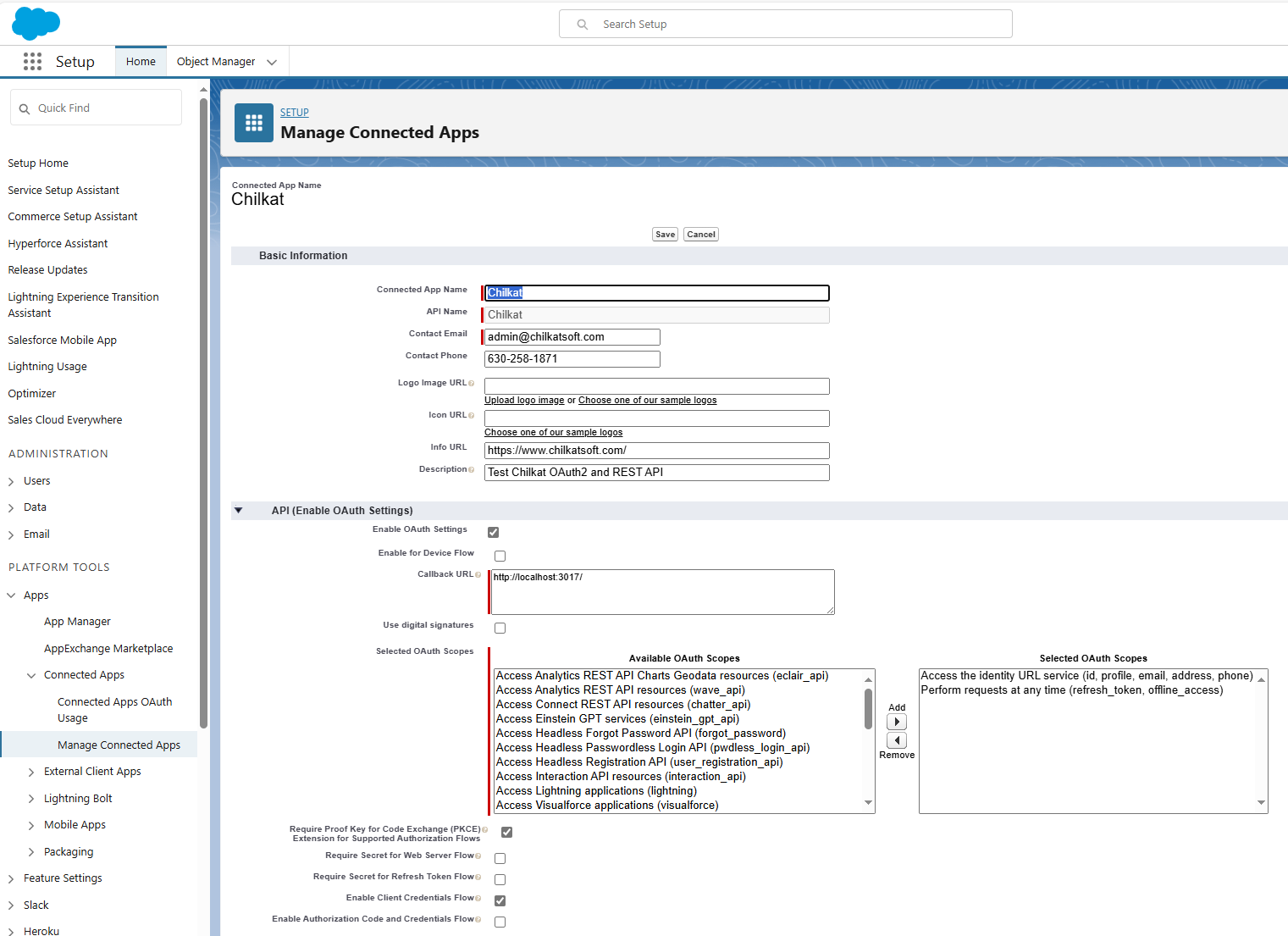
// Note: The client secret is not required because we configured our Connected App
// to not require it for the refresh flow. See the screenshot below.
// Get the "refresh_token"
loOauth2.RefreshToken = loJsonToken.StringOf("refresh_token")
// Send the HTTP POST to refresh the access token..
llSuccess = loOauth2.RefreshAccessToken()
if (llSuccess <> .T.) then
? loOauth2.LastErrorText
release loJsonToken
release loOauth2
return
endif
// The response contains a new access token, but we must keep
// our existing refresh token for when we need to refresh again in the future.
loJsonToken.UpdateString("access_token",loOauth2.AccessToken)
// Save the new JSON access token response to a file.
loSbJson = createobject("CkStringBuilder")
loJsonToken.EmitCompact = .F.
loJsonToken.EmitSb(loSbJson)
loSbJson.WriteFile("qa_data/tokens/_salesforce.json","utf-8",.F.)
? "OAuth2 authorization granted!"
? "New Access Token = " + loOauth2.AccessToken
// --------------------------------------------------------------------------
// Here's a screenshot of a Salesforce Connected App
// which does not requires the secret for the authorization or refresh flow.
//  release loJsonToken
release loOauth2
release loSbJson
release loJsonToken
release loOauth2
release loSbJson