JavaScript Requires Chilkat v10.1.2+
JavaScript
Rabobank OAuth2 Access Token
See more OAuth2 Examples
Demonstrates how to get an OAuth 2.0 access token to access Rabobank API'sImportant: This example is for desktop apps only. (It is not for web-based applications.)
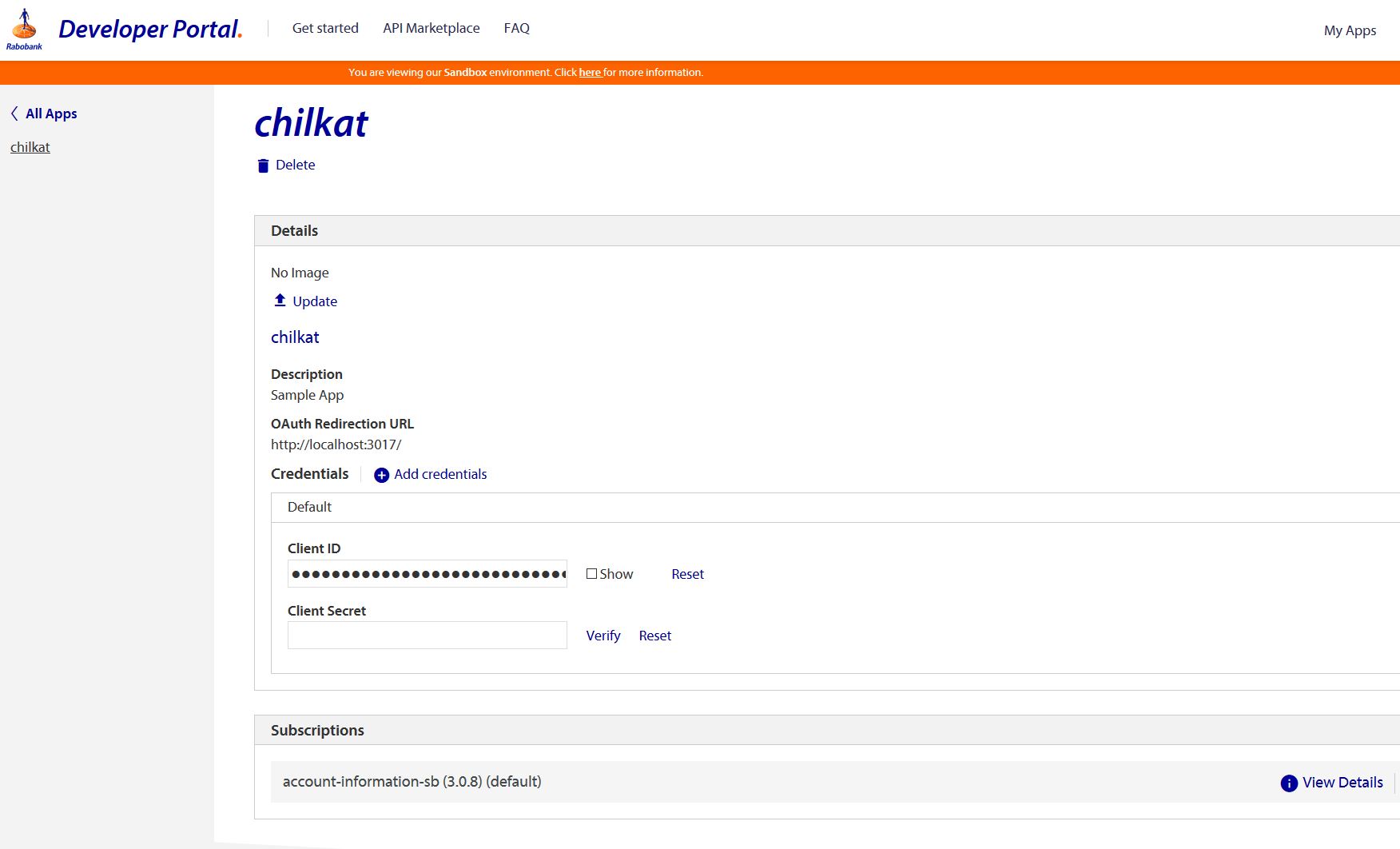
Your app defined in the Rabobank portal should look something like this. (Our test app is named "chilkat". You should name your app something else.)
Note
This example is intended for running within a Chilkat.Js embedded JavaScript engine. All Chilkat JavaScript examples require Chilkat
v11.4.0 or greater.
var success = false;

//  For more information about the OAuth2, see OAuth 2.0 Authorization Flow

var oauth2 = new CkOAuth2();

//  This should be the port in the localhost callback URL for your app.
//  The callback URL would look like "http://localhost:3017/" if the port number is 3017.
oauth2.ListenPort = 3017;

//  IMPORTANT: Don't forget to subscribe your Rabobank application to the OAuth 2.0 services in the Rabobank Online Developer Portal.
//  IMPORTANT: Don't forget to subscribe your Rabobank application to the OAuth 2.0 services in the Rabobank Online Developer Portal.
//  IMPORTANT: Don't forget to subscribe your Rabobank application to the OAuth 2.0 services in the Rabobank Online Developer Portal.
//  IMPORTANT: Don't forget to subscribe your Rabobank application to the OAuth 2.0 services in the Rabobank Online Developer Portal.

//  See also https://developer.rabobank.nl/faq

oauth2.AuthorizationEndpoint = "https://api-sandbox.rabobank.nl/openapi/sandbox/oauth2/authorize";
oauth2.TokenEndpoint = "https://api-sandbox.rabobank.nl/openapi/sandbox/oauth2/token";

//  Replace these with actual values.
oauth2.ClientId = "YOUR_APP_CLIENT_ID";
//  This is your app password:
oauth2.ClientSecret = "YOUR_APP_CLIENT_SECRET";

oauth2.CodeChallenge = false;
//  Provide a SPACE separated list of scopes, as defined in the Rabobank API documentation,
//  such as at https://developer-sandbox.rabobank.nl/reference/accounts-ais-sb/3-0-8

//  Important: To get a refresh token in the final response, you have to ask for "offline_access" scope
oauth2.Scope = "ais.balances.read ais.transactions.read-90days ais.transactions.read-history";

//  Begin the OAuth2 Authorization code flow.  This returns a URL that should be loaded in a browser.
var url = oauth2.StartAuth();
if (oauth2.LastMethodSuccess !== true) {
    console.log(oauth2.LastErrorText);
    return;
}

console.log("url = " + url);

//  Launch the default browser on the system and navigate to the url.
//  The LaunchBrowser method was added in Chilkat v10.1.2.
success = oauth2.LaunchBrowser(url);
if (success == false) {
    console.log(oauth2.LastErrorText);
    return;
}

//  Wait for the user to approve or deny authorization in the browser.
var numMsWaited = 0;
while ((numMsWaited < 90000) && (oauth2.AuthFlowState < 3)) {
    oauth2.SleepMs(100);
    numMsWaited = numMsWaited+100;
}

//  If the browser does not respond within the specified time, AuthFlowState will be:
//
//  1: Waiting for Redirect - The OAuth2 background thread is waiting for the browser's redirect request.
//  2: Waiting for Final Response - The thread is awaiting the final access token response.
//  In either case, cancel the background task initiated by StartAuth.

if (oauth2.AuthFlowState < 3) {
    oauth2.Cancel();
    console.log("No response from the browser!");
    return;
}

//  Check AuthFlowState to determine if authorization was granted, denied, or failed:
//
//  3: Success - OAuth2 flow completed, the background thread exited, and the successful response is in AccessTokenResponse.
//  4: Access Denied - OAuth2 flow completed, the background thread exited, and the error response is in AccessTokenResponse.
//  5: Failure - OAuth2 flow failed before completion, the background thread exited, and error details are in FailureInfo.

if (oauth2.AuthFlowState == 5) {
    console.log("OAuth2 failed to complete.");
    console.log(oauth2.FailureInfo);
    return;
}

if (oauth2.AuthFlowState == 4) {
    console.log("OAuth2 authorization was denied.");
    console.log(oauth2.AccessTokenResponse);
    return;
}

if (oauth2.AuthFlowState !== 3) {
    console.log("Unexpected AuthFlowState:" + oauth2.AuthFlowState);
    return;
}

console.log("OAuth2 authorization granted!");
console.log("Access Token = " + oauth2.AccessToken);

//  Get the full JSON response:
var json = new CkJsonObject();
json.Load(oauth2.AccessTokenResponse);
json.EmitCompact = false;

//  The JSON response looks like this:

//  {
//    "token_type": "Bearer",
//    "access_token": "AAIkYTU0ZWM ... sxE0KL0HHWw",
//    "expires_in": 3600,
//    "consented_on": 1584641121,
//    "scope": "ais.balances.read ais.transactions.read-90days ais.transactions.read-history",
//    "refresh_token": "AAJXXSdN ... Uiblz9ILkxNBlytRGA",
//    "refresh_token_expires_in": 157784760,
//    "expires_on": "1584644722"
//  }

console.log(json.Emit());

//  Save the JSON to a file to be used in future requests.
var fac = new CkFileAccess();
fac.WriteEntireTextFile("qa_data/tokens/rabobank.json",json.Emit(),"utf-8",false);