Java
 Java
Java
Demonstrates the ChilkatPath XML Method
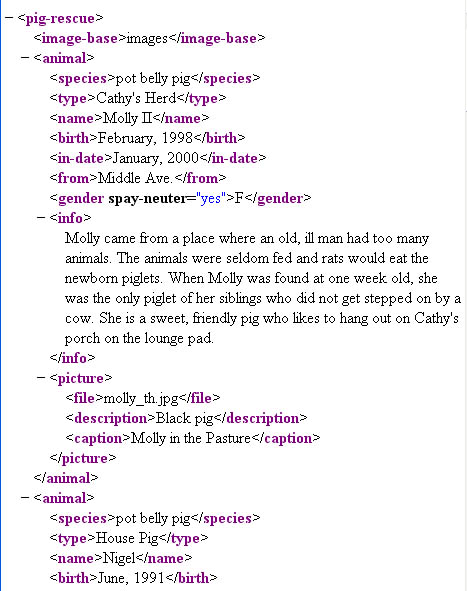
Demonstrates how to use the ChilkatPath method. This example uses the XML sample file pigs.xml. The pigs.xml file contains this content:
Chilkat Java Downloads
import com.chilkatsoft.*;

public class ChilkatExample {

  static {
    try {
        System.loadLibrary("chilkat");
    } catch (UnsatisfiedLinkError e) {
      System.err.println("Native code library failed to load.\n" + e);
      System.exit(1);
    }
  }

  public static void main(String argv[])
  {
    boolean success = false;

    CkXml xml = new CkXml();

    success = xml.LoadXmlFile("qa_data/xml/pigs.xml");
    if (success != true) {
        System.out.println(xml.lastErrorText());
        return;
        }

    //  Get the content of the "species" node for the 1st animal:
    String result;
    result = xml.chilkatPath("animal|species|*");
    //  Output should be "pot belly pig"
    System.out.println(result);

    //  Get the content of the "type" node for the 2nd animal:
    //  Indexing begins at 0.  Therefore, the 2nd direct child having
    //  the tag "animal" is at index 1
    result = xml.chilkatPath("animal[1]|type|*");
    //  Output should be "House Pig"
    System.out.println(result);

    //  Find the pig having the name "Nigel" and display the
    //  birth date.  To do this, we'll navigate to the node having
    //  tag="name" with the exact content "Nigel", then navigate up,
    //  and finally navigate back down to the "birth" node:
    result = xml.chilkatPath("/C/name,Nigel|..|birth|*");
    //  Output should be "June, 1991"
    System.out.println(result);

    //  Navigate to the 1st animal's picture and print the filename,
    //  description, and caption.
    //  The "$" updates the caller's internal pointer to reference
    //  the node that is the result of evaluating the path.
    //  An empty string is returned for success, and a NULL/nil/0
    //  pointer (reference) is returned on failure.
    result = xml.chilkatPath("animal|picture|$");
    if (xml.get_LastMethodSuccess() != true) {
        System.out.println("Failed to navigate to animal|picture.");
        return;
        }

    //  Display the contents of the file/description/caption child nodes
    System.out.println("Picture Info:");
    System.out.println(xml.getChildContent("file"));
    System.out.println(xml.getChildContent("description"));
    System.out.println(xml.getChildContent("caption"));

    //  Return back to the root of the XML document:
    xml.GetRoot2();

    //  Display the value of the "spay-neuter" attribute of the 1st animal:
    System.out.println("----");
    result = xml.chilkatPath("animal|gender|(spay-neuter)");
    System.out.println(result);
  }
}