Java Requires Chilkat v11.7.0+
Java
QR Code with Binary Data
See more QR Code Examples
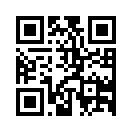
Demonstrates a QR code that holds arbitrary bytes rather than text. The payload type is binary and the bytes are given as base64 in payload.base64. Any byte value may be used, including zero. Keep in mind that many phone camera apps expect text, so binary payloads are for readers that you control.Chilkat Java Downloads
import com.chilkatsoft.*;
public class ChilkatExample {
static {
try {
System.loadLibrary("chilkat");
} catch (UnsatisfiedLinkError e) {
System.err.println("Native code library failed to load.\n" + e);
System.exit(1);
}
}
public static void main(String argv[])
{
boolean success = false;
// This example requires the Chilkat API to have been previously unlocked.
// See Global Unlock Sample for sample code.
// The bytes to encode. Here they come from hex, but they could be loaded from a file with LoadFile.
CkBinData bd = new CkBinData();
success = bd.AppendEncoded("000102030405FF00FE4368696C6B6174","hex");
if (success == false) {
System.out.println(bd.lastErrorText());
return;
}
CkJsonObject json = new CkJsonObject();
json.UpdateString("payload.type","binary");
json.UpdateString("payload.base64",bd.getEncoded("base64"));
json.UpdateString("output.path","qa_output/qr_binary.png");
json.UpdateBool("output.overwrite",true);
json.UpdateString("output.return","none");
CkFormats fmt = new CkFormats();
CkJsonObject jsonOut = new CkJsonObject();
success = fmt.QrCode("generate",json,jsonOut);
if (success == false) {
System.out.println(fmt.lastErrorText());
return;
}
System.out.println("bytes given: " + bd.get_NumBytes());
System.out.println("bytes encoded: " + jsonOut.IntOf("symbols[0].payloadBytes"));
System.out.println("mode: " + jsonOut.stringOf("symbols[0].selectedEncoding.mode"));
System.out.println("QR version: " + jsonOut.IntOf("symbols[0].selectedEncoding.version"));
// The image written to qa_output/qr_binary.png:
//  // Sample output:
// bytes given: 16
// bytes encoded: 16
// mode: byte
// QR version: 2
}
}