Visual FoxPro
Visual FoxPro
Firebase PUT - Writing Data
See more Firebase Examples
Demonstrates how to PUT new data to a Firebase JSON database. The data used in this example is at Chilkat Firebase Pigs Database, and is shown here: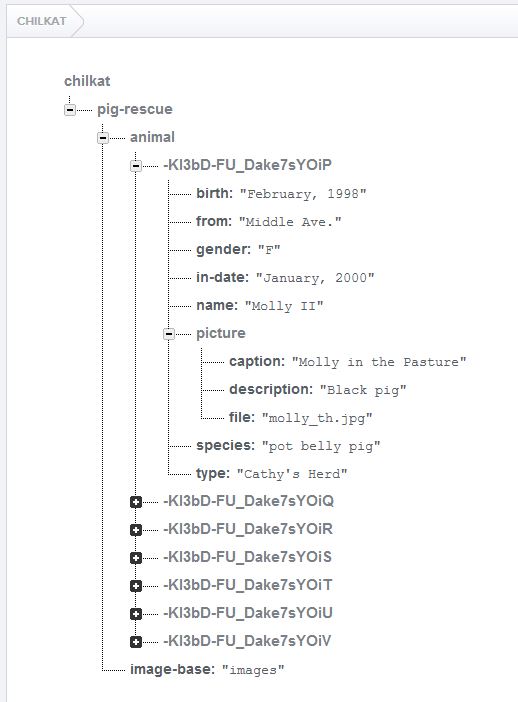
Chilkat Visual FoxPro Downloads
LOCAL lnSuccess
LOCAL loFac
LOCAL lcAccessToken
LOCAL loRest
LOCAL loAuthGoogle
LOCAL loPrng
LOCAL lcPushId
LOCAL loPigRecord
LOCAL loPath
LOCAL lcJsonResponse

lnSuccess = 0

*  Demonstrates how to PUT new data to a Firebase JSON database.

*  This example requires the Chilkat API to have been previously unlocked.
*  See Global Unlock Sample for sample code.

*  This example assumes a JWT authentication token, if required, has been previously obtained.
*  See Get Firebase Access Token from JSON Service Account Private Key for sample code.

*  Load the previously obtained Firebase access token into a string.
loFac = CreateObject('Chilkat.FileAccess')
lcAccessToken = loFac.ReadEntireTextFile("qa_data/tokens/firebaseToken.txt","utf-8")
IF (loFac.LastMethodSuccess <> 1) THEN
    ? loFac.LastErrorText
    RELEASE loFac
    CANCEL
ENDIF

loRest = CreateObject('Chilkat.Rest')

*  Make the initial connection (without sending a request yet).
*  Once connected, any number of requests may be sent.  It is not necessary to explicitly
*  call Connect before each request.
lnSuccess = loRest.Connect("chilkat.firebaseio.com",443,1,1)
IF (lnSuccess <> 1) THEN
    ? loRest.LastErrorText
    RELEASE loFac
    RELEASE loRest
    CANCEL
ENDIF

loAuthGoogle = CreateObject('Chilkat.AuthGoogle')
loAuthGoogle.AccessToken = lcAccessToken
loRest.SetAuthGoogle(loAuthGoogle)

*  Chilkat's sample data (pig-rescue data) is publicly readable at: https://chilkat.firebaseio.com/.json
*  This data is publicly readable, but not writable.  You'll need to
*  run against your own database..

*  Generate a new push ID.
loPrng = CreateObject('Chilkat.Prng')
lcPushId = loPrng.FirebasePushId()

*  We're going to add a new pig with just the name.
loPigRecord = CreateObject('Chilkat.JsonObject')
loPigRecord.AppendString("name","William")

loPath = CreateObject('Chilkat.StringBuilder')
loPath.Append("/pig-rescue/animal/")
loPath.Append(lcPushId)
loPath.Append(".json")

*  The string content of the last arg passed is  {"name":"William"}
lcJsonResponse = loRest.FullRequestString("PUT",loPath.GetAsString(),loPigRecord.Emit())
IF (loRest.LastMethodSuccess <> 1) THEN
    *  Something happened in the communications (either no request was sent, or no response was received.
    *  (The Chilkat REST API also has lower-level methods where an app can send the request in one call,
    *  and then receive the response in another call.)
    ? loRest.LastErrorText
    RELEASE loFac
    RELEASE loRest
    RELEASE loAuthGoogle
    RELEASE loPrng
    RELEASE loPigRecord
    RELEASE loPath
    CANCEL
ENDIF

*  Check the response status code.   A 200 response status indicates success.
IF (loRest.ResponseStatusCode <> 200) THEN
    ? loRest.ResponseStatusText
    ? lcJsonResponse
    ? "Failed."
    RELEASE loFac
    RELEASE loRest
    RELEASE loAuthGoogle
    RELEASE loPrng
    RELEASE loPigRecord
    RELEASE loPath
    CANCEL
ENDIF

? lcJsonResponse
? "Success."

*  Note: In many of the Chilkat examples, you may notice strange ways
*  of doing something that should be simpler and shorter.  For example,
*  building the path (above) could've been written differently,
*  with some simple string concatenation.
*
*  The reason is that the Chilkat examples are written in a
*  proprietary "example code" scripting language,
*  and then automatically generated to each of the different programming
*  languages you see on example-code.com.  The code generation is
*  limited in what it can do.  For example, string concatentation
*  is not yet a feature of the "example code" scripting language (as of May 2016),
*  and therefore you won't see the use of a programming language's string
*  concatentation operators in any example.
*

RELEASE loFac
RELEASE loRest
RELEASE loAuthGoogle
RELEASE loPrng
RELEASE loPigRecord
RELEASE loPath