Delphi ActiveX
Delphi ActiveX
AddAttribute - Insert New Attribute in an XML Node
Demonstrates adding an name=value attribute to an XML element.
This example uses the XML sample file here: sample1.xml. The sample1.xml file contains this content: 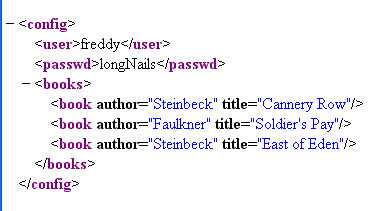
Chilkat Delphi ActiveX Downloads
uses
    Winapi.Windows, Winapi.Messages, System.SysUtils, System.Variants, System.Classes, Vcl.Graphics,
    Vcl.Controls, Vcl.Forms, Vcl.Dialogs, Vcl.StdCtrls, Chilkat_TLB;

...

procedure TForm1.Button1Click(Sender: TObject);
var
success: Integer;
xml: TChilkatXml;
bFound: Integer;
numChildren: Integer;
i: Integer;

begin
success := 0;

xml := TChilkatXml.Create(Self);

success := xml.LoadXmlFile('qa_data/xml/sample1.xml');
if (success <> 1) then
  begin
    Memo1.Lines.Add(xml.LastErrorText);
    Exit;
  end;

// Navigate to the "books" element:
bFound := xml.FindChild2('books');
if (bFound = 0) then
  begin
    Memo1.Lines.Add('No books child found!');
    Exit;
  end;

numChildren := xml.NumChildren;

i := 0;
while i < numChildren do
  begin

    // Navigate to the Nth book
    xml.GetChild2(i);

    // Display the book title:
    Memo1.Lines.Add(xml.GetAttrValue('title'));

    // Add a new integer attribute:
    // Should never fail..
    xml.AddAttributeInt('bookId',i);

    // Add a new unread="yes" attribute:
    xml.AddAttribute('unread','yes');

    // Navigate back up to the parent:
    xml.GetParent2();

    i := i + 1;
  end;

// Navigate back to the document root:
xml.GetRoot2();

// Save the updated document:
success := xml.SaveXml('modified.xml');
if (success <> 1) then
  begin
    Memo1.Lines.Add(xml.LastErrorText);
    Exit;
  end;

Memo1.Lines.Add(xml.GetXml());
end;