DataFlex Requires Chilkat v11.7.0+
DataFlex
QR Code with a Text Caption
See more QR Code Examples
Demonstrates printing a line of text under a QR code, such as the order number or the address the code holds, so that a person can read it too. render.text turns the caption on and gives its value, which is printable ASCII and is drawn in a built-in font that needs no font files. The caption can go above or below the symbol, be aligned left, center or right, and be scaled.Chilkat DataFlex Downloads
Use ChilkatAx-win32.pkg
Procedure Test
Boolean iSuccess
Variant vJson
Handle hoJson
Handle hoFmt
Variant vJsonOut
Handle hoJsonOut
String sTemp1
Integer iTemp1
Integer iTemp2
Move False To iSuccess
// This example requires the Chilkat API to have been previously unlocked.
// See Global Unlock Sample for sample code.
Get Create (RefClass(cComChilkatJsonObject)) To hoJson
If (Not(IsComObjectCreated(hoJson))) Begin
Send CreateComObject of hoJson
End
Get ComUpdateString Of hoJson "payload.text" "https://www.chilkatsoft.com/order/12345" To iSuccess
Get ComUpdateInt Of hoJson "render.moduleSize" 6 To iSuccess
// The caption. It need not be the same as the text in the QR code.
Get ComUpdateBool Of hoJson "render.text.enabled" True To iSuccess
Get ComUpdateString Of hoJson "render.text.value" "ORDER 12345" To iSuccess
// position is "below" (the default) or "above". alignment is "center" (the default), "left" or "right".
Get ComUpdateString Of hoJson "render.text.position" "below" To iSuccess
// Each dot of the caption's font is drawn this many pixels wide.
Get ComUpdateInt Of hoJson "render.text.scale" 3 To iSuccess
Get ComUpdateString Of hoJson "output.path" "qa_output/qr_caption.png" To iSuccess
Get ComUpdateBool Of hoJson "output.overwrite" True To iSuccess
Get ComUpdateString Of hoJson "output.return" "none" To iSuccess
Get Create (RefClass(cComChilkatFormats)) To hoFmt
If (Not(IsComObjectCreated(hoFmt))) Begin
Send CreateComObject of hoFmt
End
Get Create (RefClass(cComChilkatJsonObject)) To hoJsonOut
If (Not(IsComObjectCreated(hoJsonOut))) Begin
Send CreateComObject of hoJsonOut
End
Get pvComObject of hoJson to vJson
Get pvComObject of hoJsonOut to vJsonOut
Get ComQrCode Of hoFmt "generate" vJson vJsonOut To iSuccess
If (iSuccess = False) Begin
Get ComLastErrorText Of hoFmt To sTemp1
Showln sTemp1
Procedure_Return
End
Get ComStringOf Of hoJsonOut "measurements[0].text" To sTemp1
Showln "caption: " sTemp1
Get ComIntOf Of hoJsonOut "measurements[0].textScale" To iTemp1
Showln "caption scale: " iTemp1
Get ComIntOf Of hoJsonOut "measurements[0].textBandPx" To iTemp1
Showln "height added for the caption: " iTemp1 " pixels"
Get ComIntOf Of hoJsonOut "measurements[0].canvasWidth" To iTemp1
Get ComIntOf Of hoJsonOut "measurements[0].canvasHeight" To iTemp2
Showln "image: " iTemp1 " x " iTemp2 " pixels"
// The image written to qa_output/qr_caption.png:
// 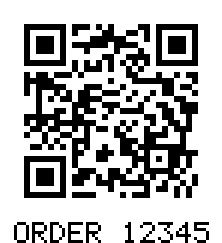 // Sample output:
// caption: ORDER 12345
// caption scale: 3
// height added for the caption: 21 pixels
// image: 222 x 243 pixels
End_Procedure