DataFlex
DataFlex
AWS Secrets Manager - Create or Update a Binary Secret
See more Secrets Examples
Demonstrates how to create or update a binary secret stored in the AWS Secrets Manager.Note: This example requires Chilkat v10.1.0 or later.
Chilkat DataFlex Downloads
Use ChilkatAx-win32.pkg
Procedure Test
Boolean iSuccess
Variant vBootstrap
Handle hoBootstrap
Variant vBsId
Handle hoBsId
Handle hoSecrets
Variant vJson
Handle hoJson
String sUrl
Handle hoHttp
Variant vBd
Handle hoBd
String sTemp1
Move False To iSuccess
// This example requires the Chilkat API to have been previously unlocked.
// See Global Unlock Sample for sample code.
// The bootstrap secret will contain the following information:
// AWS Region
// AWS Access Key
// AWS Secret Key
// See following examples for setting up a bootstrap secret in memory,
// or in the local manager (Windows Credentials Manager or Apple Keychain)
// Setup Bootstrap Secret in Local Manager
// Setup Bootstrap Secret in Memory
Get Create (RefClass(cComChilkatSecrets)) To hoBootstrap
If (Not(IsComObjectCreated(hoBootstrap))) Begin
Send CreateComObject of hoBootstrap
End
// Set the location of the bootstrap secret.
// Can be "local_manager" or "memory", depending on how you setup the bootstrap secret.
// ---------------------------------------------------------------------------------------------
// If your operating system is NOT Windows or MacOS/iOS, then change "local_manager" to "memory"
// You can also, if desired, use "memory" on Windows and MacOS/iOS if your bootstrap secret was previously setup in memory.
// ---------------------------------------------------------------------------------------------
Set ComLocation Of hoBootstrap To "local_manager"
// Specify the bootstrap secret to be used.
Get Create (RefClass(cComChilkatJsonObject)) To hoBsId
If (Not(IsComObjectCreated(hoBsId))) Begin
Send CreateComObject of hoBsId
End
Get ComUpdateString Of hoBsId "appName" "AWS" To iSuccess
Get ComUpdateString Of hoBsId "service" "Example" To iSuccess
Get ComUpdateString Of hoBsId "username" "Joe" To iSuccess
// ----------------------------------------------------
Get Create (RefClass(cComChilkatSecrets)) To hoSecrets
If (Not(IsComObjectCreated(hoSecrets))) Begin
Send CreateComObject of hoSecrets
End
// Setup for the AWS Secrets Manager
Set ComLocation Of hoSecrets To "aws_secrets_manager"
Get pvComObject of hoBsId to vBsId
Get pvComObject of hoBootstrap to vBootstrap
Get ComSetBootstrapSecret Of hoSecrets vBsId vBootstrap To iSuccess
If (iSuccess = False) Begin
Get ComLastErrorText Of hoSecrets To sTemp1
Showln sTemp1
Procedure_Return
End
// Specify the name of the secret.
// service and username are required.
// appName and domain are optional.
// Note: The values are arbitrary and can be anything you want.
Get Create (RefClass(cComChilkatJsonObject)) To hoJson
If (Not(IsComObjectCreated(hoJson))) Begin
Send CreateComObject of hoJson
End
Get ComUpdateString Of hoJson "appName" "Test2" To iSuccess
Get ComUpdateString Of hoJson "service" "Custom" To iSuccess
Get ComUpdateString Of hoJson "domain" "Ocean" To iSuccess
Get ComUpdateString Of hoJson "username" "Starfish" To iSuccess
// The purpose of this example is to show how arbitrary binary data
// can be stored as a secret.
// We'll use a small JPG image that is approximately 6KB in size.
// You can test using this same JPG at this URL:
Move "https://chilkatdownload.com/sample_data/starfish.jpg" To sUrl
Get Create (RefClass(cComChilkatHttp)) To hoHttp
If (Not(IsComObjectCreated(hoHttp))) Begin
Send CreateComObject of hoHttp
End
Get Create (RefClass(cComChilkatBinData)) To hoBd
If (Not(IsComObjectCreated(hoBd))) Begin
Send CreateComObject of hoBd
End
Get pvComObject of hoBd to vBd
Get ComDownloadBd Of hoHttp sUrl vBd To iSuccess
If (iSuccess = False) Begin
Get ComLastErrorText Of hoHttp To sTemp1
Showln sTemp1
Procedure_Return
End
// Create or update the binary secret.
Get pvComObject of hoJson to vJson
Get pvComObject of hoBd to vBd
Get ComUpdateSecretBd Of hoSecrets vJson vBd To iSuccess
If (iSuccess = False) Begin
Get ComLastErrorText Of hoSecrets To sTemp1
Showln sTemp1
Procedure_Return
End
Showln "Success."
// Here you can see the secret that was created in the AWS Secrets Manager:
// 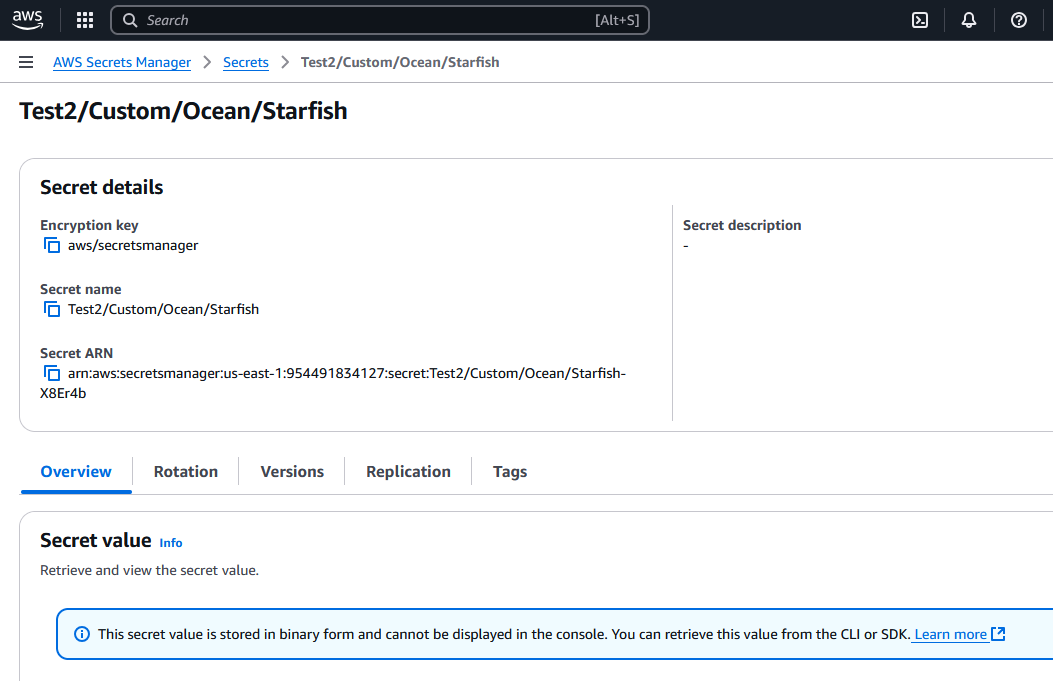 End_Procedure