Dart
Dart
Firebase GET - Reading Data
See more Firebase Examples
Demonstrates how to read parts of a Firebase JSON database. The data used in this example is at Chilkat Firebase Pigs Database, and is shown here: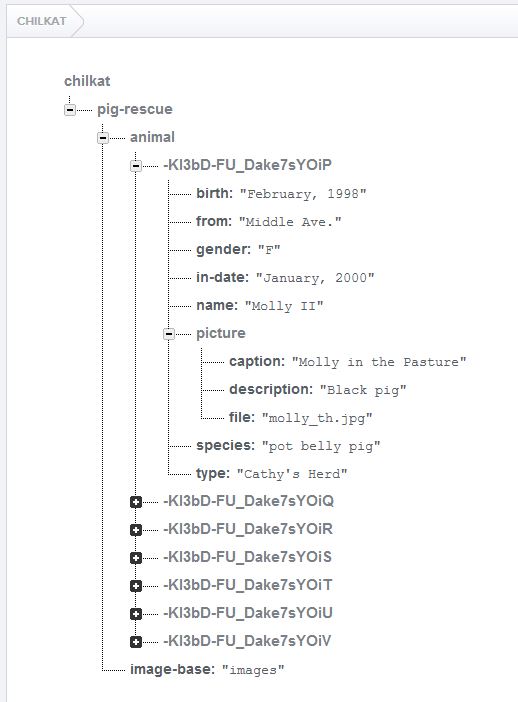
Chilkat Dart Downloads
import 'package:chilkat/chilkat.dart';

void main() {
  // Demonstrates how to read parts of a Firebase JSON database.

  // This example requires the Chilkat API to have been previously unlocked.
  // See Global Unlock Sample for sample code.

  // This example assumes a JWT authentication token, if required, has been previously obtained.
  // See Get Firebase Access Token from JSON Service Account Private Key for sample code.

  // Load the previously obtained Firebase access token into a string.
  final fac = CkFileAccess();
  final String accessToken;
  try {
    accessToken = fac.readEntireTextFile('qa_data/tokens/firebaseToken.txt', 'utf-8');
  } on ChilkatException catch (e) {
    print(e.lastErrorText);
    return;
  }

  final rest = CkRest();

  // Make the initial connection (without sending a request yet).
  // Once connected, any number of requests may be sent.  It is not necessary to explicitly
  // call Connect before each request.
  try {
    rest.connect('chilkat.firebaseio.com', 443, true, true);
  } on ChilkatException catch (e) {
    print(e.lastErrorText);
    return;
  }

  // If authentication is required...
  final authGoogle = CkAuthGoogle();
  authGoogle.accessToken = accessToken;
  rest.setAuthGoogle(authGoogle);

  // Chilkat's sample data (pig-rescue data) is publicly readable at: https://chilkat.firebaseio.com/.json

  // Let's get the animals with the shallow parameter so we can see how many pigs exist.
  final String jsonResponse;
  try {
    jsonResponse = rest.fullRequestNoBody('GET', '/pig-rescue/animal.json?shallow=true');
  } on ChilkatException catch (e) {
    print(e.lastErrorText);
    return;
  }

  // The JSON returned should look like this:
  // {"-KI3bD-FU_Dake7sYOiP":true,"-KI3bD-FU_Dake7sYOiT":true,"-KI3bD-FU_Dake7sYOiS":true,"-KI3bD-FU_Dake7sYOiU":true,"-KI3bD-FU_Dake7sYOiV":true,"-KI3bD-FU_Dake7sYOiR":true,"-KI3bD-FU_Dake7sYOiQ":true}
  print(jsonResponse);

  // Parse the response so we can iterate over each pig in the database..
  final piggyPath = CkStringBuilder();
  final shallow = CkJsonObject();
  final piggyData = CkJsonObject();
  shallow.load(jsonResponse);
  final count = shallow.size;
  var i = 0;
  while (i < count) {

    // Get each individual pig's data.
    piggyPath.clear();
    piggyPath.append('/pig-rescue/animal/');
    piggyPath.append(shallow.nameAt(i));
    piggyPath.append('/.json');

    final String piggyJson;
    try {
      piggyJson = rest.fullRequestNoBody('GET', piggyPath.getAsString());
    } on ChilkatException catch (e) {
      print(e.lastErrorText);
      return;
    }

    // Show this piggy's data...
    // An example of one pig's data is shown here:
    // {"birth":"February, 1998","from":"Middle Ave.","gender":"F","in-date":"January, 2000",
    //   "name":"Molly II","picture":{"caption":"Molly in the Pasture","description":"Black pig","file":"molly_th.jpg"},
    //   "species":"pot belly pig","type":"Cathy's Herd"}
    print('---- $i ----');
    print(piggyJson);

    // Let's get the pig's name, and the caption of the picture.
    piggyData.load(piggyJson);
    print('name: ${piggyData.stringOf('name')}');
    print('caption: ${piggyData.stringOf('picture.caption')}');

    i++;
  }

  // Note: In many of the Chilkat examples, you may notice strange ways
  // of doing something that should be simpler and shorter.  For example,
  // building the piggyPath (above) could've been written differently,
  // with some simple string concatenation.
  //
  // The reason is that the Chilkat examples are written in a
  // proprietary "example code" scripting language,
  // and then automatically generated to each of the different programming
  // languages you see on example-code.com.  The code generation is
  // limited in what it can do.  For example, string concatentation
  // is not yet a feature of the "example code" scripting language (as of May 2016),
  // and therefore you won't see the use of a programming language's string
  // concatentation operators in any example.
  //
}