C#
C#
Google Sheets - Append Values to an Existing Spreadsheet
See more Google Sheets Examples
Appends values to an existing Google spreadsheet.Chilkat C# Downloads
bool success = false;
// This example requires the Chilkat API to have been previously unlocked.
// See Global Unlock Sample for sample code.
// This example uses a previously obtained access token having permission for the
// Google Sheets scope.
// In this example, Get Google Sheets OAuth2 Access Token, the access
// token was saved to a JSON file. This example fetches the access token from the file..
Chilkat.JsonObject jsonToken = new Chilkat.JsonObject();
success = jsonToken.LoadFile("qa_data/tokens/googleSheets.json");
if (jsonToken.HasMember("access_token") == false) {
Debug.WriteLine("No access token found.");
return;
}
Chilkat.Http http = new Chilkat.Http();
http.AuthToken = jsonToken.StringOf("access_token");
// To append values to an existing spreadsheet, our HTTP request body will
// contain JSON in the format of a "ValueRange". For example, the spreadsheet we'll be
// adding to in this example looks like this:
// 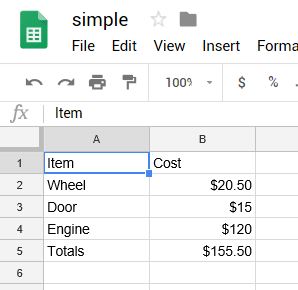 // The JSON ValueRange for the cells in the above spreadsheet is:
// {
// "range": "Sheet1!A1:B5",
// "majorDimension": "ROWS",
// "values": [
// [
// "Item",
// "Cost"
// ],
// [
// "Wheel",
// "$20.50"
// ],
// [
// "Door",
// "$15"
// ],
// [
// "Engine",
// "$100"
// ],
// [
// "Totals",
// "$135.50"
// ]
// ]
// }
// This example will append 6 cells (3 rows / 2 columns).
// We'll be appending the following:
//
// "Paint", "$100"
// "Brakes", "$100"
// "New Total", "$335.50"
//
// The range of cells we'll be appending is A1:B5
// Therefore, the ValueRange JSON we'll be sending in our POST body is:
// {
// "range": "Sheet1!A1:B5",
// "majorDimension": "ROWS",
// "values": [
// [
// "Paint",
// "$100"
// ],
// [
// "Brakes",
// "$100"
// ],
// [
// "New Total",
// "$335.50"
// ]
// ]
// }
Chilkat.JsonObject json = new Chilkat.JsonObject();
json.UpdateString("range","Sheet1!A1:B5");
json.UpdateString("majorDimension","ROWS");
json.I = 0;
json.J = 1;
json.UpdateString("values[i][j]","Paint");
json.J = 1;
json.UpdateString("values[i][j]","$100");
json.I = 1;
json.J = 0;
json.UpdateString("values[i][j]","Brakes");
json.J = 1;
json.UpdateString("values[i][j]","$100");
json.I = 2;
json.J = 0;
json.UpdateString("values[i][j]","Totals");
json.J = 1;
json.UpdateString("values[i][j]","$335.50");
json.EmitCompact = false;
Debug.WriteLine(json.Emit());
// Send the POST to:
// https://sheets.googleapis.com/v4/spreadsheets/{spreadsheetId}/values/{range}:append?valueInputOption=USER_ENTERED
http.SetUrlVar("spreadsheetId","1_SO2L-Y6nCayNpNppJLF0r9yHB2UnaCleGCKeE4O0SA");
http.SetUrlVar("range","Sheet1!A1:B5");
Chilkat.HttpResponse resp = new Chilkat.HttpResponse();
success = http.HttpJson("POST","https://sheets.googleapis.com/v4/spreadsheets/{$spreadsheetId}/values/{$range}:append?valueInputOption=USER_ENTERED",json,"application/json",resp);
if (success == false) {
Debug.WriteLine(http.LastErrorText);
return;
}
Debug.WriteLine("response status code = " + Convert.ToString(resp.StatusCode));
Debug.WriteLine("response JSON = " + resp.BodyStr);
// Sample output:
//
// response status code = 200
// response JSON = {
// "spreadsheetId": "1_SO2L-Y6nCayNpNppJLF0r9yHB2UnaCleGCKeE4O0SA",
// "tableRange": "Sheet1!A1:B5",
// "updates": {
// "spreadsheetId": "1_SO2L-Y6nCayNpNppJLF0r9yHB2UnaCleGCKeE4O0SA",
// "updatedRange": "Sheet1!A6:B8",
// "updatedRows": 3,
// "updatedColumns": 2,
// "updatedCells": 6
// }
// }
//
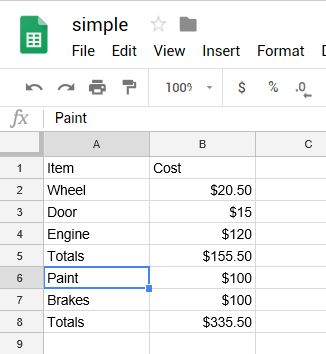
// Our Google Spreadsheet now looks like this:
//
// The JSON ValueRange for the cells in the above spreadsheet is:
// {
// "range": "Sheet1!A1:B5",
// "majorDimension": "ROWS",
// "values": [
// [
// "Item",
// "Cost"
// ],
// [
// "Wheel",
// "$20.50"
// ],
// [
// "Door",
// "$15"
// ],
// [
// "Engine",
// "$100"
// ],
// [
// "Totals",
// "$135.50"
// ]
// ]
// }
// This example will append 6 cells (3 rows / 2 columns).
// We'll be appending the following:
//
// "Paint", "$100"
// "Brakes", "$100"
// "New Total", "$335.50"
//
// The range of cells we'll be appending is A1:B5
// Therefore, the ValueRange JSON we'll be sending in our POST body is:
// {
// "range": "Sheet1!A1:B5",
// "majorDimension": "ROWS",
// "values": [
// [
// "Paint",
// "$100"
// ],
// [
// "Brakes",
// "$100"
// ],
// [
// "New Total",
// "$335.50"
// ]
// ]
// }
Chilkat.JsonObject json = new Chilkat.JsonObject();
json.UpdateString("range","Sheet1!A1:B5");
json.UpdateString("majorDimension","ROWS");
json.I = 0;
json.J = 1;
json.UpdateString("values[i][j]","Paint");
json.J = 1;
json.UpdateString("values[i][j]","$100");
json.I = 1;
json.J = 0;
json.UpdateString("values[i][j]","Brakes");
json.J = 1;
json.UpdateString("values[i][j]","$100");
json.I = 2;
json.J = 0;
json.UpdateString("values[i][j]","Totals");
json.J = 1;
json.UpdateString("values[i][j]","$335.50");
json.EmitCompact = false;
Debug.WriteLine(json.Emit());
// Send the POST to:
// https://sheets.googleapis.com/v4/spreadsheets/{spreadsheetId}/values/{range}:append?valueInputOption=USER_ENTERED
http.SetUrlVar("spreadsheetId","1_SO2L-Y6nCayNpNppJLF0r9yHB2UnaCleGCKeE4O0SA");
http.SetUrlVar("range","Sheet1!A1:B5");
Chilkat.HttpResponse resp = new Chilkat.HttpResponse();
success = http.HttpJson("POST","https://sheets.googleapis.com/v4/spreadsheets/{$spreadsheetId}/values/{$range}:append?valueInputOption=USER_ENTERED",json,"application/json",resp);
if (success == false) {
Debug.WriteLine(http.LastErrorText);
return;
}
Debug.WriteLine("response status code = " + Convert.ToString(resp.StatusCode));
Debug.WriteLine("response JSON = " + resp.BodyStr);
// Sample output:
//
// response status code = 200
// response JSON = {
// "spreadsheetId": "1_SO2L-Y6nCayNpNppJLF0r9yHB2UnaCleGCKeE4O0SA",
// "tableRange": "Sheet1!A1:B5",
// "updates": {
// "spreadsheetId": "1_SO2L-Y6nCayNpNppJLF0r9yHB2UnaCleGCKeE4O0SA",
// "updatedRange": "Sheet1!A6:B8",
// "updatedRows": 3,
// "updatedColumns": 2,
// "updatedCells": 6
// }
// }
//
// Our Google Spreadsheet now looks like this:
//