B4X Requires Chilkat v11.7.0+
B4X
QR Code Colors and Transparent Background
See more QR Code Examples
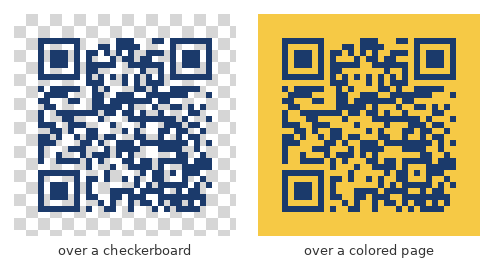
Demonstrates colored QR codes. render.foreground is the color of the dark modules and render.background the color behind them, each as #RRGGBB. Either can instead be an object with a color and an opacity from 0 to 1, and a background opacity of 0 gives a PNG with a transparent background to place over a page or a design. Readers need contrast: keep the modules clearly darker than whatever ends up behind them.Chilkat B4X Downloads
Dim success As Boolean = False
' This example requires the Chilkat API to have been previously unlocked.
' See Global Unlock Sample for sample code.
Dim fmt As ChilkatFormats
fmt.Initialize
Dim jsonOut As ChilkatJsonObject
jsonOut.Initialize
' Dark blue modules on a pale yellow background.
Dim json As ChilkatJsonObject
json.Initialize
json.UpdateString("payload.text", "https://www.chilkatsoft.com/")
json.UpdateInt("render.moduleSize", 6)
json.UpdateString("render.foreground", "#1B3A6B")
json.UpdateString("render.background", "#FFF8DC")
json.UpdateString("output.path", "qa_output/qr_blue.png")
json.UpdateBool("output.overwrite", True)
json.UpdateString("output.return", "none")
success = fmt.QrCode("generate", json, jsonOut)
If success = False Then
Log(fmt.LastErrorText)
Return
End If
Log("colored: " & jsonOut.StringOf("outputs[0].path") & ", " & jsonOut.IntOf("outputs[0].byteCount") & " bytes")
' The image written to qa_output/qr_blue.png:
'  ' The same modules on a fully transparent background.
Dim json2 As ChilkatJsonObject
json2.Initialize
json2.UpdateString("payload.text", "https://www.chilkatsoft.com/")
json2.UpdateInt("render.moduleSize", 6)
json2.UpdateString("render.foreground", "#1B3A6B")
json2.UpdateString("render.background.color", "#FFFFFF")
json2.UpdateNumber("render.background.opacity", "0")
json2.UpdateString("output.path", "qa_output/qr_transparent.png")
json2.UpdateBool("output.overwrite", True)
json2.UpdateString("output.return", "none")
success = fmt.QrCode("generate", json2, jsonOut)
If success = False Then
Log(fmt.LastErrorText)
Return
End If
Log("transparent: " & jsonOut.StringOf("outputs[0].path") & ", " & jsonOut.IntOf("outputs[0].byteCount") & " bytes")
' qa_output/qr_transparent.png, placed here over a checkerboard and over a colored page
' to show that whatever is behind the image shows through:
'
 ' Sample output:
' colored: qa_output/qr_blue.png, 1345 bytes
' transparent: qa_output/qr_transparent.png, 1377 bytes