Classic ASP
Classic ASP
AddAttribute - Insert New Attribute in an XML Node
Demonstrates adding an name=value attribute to an XML element.
This example uses the XML sample file here: sample1.xml. The sample1.xml file contains this content: 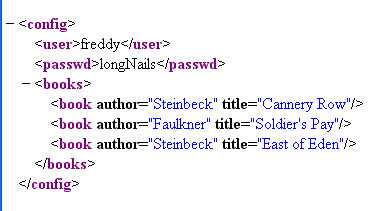
Chilkat Classic ASP Downloads
<html>
<head>
<meta http-equiv="Content-Type" content="text/html; charset=utf-8">
</head>
<body>
<%
success = 0

set xml = Server.CreateObject("Chilkat.Xml")

success = xml.LoadXmlFile("qa_data/xml/sample1.xml")
If (success <> 1) Then
    Response.Write "<pre>" & Server.HTMLEncode( xml.LastErrorText) & "</pre>"
    Response.End
End If

'  Navigate to the "books" element:
bFound = xml.FindChild2("books")
If (bFound = 0) Then
    Response.Write "<pre>" & Server.HTMLEncode( "No books child found!") & "</pre>"
    Response.End
End If

numChildren = xml.NumChildren

i = 0
Do While i < numChildren

    '  Navigate to the Nth book
    success = xml.GetChild2(i)

    '  Display the book title:
    Response.Write "<pre>" & Server.HTMLEncode( xml.GetAttrValue("title")) & "</pre>"

    '  Add a new integer attribute:
    '  Should never fail..
    success = xml.AddAttributeInt("bookId",i)

    '  Add a new unread="yes" attribute:
    success = xml.AddAttribute("unread","yes")

    '  Navigate back up to the parent:
    success = xml.GetParent2()

    i = i + 1
Loop

'  Navigate back to the document root:
xml.GetRoot2

'  Save the updated document:
success = xml.SaveXml("modified.xml")
If (success <> 1) Then
    Response.Write "<pre>" & Server.HTMLEncode( xml.LastErrorText) & "</pre>"
    Response.End
End If

Response.Write "<pre>" & Server.HTMLEncode( xml.GetXml()) & "</pre>"

%>
</body>
</html>