Classic ASP Requires Chilkat v11.7.0+
;S:;P:;; and offer to join the network. T is WPA (also used for WPA2 and WPA3), WEP, or nopass for an open network, and H:true can be added for a hidden network. In the name and the password, the characters backslash, semicolon, comma, colon and double quote must each be preceded by a backslash.
Classic ASP
Create a Wi-Fi QR Code
See more QR Code Examples
Demonstrates a QR code that joins a phone to a Wi-Fi network when scanned. A QR code only holds text. Phones recognize text of the form WIFI:T:Chilkat Classic ASP Downloads
<html>
<head>
<meta http-equiv="Content-Type" content="text/html; charset=utf-8">
</head>
<body>
<%
success = 0
' This example requires the Chilkat API to have been previously unlocked.
' See Global Unlock Sample for sample code.
set json = Server.CreateObject("Chilkat.JsonObject")
success = json.UpdateString("payload.text","WIFI:T:WPA;S:Chilkat Guest;P:correct-horse-battery-staple;;")
' Level Q, so that the code still scans when it is printed small or gets worn.
success = json.UpdateString("encoding.qr.errorCorrection","Q")
success = json.UpdateInt("render.moduleSize",8)
' Say which network it is under the code.
success = json.UpdateBool("render.text.enabled",1)
success = json.UpdateString("render.text.value","Wi-Fi: Chilkat Guest")
success = json.UpdateInt("render.text.scale",2)
success = json.UpdateString("output.path","qa_output/qr_wifi.png")
success = json.UpdateBool("output.overwrite",1)
success = json.UpdateString("output.return","none")
set fmt = Server.CreateObject("Chilkat.Formats")
set jsonOut = Server.CreateObject("Chilkat.JsonObject")
success = fmt.QrCode("generate",json,jsonOut)
If (success = 0) Then
Response.Write "<pre>" & Server.HTMLEncode( fmt.LastErrorText) & "</pre>"
Response.End
End If
Response.Write "<pre>" & Server.HTMLEncode( "file: " & jsonOut.StringOf("outputs[0].path")) & "</pre>"
Response.Write "<pre>" & Server.HTMLEncode( "QR version: " & jsonOut.IntOf("symbols[0].selectedEncoding.version")) & "</pre>"
Response.Write "<pre>" & Server.HTMLEncode( "image: " & jsonOut.IntOf("outputs[0].width") & " x " & jsonOut.IntOf("outputs[0].height") & " pixels") & "</pre>"
' The image written to qa_output/qr_wifi.png:
' 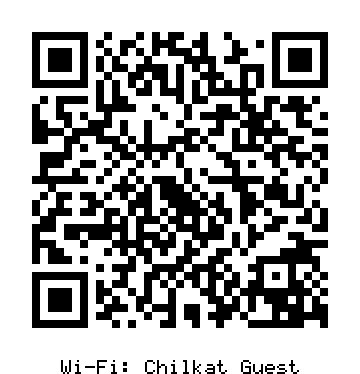 ' Sample output:
' file: qa_output/qr_wifi.png
' QR version: 5
' image: 360 x 374 pixels
%>
</body>
</html>