Android™ Requires Chilkat v11.7.0+
Android™
QR Code with Non-English Text (UTF-8 and ECI)
See more QR Code Examples
Demonstrates text outside ASCII. QrCode always stores text as UTF-8 bytes, which is what phones expect. A QR code can also say so explicitly with an ECI header: setting encoding.eci to 26 declares the bytes to be UTF-8, for readers that would otherwise assume another character set. The header costs a little space, and a few older readers do not understand it, so it is off by default.Chilkat Android™ Downloads
// Important: Don't forget to include the call to System.loadLibrary
// as shown at the bottom of this code sample.
package com.test;
import android.app.Activity;
import com.chilkatsoft.*;
import android.widget.TextView;
import android.os.Bundle;
public class SimpleActivity extends Activity {
private static final String TAG = "Chilkat";
// Called when the activity is first created.
@Override
public void onCreate(Bundle savedInstanceState) {
super.onCreate(savedInstanceState);
boolean success = false;
// This example requires the Chilkat API to have been previously unlocked.
// See Global Unlock Sample for sample code.
// The text is "Gruesse aus Muenchen" written with u-umlaut and sharp s. It is given here with
// JSON escapes only so that this source is plain ASCII. Decode turns the escapes into characters.
CkStringBuilder sbText = new CkStringBuilder();
sbText.Append("Gr\u00fc\u00dfe aus M\u00fcnchen");
sbText.Decode("json","utf-8");
CkJsonObject json = new CkJsonObject();
json.UpdateSb("payload.text",sbText);
json.UpdateString("output.path","qa_output/qr_utf8.png");
json.UpdateBool("output.overwrite",true);
json.UpdateString("output.return","none");
CkFormats fmt = new CkFormats();
CkJsonObject jsonOut = new CkJsonObject();
success = fmt.QrCode("generate",json,jsonOut);
if (success == false) {
Log.i(TAG, fmt.lastErrorText());
return;
}
// 17 characters, three of which take two bytes in UTF-8.
Log.i(TAG, "characters: " + String.valueOf(sbText.get_Length()));
Log.i(TAG, "bytes encoded: " + String.valueOf(jsonOut.IntOf("symbols[0].payloadBytes")));
Log.i(TAG, "ECI header: " + String.valueOf(jsonOut.HasMember("symbols[0].selectedEncoding.eci")));
// Without an ECI header (qa_output/qr_utf8.png):
// 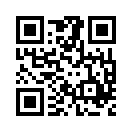 // The same text with an ECI header declaring UTF-8.
json.UpdateInt("encoding.eci",26);
json.UpdateString("output.path","qa_output/qr_utf8_eci.png");
success = fmt.QrCode("generate",json,jsonOut);
if (success == false) {
Log.i(TAG, fmt.lastErrorText());
return;
}
Log.i(TAG, "with encoding.eci = 26, ECI header: " + String.valueOf(jsonOut.HasMember("symbols[0].selectedEncoding.eci")) + ", value " + String.valueOf(jsonOut.IntOf("symbols[0].selectedEncoding.eci")));
// With the ECI header (qa_output/qr_utf8_eci.png). Both scan as the same text:
//
 // Sample output:
// characters: 17
// bytes encoded: 20
// ECI header: False
// with encoding.eci = 26, ECI header: True, value 26
}
static {
System.loadLibrary("chilkat");
// Note: If the incorrect library name is passed to System.loadLibrary,
// then you will see the following error message at application startup:
//"The application <your-application-name> has stopped unexpectedly. Please try again."
}
}