Android™ Requires Chilkat v11.7.0+
Android™
Get the Modules of a QR Code (Bit Matrix)
See more QR Code Examples
Demonstrates getting the QR code itself, as a grid of dark and light modules, to draw with something other than the built-in PNG and SVG output: on a canvas, in a PDF, on a display, or with a label printer language. With output.includeModuleData the response has symbols[0].moduleData, a bit matrix with one bit per module, each row starting on a new byte, most significant bit first, 1 for dark. The quiet zone is not part of the matrix. The example prints the symbol using two characters per module.Chilkat Android™ Downloads
// Important: Don't forget to include the call to System.loadLibrary
// as shown at the bottom of this code sample.
package com.test;
import android.app.Activity;
import com.chilkatsoft.*;
import android.widget.TextView;
import android.os.Bundle;
public class SimpleActivity extends Activity {
private static final String TAG = "Chilkat";
// Called when the activity is first created.
@Override
public void onCreate(Bundle savedInstanceState) {
super.onCreate(savedInstanceState);
boolean success = false;
// This example requires the Chilkat API to have been previously unlocked.
// See Global Unlock Sample for sample code.
CkJsonObject json = new CkJsonObject();
json.UpdateString("payload.text","CHILKAT");
json.UpdateBool("output.includeModuleData",true);
CkFormats fmt = new CkFormats();
CkJsonObject jsonOut = new CkJsonObject();
success = fmt.QrCode("generate",json,jsonOut);
if (success == false) {
Log.i(TAG, fmt.lastErrorText());
return;
}
int width = jsonOut.IntOf("symbols[0].moduleData.width");
int height = jsonOut.IntOf("symbols[0].moduleData.height");
int rowBytes = jsonOut.IntOf("symbols[0].moduleData.rowBytes");
Log.i(TAG, "kind: " + jsonOut.stringOf("symbols[0].moduleData.kind"));
Log.i(TAG, "modules: " + String.valueOf(width) + " x " + String.valueOf(height) + ", " + String.valueOf(rowBytes) + " bytes per row");
// The matrix is height rows of rowBytes bytes.
CkBinData bd = new CkBinData();
success = bd.AppendEncoded(jsonOut.stringOf("symbols[0].moduleData.bytesBase64"),"base64");
if (success == false) {
Log.i(TAG, bd.lastErrorText());
return;
}
CkStringBuilder sbRow = new CkStringBuilder();
int row;
int col;
int b;
int mask = 128;
for (row = 0; row <= height - 1; row++) {
sbRow.Clear();
for (col = 0; col <= width - 1; col++) {
// The module at (col,row) is a bit of the byte at (row * rowBytes) + (col / 8).
// The leftmost module of each byte is its most significant bit.
if ((col % 8) == 0) {
mask = 128;
}
b = bd.GetByte((row * rowBytes) + (col / 8));
if (((b / mask) % 2) == 1) {
sbRow.Append("##");
}
else {
sbRow.Append(" ");
}
mask = mask / 2;
}
Log.i(TAG, sbRow.getAsString());
}
// The same symbol as the PNG that the call also returned:
// 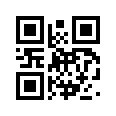 // Sample output:
// kind: bitMatrix
// modules: 21 x 21, 3 bytes per row
// ############## ##############
// ## ## #### ## ##
// ## ###### ## ## #### ## ###### ##
// ## ###### ## ## ## ###### ##
// ## ###### ## ## ## ## ## ###### ##
// ## ## #### ## ## ##
// ############## ## ## ## ##############
// ####
// ## ########## #### ##########
// #### ## ######## ######
// #### ######## #### ## #### ####
// ## ## ############ #### ##
// ###### #### ###### ## ## ##
// ## ## ## ## ## ##
// ############## ## ## ## ##
// ## ## ## ## ###### ####
// ## ###### ## #### ## ## ##
// ## ###### ## ## ############ ##
// ## ###### ## ## ## #### ##
// ## ## ## ######## ##
// ############## ## ## ######
}
static {
System.loadLibrary("chilkat");
// Note: If the incorrect library name is passed to System.loadLibrary,
// then you will see the following error message at application startup:
//"The application <your-application-name> has stopped unexpectedly. Please try again."
}
}