Android™
Android™
Get OAuth2 Access Token for Azure Registered App
See more OAuth2 Examples
Demonstrates how to get OAuth2 access token for an Azure Registered App from a desktop application or script. This example demonstrates the OAuth2 authorization flow.This example requires Chilkat v10.1.2 or greater.
Chilkat Android™ Downloads
// Important: Don't forget to include the call to System.loadLibrary
// as shown at the bottom of this code sample.
package com.test;
import android.app.Activity;
import com.chilkatsoft.*;
import android.widget.TextView;
import android.os.Bundle;
public class SimpleActivity extends Activity {
private static final String TAG = "Chilkat";
// Called when the activity is first created.
@Override
public void onCreate(Bundle savedInstanceState) {
super.onCreate(savedInstanceState);
boolean success = false;
// To further clarify, see OAuth 2.0 Authorization Flow
CkOAuth2 oauth2 = new CkOAuth2();
// This should be the port in the localhost callback URL for your app.
// The callback URL would look like "http://localhost:3017/" if the port number is 3017.
oauth2.put_ListenPort(3017);
// ----------------------------------------------------------------------------------------------------------
// The screenshot at the bottom of this page shows how we created the Azure App Registration for this example.
// ----------------------------------------------------------------------------------------------------------
// Note: The endpoint depends on the Azure App Registration.
// See How to Choose the Correct Endpoints for your Azure App Registration
oauth2.put_AuthorizationEndpoint("https://login.microsoftonline.com/common/oauth2/v2.0/authorize");
oauth2.put_TokenEndpoint("https://login.microsoftonline.com/common/oauth2/v2.0/token");
// Replace these with actual values.
oauth2.put_ClientId("CLIENT_ID");
// This is for Require Proof Key for Code Exchange (PKCE)
// See OAuth2 PKCE Explained
oauth2.put_CodeChallenge(true);
oauth2.put_CodeChallengeMethod("S256");
// Provide a SPACE separated list of scopes.
// See https://developer.microsoft.com/en-us/graph/docs/authorization/permission_scopes
// Important: To get a refresh token in the final response, ask for "offline_access" scope
oauth2.put_Scope("openid profile offline_access user.readwrite mail.readwrite mail.send files.readwrite");
// Begin the OAuth2 three-legged flow. This returns a URL that should be loaded in a browser.
String url = oauth2.startAuth();
if (oauth2.get_LastMethodSuccess() != true) {
Log.i(TAG, oauth2.lastErrorText());
return;
}
// Launch the default browser on the system and navigate to the url.
// The LaunchBrowser method was added in Chilkat v10.1.2.
success = oauth2.LaunchBrowser(url);
if (success == false) {
Log.i(TAG, oauth2.lastErrorText());
return;
}
// Wait for the user to approve or deny authorization in the browser.
int numMsWaited = 0;
while ((numMsWaited < 90000) and (oauth2.get_AuthFlowState() < 3)) {
oauth2.SleepMs(100);
numMsWaited = numMsWaited + 100;
}
// If the browser does not respond within the specified time, AuthFlowState will be:
//
// 1: Waiting for Redirect – The OAuth2 background thread is waiting for the browser's redirect request.
// 2: Waiting for Final Response – The thread is awaiting the final access token response.
// In either case, cancel the background task initiated by StartAuth.
if (oauth2.get_AuthFlowState() < 3) {
oauth2.Cancel();
Log.i(TAG, "No response from the browser!");
return;
}
// Check AuthFlowState to determine if authorization was granted, denied, or failed:
//
// 3: Success – OAuth2 flow completed, the background thread exited, and the successful response is in AccessTokenResponse.
// 4: Access Denied – OAuth2 flow completed, the background thread exited, and the error response is in AccessTokenResponse.
// 5: Failure – OAuth2 flow failed before completion, the background thread exited, and error details are in FailureInfo.
if (oauth2.get_AuthFlowState() == 5) {
Log.i(TAG, "OAuth2 failed to complete.");
Log.i(TAG, oauth2.failureInfo());
return;
}
if (oauth2.get_AuthFlowState() == 4) {
Log.i(TAG, "OAuth2 authorization was denied.");
Log.i(TAG, oauth2.accessTokenResponse());
return;
}
if (oauth2.get_AuthFlowState() != 3) {
Log.i(TAG, "Unexpected AuthFlowState:" + String.valueOf(oauth2.get_AuthFlowState()));
return;
}
Log.i(TAG, "OAuth2 authorization granted!");
Log.i(TAG, "Access Token = " + oauth2.accessToken());
// When the token is near expiration, your app can refresh as shown here:
// Refresh Expiring OAuth2 Access Token for Azure Registered App
// Get the full JSON response:
CkJsonObject json = new CkJsonObject();
json.Load(oauth2.accessTokenResponse());
json.put_EmitCompact(false);
// The JSON response looks like this:
// {
// "token_type": "Bearer",
// "scope": "User.Read Mail.ReadWrite Mail.Send",
// "expires_in": 3600,
// "ext_expires_in": 0,
// "access_token": "EwBAA8l6B...",
// "refresh_token": "MCRMdbe...",
// "id_token": "eyJ0eXA..."
// }
// If an "expires_on" member does not exist, then add the JSON member by
// getting the current system date/time and adding the "expires_in" seconds.
// This way we'll know when the token expires.
if (json.HasMember("expires_on") != true) {
CkDateTime dtExpire = new CkDateTime();
dtExpire.SetFromCurrentSystemTime();
dtExpire.AddSeconds(json.IntOf("expires_in"));
json.AppendString("expires_on",dtExpire.getAsUnixTimeStr(false));
}
Log.i(TAG, json.emit());
// Save the JSON to a file for future requests.
CkFileAccess fac = new CkFileAccess();
fac.WriteEntireTextFile("qa_data/tokens/_myAzureApp.json",json.emit(),"utf-8",false);
// This is a screenshot of how we created the Azure App for this example:
// 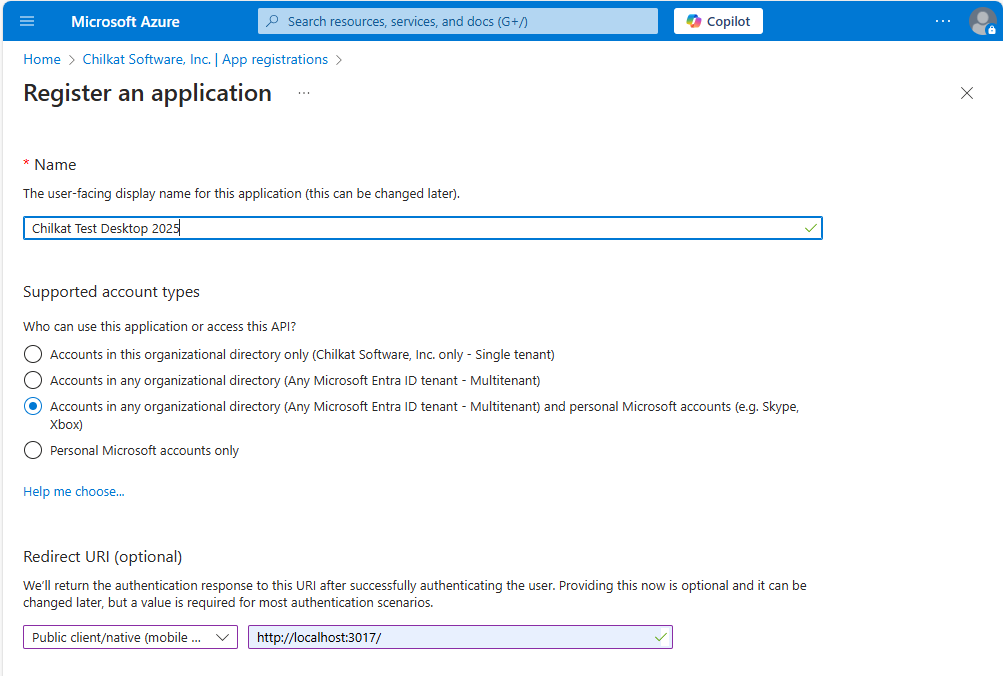 }
static {
System.loadLibrary("chilkat");
// Note: If the incorrect library name is passed to System.loadLibrary,
// then you will see the following error message at application startup:
//"The application <your-application-name> has stopped unexpectedly. Please try again."
}
}
}
static {
System.loadLibrary("chilkat");
// Note: If the incorrect library name is passed to System.loadLibrary,
// then you will see the following error message at application startup:
//"The application <your-application-name> has stopped unexpectedly. Please try again."
}
}