Unicode C++ Requires Chilkat v11.7.0+
Unicode C++
QR Code Colors and Transparent Background
See more QR Code Examples
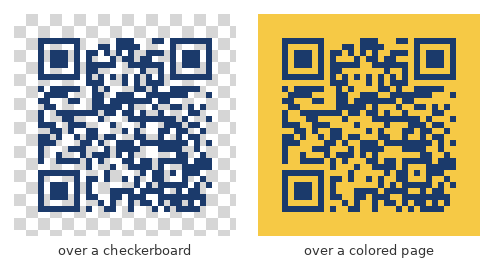
Demonstrates colored QR codes. render.foreground is the color of the dark modules and render.background the color behind them, each as #RRGGBB. Either can instead be an object with a color and an opacity from 0 to 1, and a background opacity of 0 gives a PNG with a transparent background to place over a page or a design. Readers need contrast: keep the modules clearly darker than whatever ends up behind them.Chilkat Unicode C++ Downloads
#include <CkFormatsW.h>
#include <CkJsonObjectW.h>
void ChilkatSample(void)
{
bool success = false;
// This example requires the Chilkat API to have been previously unlocked.
// See Global Unlock Sample for sample code.
CkFormatsW fmt;
CkJsonObjectW jsonOut;
// Dark blue modules on a pale yellow background.
CkJsonObjectW json;
json.UpdateString(L"payload.text",L"https://www.chilkatsoft.com/");
json.UpdateInt(L"render.moduleSize",6);
json.UpdateString(L"render.foreground",L"#1B3A6B");
json.UpdateString(L"render.background",L"#FFF8DC");
json.UpdateString(L"output.path",L"qa_output/qr_blue.png");
json.UpdateBool(L"output.overwrite",true);
json.UpdateString(L"output.return",L"none");
success = fmt.QrCode(L"generate",json,jsonOut);
if (success == false) {
wprintf(L"%s\n",fmt.lastErrorText());
return;
}
wprintf(L"colored: %s, %d bytes\n",jsonOut.stringOf(L"outputs[0].path"),jsonOut.IntOf(L"outputs[0].byteCount"));
// The image written to qa_output/qr_blue.png:
//  // The same modules on a fully transparent background.
CkJsonObjectW json2;
json2.UpdateString(L"payload.text",L"https://www.chilkatsoft.com/");
json2.UpdateInt(L"render.moduleSize",6);
json2.UpdateString(L"render.foreground",L"#1B3A6B");
json2.UpdateString(L"render.background.color",L"#FFFFFF");
json2.UpdateNumber(L"render.background.opacity",L"0");
json2.UpdateString(L"output.path",L"qa_output/qr_transparent.png");
json2.UpdateBool(L"output.overwrite",true);
json2.UpdateString(L"output.return",L"none");
success = fmt.QrCode(L"generate",json2,jsonOut);
if (success == false) {
wprintf(L"%s\n",fmt.lastErrorText());
return;
}
wprintf(L"transparent: %s, %d bytes\n",jsonOut.stringOf(L"outputs[0].path"),jsonOut.IntOf(L"outputs[0].byteCount"));
// qa_output/qr_transparent.png, placed here over a checkerboard and over a colored page
// to show that whatever is behind the image shows through:
//
 // Sample output:
// colored: qa_output/qr_blue.png, 1345 bytes
// transparent: qa_output/qr_transparent.png, 1377 bytes
}