|
Chilkat • HOME • .NET Core C# • Android™ • AutoIt • C • C# • C++ • Chilkat2-Python • CkPython • Classic ASP • DataFlex • Delphi ActiveX • Delphi DLL • Go • Java • Lianja • Mono C# • Node.js • Objective-C • PHP ActiveX • PHP Extension • Perl • PowerBuilder • PowerShell • PureBasic • Ruby • SQL Server • Swift 2 • Swift 3,4,5... • Tcl • Unicode C • Unicode C++ • VB.NET • VBScript • Visual Basic 6.0 • Visual FoxPro • Xojo Plugin
(VBScript) AddAttribute - Insert New Attribute in an XML NodeDemonstrates adding an name=value attribute to an XML element.
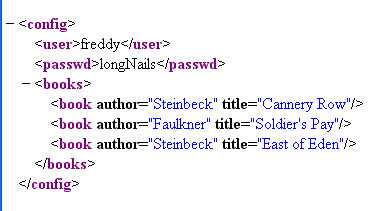
This example uses the XML sample file here: sample1.xml. The sample1.xml file contains this content:
Dim fso, outFile Set fso = CreateObject("Scripting.FileSystemObject") Set outFile = fso.CreateTextFile("output.txt", True) set xml = CreateObject("Chilkat_9_5_0.Xml") success = xml.LoadXmlFile("qa_data/xml/sample1.xml") If (success <> 1) Then outFile.WriteLine(xml.LastErrorText) WScript.Quit End If ' Navigate to the "books" element: bFound = xml.FindChild2("books") If (bFound = 0) Then outFile.WriteLine("No books child found!") WScript.Quit End If numChildren = xml.NumChildren i = 0 Do While i < numChildren ' Navigate to the Nth book success = xml.GetChild2(i) ' Display the book title: outFile.WriteLine(xml.GetAttrValue("title")) ' Add a new integer attribute: ' Should never fail.. success = xml.AddAttributeInt("bookId",i) ' Add a new unread="yes" attribute: success = xml.AddAttribute("unread","yes") ' Navigate back up to the parent: success = xml.GetParent2() i = i + 1 Loop ' Navigate back to the document root: xml.GetRoot2 ' Save the updated document: success = xml.SaveXml("modified.xml") If (success <> 1) Then outFile.WriteLine(xml.LastErrorText) WScript.Quit End If outFile.WriteLine(xml.GetXml()) outFile.Close |
||||
© 2000-2024 Chilkat Software, Inc. All Rights Reserved.