VB.NET
VB.NET
Test HotMail POP3 (pop3.live.com or pop-mail.outlook.com)
See more POP3 Examples
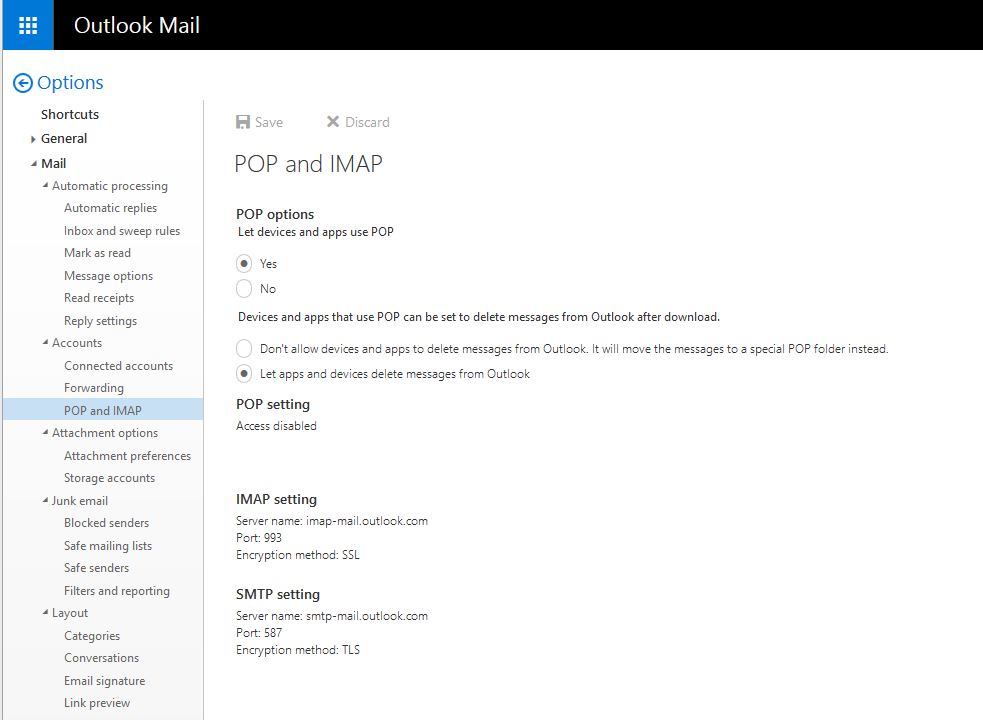
Demonstrates connecting and authenticating to pop3.live.com. Make sure to enable POP3 access, as shown here:
Chilkat VB.NET Downloads
Dim success As Boolean = False

' This example requires the Chilkat API to have been previously unlocked.
' See Global Unlock Sample for sample code.

Dim mailman As New Chilkat.MailMan

' Connection settings for pop3.live.com (or pop-mail.outlook.com, both should work)
mailman.MailHost = "pop-mail.outlook.com"
mailman.MailHost = "pop3.live.com"

mailman.PopUsername = "my_account@live.com"
mailman.PopPassword = "my_live.com_password"
mailman.MailPort = 995
mailman.PopSsl = True

' Make the TLS connection to the POP3 server.
success = mailman.Pop3Connect()
If (success <> True) Then
    Debug.WriteLine(mailman.LastErrorText)
    Exit Sub
End If


' Authenticate..
success = mailman.Pop3Authenticate()
If (success <> True) Then
    Debug.WriteLine(mailman.LastErrorText)
    Exit Sub
End If


' Find out how many emails are on the server..
Dim numEmails As Integer = mailman.CheckMail()
If (numEmails < 0) Then
    Debug.WriteLine(mailman.LastErrorText)
    Exit Sub
End If


' Examine the POP3 session log:
Debug.WriteLine(mailman.Pop3SessionLog)

' End the POP3 session and close the connection to the POP3 server.
success = mailman.Pop3EndSession()
If (success <> True) Then
    Debug.WriteLine(mailman.LastErrorText)
    Exit Sub
End If


Debug.WriteLine("-- Finished.")

' The output of this program:

' 	**** Connected to pop3.live.com:995
' 	< +OK DUB006-POP206 POP3 server ready
' 	> USER chilkat@live.com
' 	< +OK password required
' 	> PASS ****
' 	< +OK User successfully authenticated. [AuthResult=0 Proxy=CY1PR17MB0630.namprd17.prod.outlook.com:1995:SSL]
' 	> STAT
' 	< +OK 46 3980488
'
' 	-- Finished.
'