|
Chilkat • HOME • .NET Core C# • Android™ • AutoIt • C • C# • C++ • Chilkat2-Python • CkPython • Classic ASP • DataFlex • Delphi ActiveX • Delphi DLL • Go • Java • Lianja • Mono C# • Node.js • Objective-C • PHP ActiveX • PHP Extension • Perl • PowerBuilder • PowerShell • PureBasic • Ruby • SQL Server • Swift 2 • Swift 3,4,5... • Tcl • Unicode C • Unicode C++ • VB.NET • VBScript • Visual Basic 6.0 • Visual FoxPro • Xojo Plugin
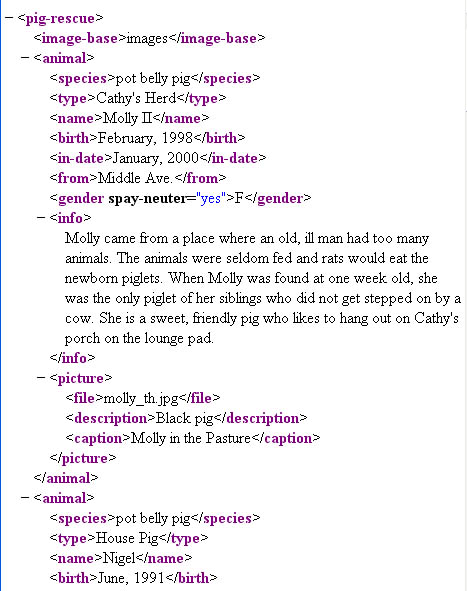
(CkPython) Demonstrates the ChilkatPath XML MethodDemonstrates how to use the ChilkatPath method. This example uses the XML sample file pigs.xml. The pigs.xml file contains this content:
import sys import chilkat xml = chilkat.CkXml() success = xml.LoadXmlFile("qa_data/xml/pigs.xml") if (success != True): print(xml.lastErrorText()) sys.exit() # Get the content of the "species" node for the 1st animal: result = xml.chilkatPath("animal|species|*") # Output should be "pot belly pig" print(result) # Get the content of the "type" node for the 2nd animal: # Indexing begins at 0. Therefore, the 2nd direct child having # the tag "animal" is at index 1 result = xml.chilkatPath("animal[1]|type|*") # Output should be "House Pig" print(result) # Find the pig having the name "Nigel" and display the # birth date. To do this, we'll navigate to the node having # tag="name" with the exact content "Nigel", then navigate up, # and finally navigate back down to the "birth" node: result = xml.chilkatPath("/C/name,Nigel|..|birth|*") # Output should be "June, 1991" print(result) # Navigate to the 1st animal's picture and print the filename, # description, and caption. # The "$" updates the caller's internal pointer to reference # the node that is the result of evaluating the path. # An empty string is returned for success, and a NULL/nil/0 # pointer (reference) is returned on failure. result = xml.chilkatPath("animal|picture|$") if (xml.get_LastMethodSuccess() != True): print("Failed to navigate to animal|picture.") sys.exit() # Display the contents of the file/description/caption child nodes print("Picture Info:") print(xml.getChildContent("file")) print(xml.getChildContent("description")) print(xml.getChildContent("caption")) # Return back to the root of the XML document: xml.GetRoot2() # Display the value of the "spay-neuter" attribute of the 1st animal: print("----") result = xml.chilkatPath("animal|gender|(spay-neuter)") print(result) |
||||
© 2000-2024 Chilkat Software, Inc. All Rights Reserved.