PowerBuilder
 PowerBuilder
Demonstrates the ChilkatPath XML Method
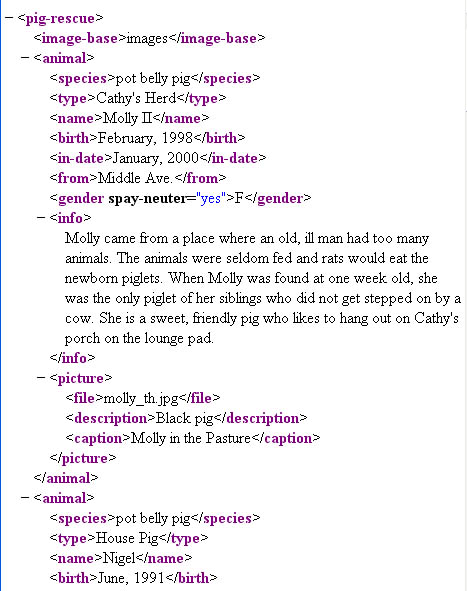
Demonstrates how to use the ChilkatPath method. This example uses the XML sample file pigs.xml. The pigs.xml file contains this content:
Chilkat PowerBuilder Downloads
integer li_rc
integer li_Success
oleobject loo_Xml
string ls_Result
li_Success = 0
loo_Xml = create oleobject
li_rc = loo_Xml.ConnectToNewObject("Chilkat.Xml")
if li_rc < 0 then
destroy loo_Xml
MessageBox("Error","Connecting to COM object failed")
return
end if
li_Success = loo_Xml.LoadXmlFile("qa_data/xml/pigs.xml")
if li_Success <> 1 then
Write-Debug loo_Xml.LastErrorText
destroy loo_Xml
return
end if
// Get the content of the "species" node for the 1st animal:
ls_Result = loo_Xml.ChilkatPath("animal|species|*")
// Output should be "pot belly pig"
Write-Debug ls_Result
// Get the content of the "type" node for the 2nd animal:
// Indexing begins at 0. Therefore, the 2nd direct child having
// the tag "animal" is at index 1
ls_Result = loo_Xml.ChilkatPath("animal[1]|type|*")
// Output should be "House Pig"
Write-Debug ls_Result
// Find the pig having the name "Nigel" and display the
// birth date. To do this, we'll navigate to the node having
// tag="name" with the exact content "Nigel", then navigate up,
// and finally navigate back down to the "birth" node:
ls_Result = loo_Xml.ChilkatPath("/C/name,Nigel|..|birth|*")
// Output should be "June, 1991"
Write-Debug ls_Result
// Navigate to the 1st animal's picture and print the filename,
// description, and caption.
// The "$" updates the caller's internal pointer to reference
// the node that is the result of evaluating the path.
// An empty string is returned for success, and a NULL/nil/0
// pointer (reference) is returned on failure.
ls_Result = loo_Xml.ChilkatPath("animal|picture|$")
if loo_Xml.LastMethodSuccess <> 1 then
Write-Debug "Failed to navigate to animal|picture."
destroy loo_Xml
return
end if
// Display the contents of the file/description/caption child nodes
Write-Debug "Picture Info:"
Write-Debug loo_Xml.GetChildContent("file")
Write-Debug loo_Xml.GetChildContent("description")
Write-Debug loo_Xml.GetChildContent("caption")
// Return back to the root of the XML document:
loo_Xml.GetRoot2()
// Display the value of the "spay-neuter" attribute of the 1st animal:
Write-Debug "----"
ls_Result = loo_Xml.ChilkatPath("animal|gender|(spay-neuter)")
Write-Debug ls_Result
destroy loo_Xml