|
Chilkat • HOME • Android™ • AutoIt • C • C# • C++ • Chilkat2-Python • CkPython • Classic ASP • DataFlex • Delphi DLL • Go • Java • Node.js • Objective-C • PHP Extension • Perl • PowerBuilder • PowerShell • PureBasic • Ruby • SQL Server • Swift • Tcl • Unicode C • Unicode C++ • VB.NET • VBScript • Visual Basic 6.0 • Visual FoxPro • Xojo Plugin
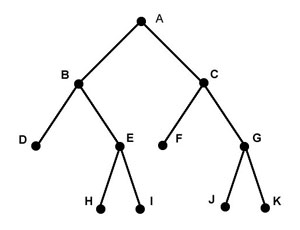
(C#) XML Tree Traversal Order for Search* MethodsThe Chilkat XML API provides a number of Search* methods for locating XML nodes based on criteria. These methods traverse an XML document in a breadth-first order. (See Breadth-First Search). The XML document used in this example has the following tree structure:
The nodes are traversed in the order: A, B, C, D, E, F, G, H, I, J, K. The input XML, available at http://www.chilkatsoft.com/data/searchOrder.xml, is this:
<a>crocodileA
    <b>crocodileB
        <d>crocodileD</d>
        <e>crocodileE
            <h>crocodileH</h>
            <i>crocodileI</i>
        </e>
    </b>
    <c>crocodileC
        <f>crocodileF</f>
        <g>crocodileG
            <j>crocodileJ</j>
            <k>crocodileK</k>
        </g>
    </c>
</a>
Chilkat.Xml xml = new Chilkat.Xml(); Chilkat.Xml xBeginAfter = null; Chilkat.Xml xFound = null; bool success; // The sample input XML is available at http://www.chilkatsoft.com/data/searchOrder.xml success = xml.LoadXmlFile("searchOrder.xml"); if (success != true) { Debug.WriteLine(xml.LastErrorText); return; } // IMPORTANT: The following loop for iterating over all // matching nodes performs reasonably well for small to // mid-size XML documents or sub-trees. Performance // can be poor when the sub-tree contains many thousands // of nodes (or more). // NOTE: The search is always rooted at the calling node. // In this example, it happens to also be the root node of the entire // XML document. Searches can be performed on sub-trees // within the document by calling the Search* method from // the root node of a sub-tree. // Demonstrate the breadth-first traversal: xBeginAfter = xml.GetSelf(); xFound = xml.SearchAllForContent(xBeginAfter,"*croc*"); while ((xml.LastMethodSuccess == true)) { Debug.WriteLine(xFound.Tag); xBeginAfter = xFound; xFound = xml.SearchAllForContent(xBeginAfter,"*croc*"); } |
||||
© 2000-2025 Chilkat Software, Inc. All Rights Reserved.